189
5.3 Disk Management
NVR can create new RAID disk or delete/format the RAID disk. Also, users can manage
NVR’s storage device for data transmission and file sharing service.
5.3.1 Disk Management
Please select “Disk Management” from the drop-down menu of Disk Management to
begin.
1. Disk Information
The steps for creating and deleting NVR’s hard disk, please refer to 2.3.5 Disk
Management.
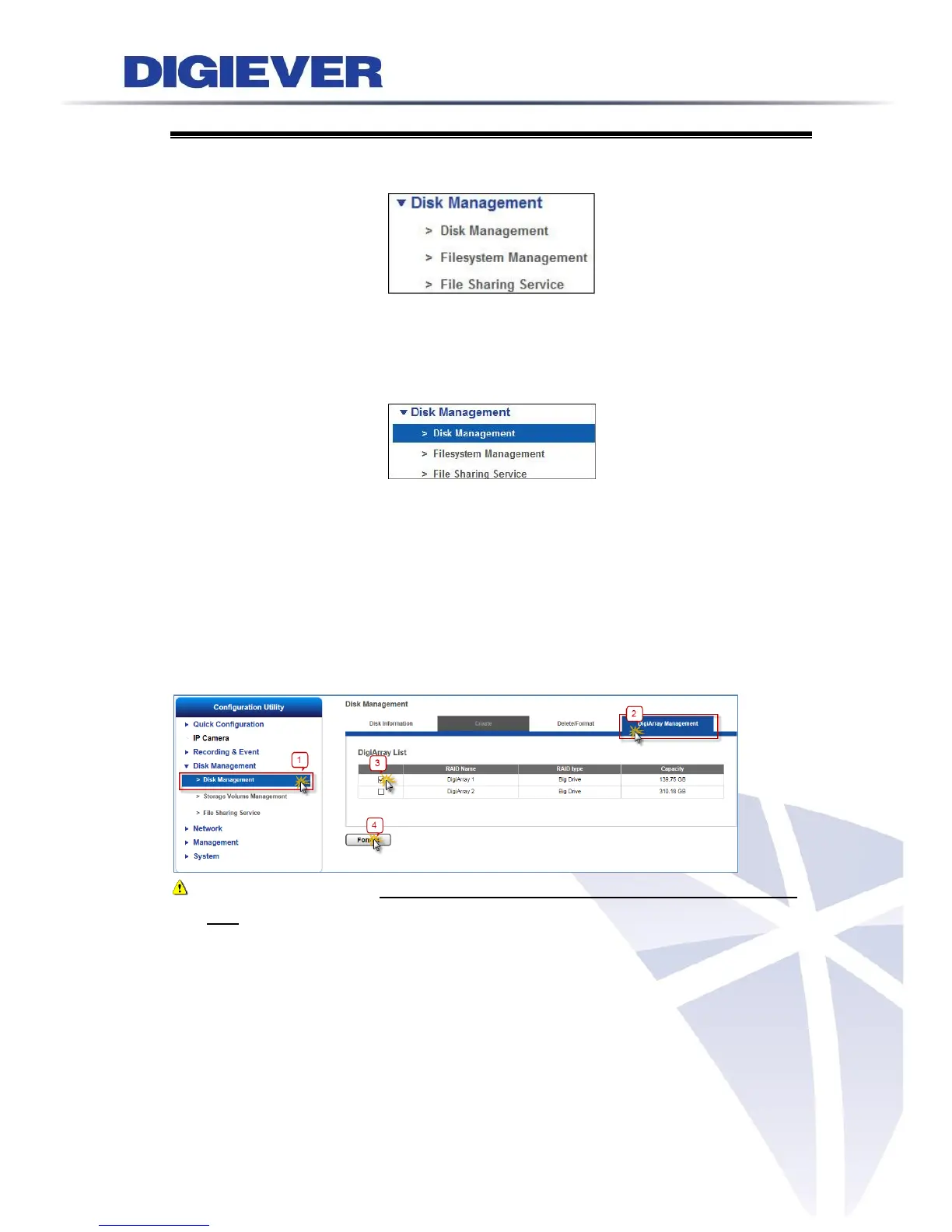
2. Add DIGIARRAY to NVR
(1) Format DIGIARRAY to add its volume into NVR’s volume pool
Choose the volume which one you want to add into the volume pool and press “Format”
button.
Note: Please make sure NVR and DIGIARRARY are power on with a complete RAID
type, before you start to connect DIGIARRAY to NVR.
(2) Check status
You could find the information of storage volume pool from Storage Volume
Management page.



 To Next Page