224
5.6.7 UPS Management
Please select “UPS Management” from the drop-down menu of Management to
begin.
UPS (Uninterruptible Power Supply) is designed to provide emergency power for
unexpected power outage.
Note: YEC UPS device is supported by NVR.
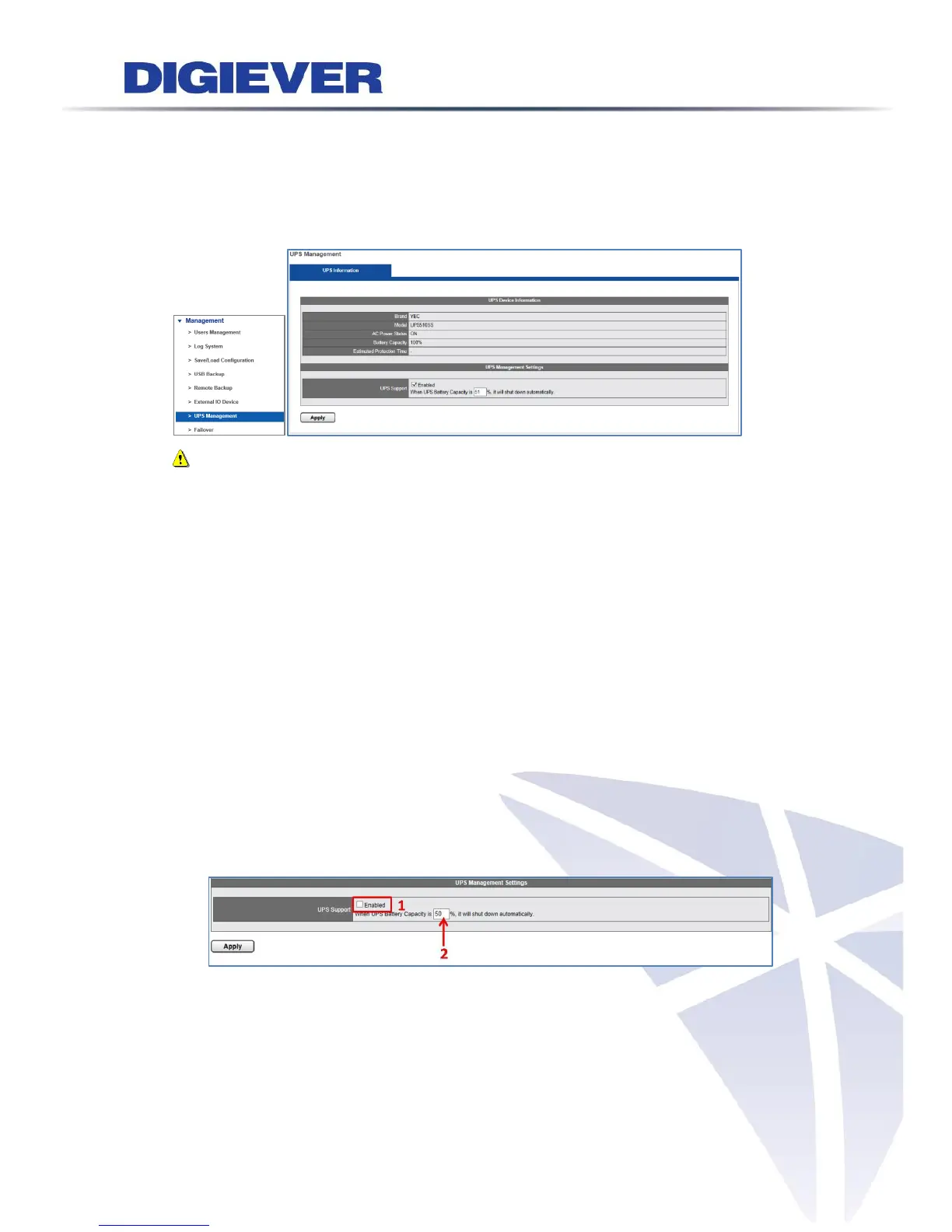
UPS Device Information
Users can obtain basic UPS information from UPS device information, including
brand, model, AC power status, battery capacity and estimated protection
time.
Estimated protection time allows users to realize the estimated time to
progress regular monitoring.
UPS Management Settings–Smart Shutdown and Backup
Smart Shutdown and Startup feature can maintain usual surveillance
performance when users encounter power outage.
Please enable UPS Support. Then, fill in numbers to automatically shut down or
startup NVR
With Smart Shutdown and Startup, users can set up when to automatically shut
down NVR (Sleep Mode). Once UPS battery is over the percentage of capacity,
NVR will start up automatically.



 To Next Page