Dobot M1 User Guide 7 Maintenance
Issue V1.3.4 (2019-05-23) User Guide Copyright © Yuejiang Technology Co., Ltd
124
If the SN number of Dobot M1 is earlier than DT2118xxxxx, the Encoder battery is
located on the base of the Dobot M1. If the SN number of Dobsot M1 is
DT2118xxxxx and later numbers, the Encoder battery is located on the Forearm of
the Dobot M1. Please check the SN number on the M1Studio > Help > About
M1Studio page.
xxxxx is the random number, please replace it based on site requirements.
If the SN number is DT2118xxxxx but the encoder battery is not located on the
Forearm, the battery must be located on the base.
If the battery is located on the base, please perform the following steps.
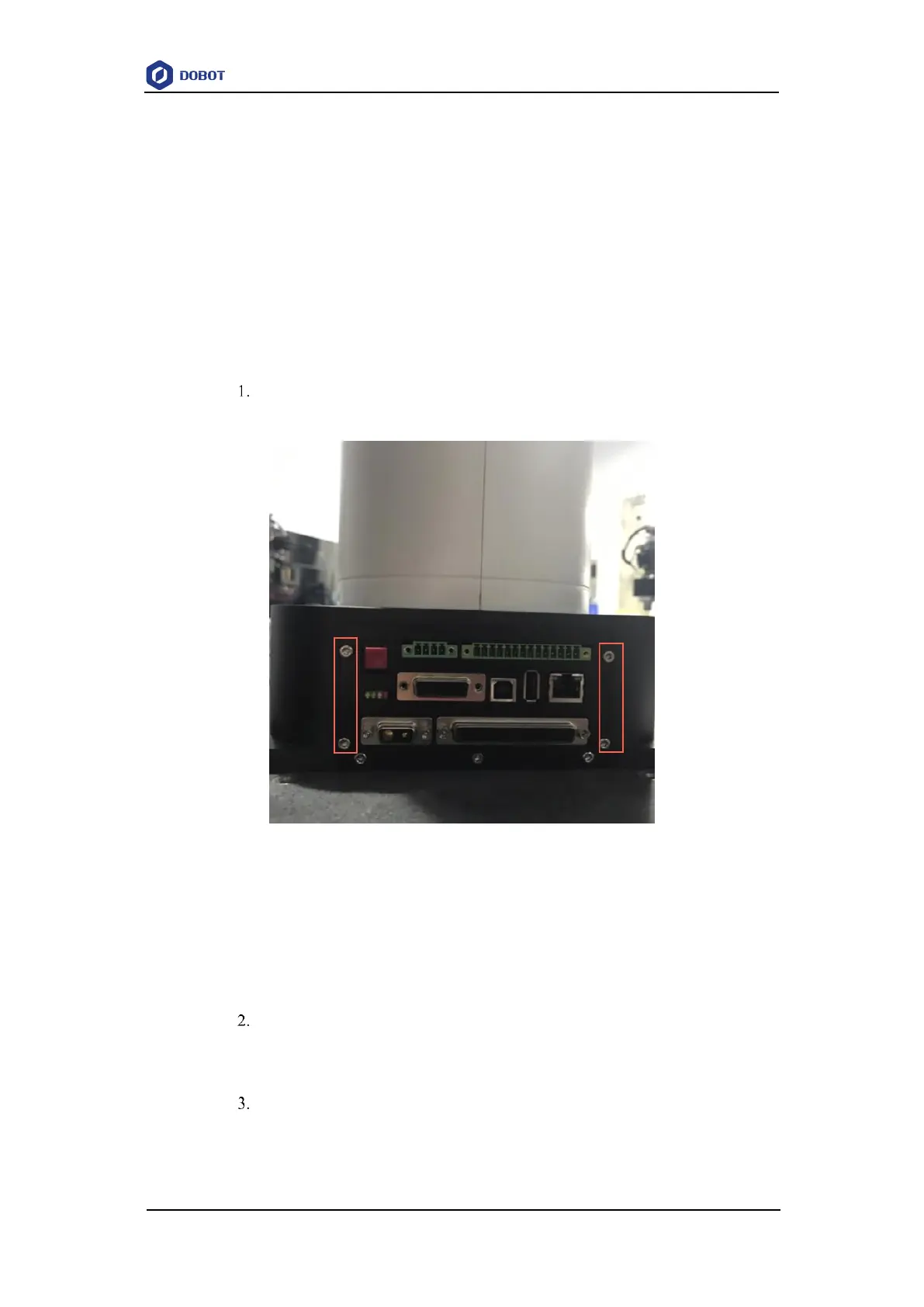
Loosen the four screws on the interface board of the base using a 2.5# hexagonal
wrench, as shown in Figure 7.7.
Figure 7.7 Interface board of the base
NOTE
The appearance of the interface board depends on the production batch of Dobot M1.
However, the replacement method remains unchanged.
Remove the main controller from the base.
Please remove the main controller lightly to prevent disconnection between the
main controller and the robotic arm.
Remove the original battery.
NOTE
After removing the battery from the main controller on the base, you need to install the



 To Next Page