21
Enlarging/Reducing from Standard-Size Document to Standard-Size Paper
2.
Printing
s
Enlarging/Reducing from Standard-Size Document to Standard-Size Paper
U.S.
1
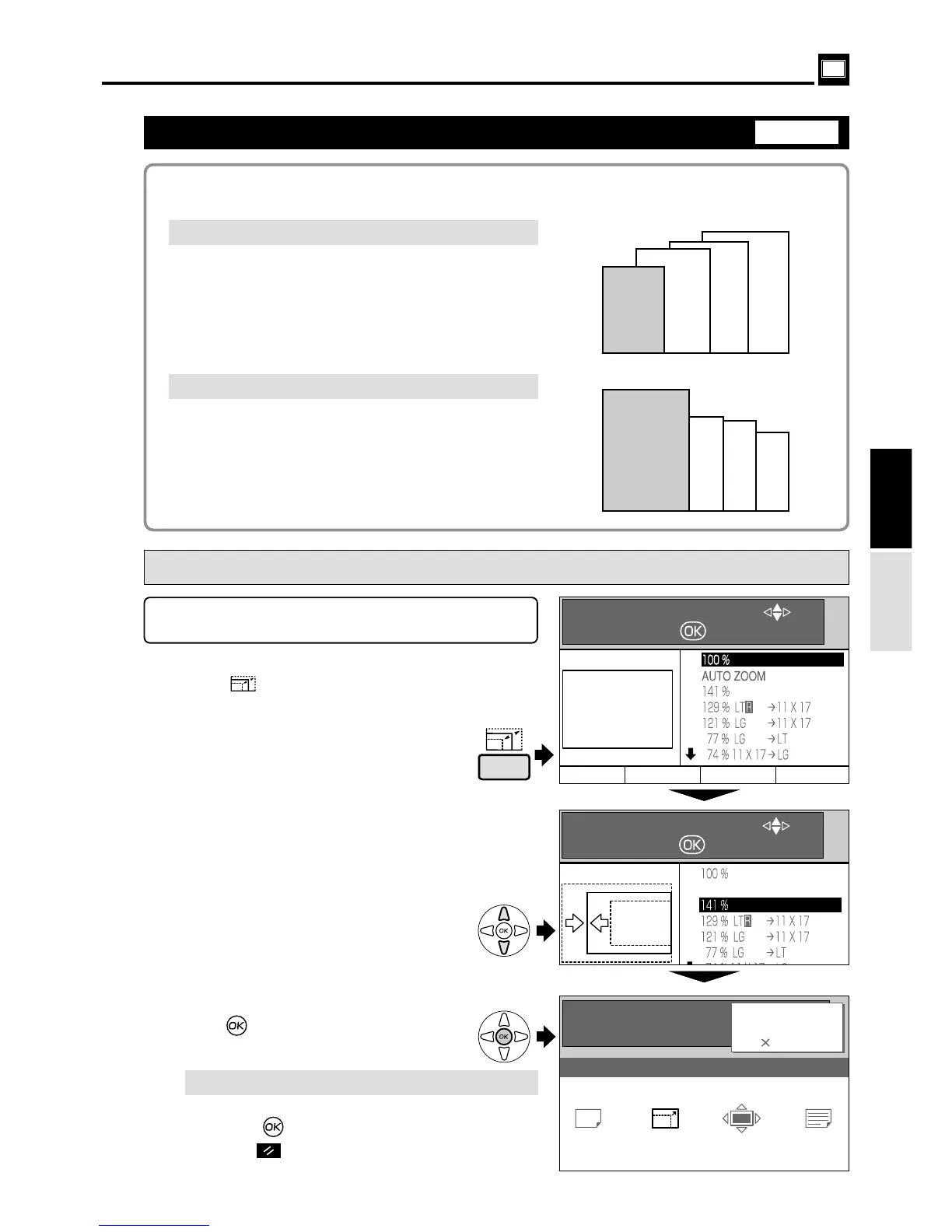
Press (ZOOM) key.
A table of zoom ratios is displayed on the LCD
panel.
The following zoom ratios are available when enlarging or reducing a standard-size
document onto standard-size printing paper.
s
How to Set Enlarging / Reducing
(from Standard-Size Document to Standard-Size Paper)
¡
Enlargements
You can enlarge a standard-size document onto
standard-size paper using the following zoom ratios:
.......141%
LTR
a
LDG .......129%
LGL
a
LDG .......121%
¡
Reductions
You can reduce a standard-size document onto
standard-size paper using the following zoom ratios:
LGL
a
LTR ....... 77%
LDG
a
LGL ....... 74%
LDG
a
LTR ....... 64%
2
Press“CURSOR” keys to select the desired
zoom ratio. The selected zoom ratio is
displayed highlighted.
3
Press (OK) key. The zoom ratio is set,
and the main screen is redisplayed.
440244us
"
Set the desired zoom ratio before starting the
platemaking process.
Each press of“CURSOR”key moves to
a different item and that item is
displayed highlighted.
¡
To return to “100%", use one of the following two methods:
"
Select 100% using
“
CURSOR
”
keys, and
press (OK) key.
"
Press (ALL CLEAR) key. In this case, all
settings are reset to standard mode.
Select
Set
Press
(Basic)
SELECT AN ITEM WITH
AND PRESS
AUTO ZOOM
A 3
141%
0.0 mm
0.0 mm
TEXT
READY
0
SHT
1
SET
SELECT AN ITEM WITH
AND PRESS
ZOOM


 To Next Page