2017.06.19 FwdMan2.8.17.docx 10-79
10.5 Remarks
It is sometimes desirable to enter additional Remarks after testing or while moving on to the
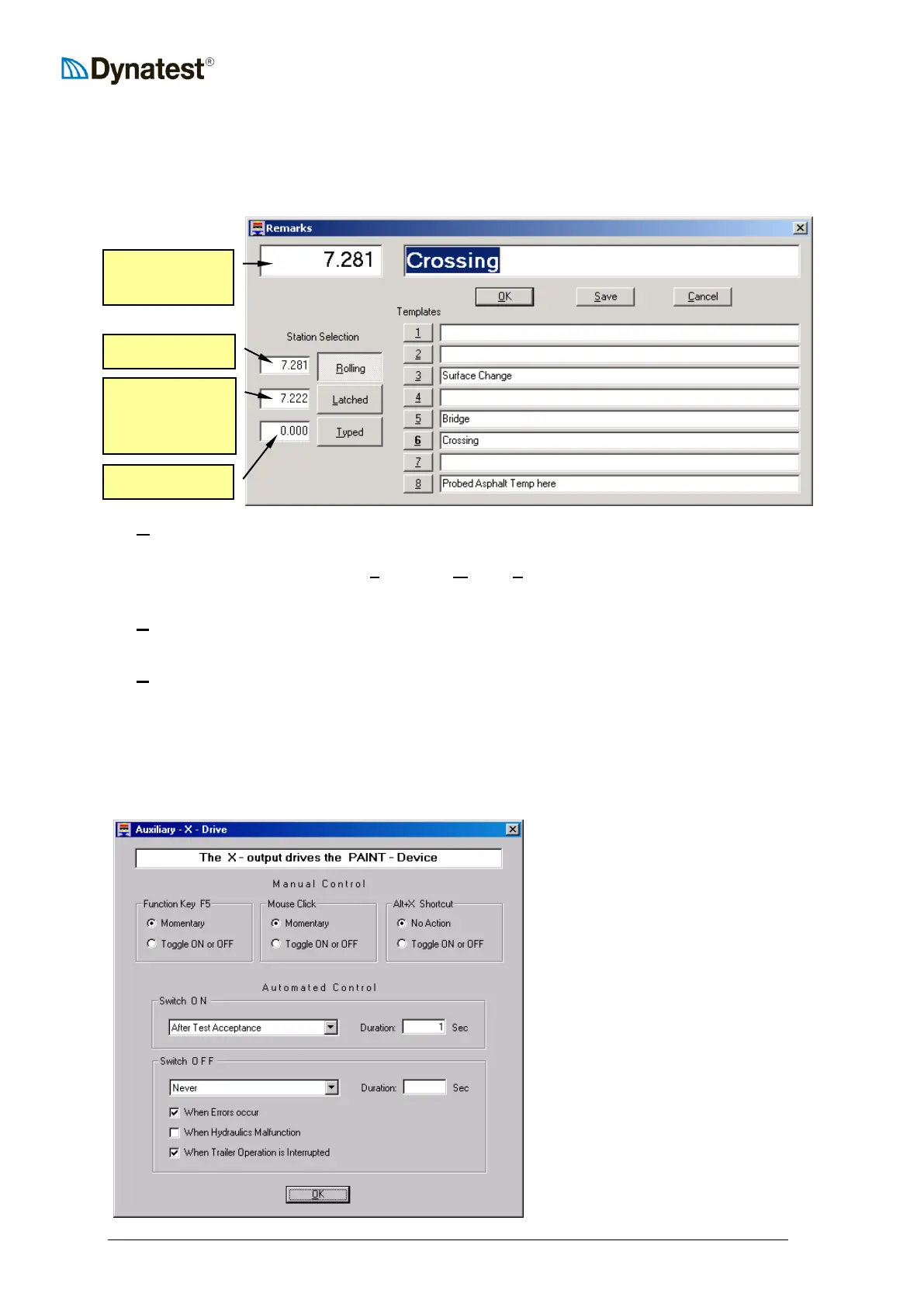
next test station. Pressing the “Remarks” button (or F4 or Alt+R) opens the following
window:
UURUUolling Use this mode if you want the rolling DMI reading to be stored with your
remarks. In this example the Remarks button was pressed at 7.222 (ahead of
the Crossing), then UU6UU and then UUOUUK (or UUSUUave) was pressed at 7.281 while
passing the Crossing.
UULUUatched Use this mode if you prefer to use the DMI reading at the moment you press
the Remarks button (while passing the spot of interest).
UUTUUyped Use this mode if you want to enter the station manually.
The eight templates can be used to prepare often used remarks.
10.6 Auxiliary Outputs X and Y
Function Keys F5 and F6 are dedicated to control two auxiliary outputs (MOS Switches) at
the Compact 15 front panel. Right click either button to access the options:
In this case output X controls a
paint spray device. F5 (or the
mouse) will switch ON the output
momentarily, only.
In addition to manual control, the
output is activated for one second
“After Test Acceptance”.
Further, the output is switched OFF
if errors occur or if the user
interrupts the System operation.



 To Next Page