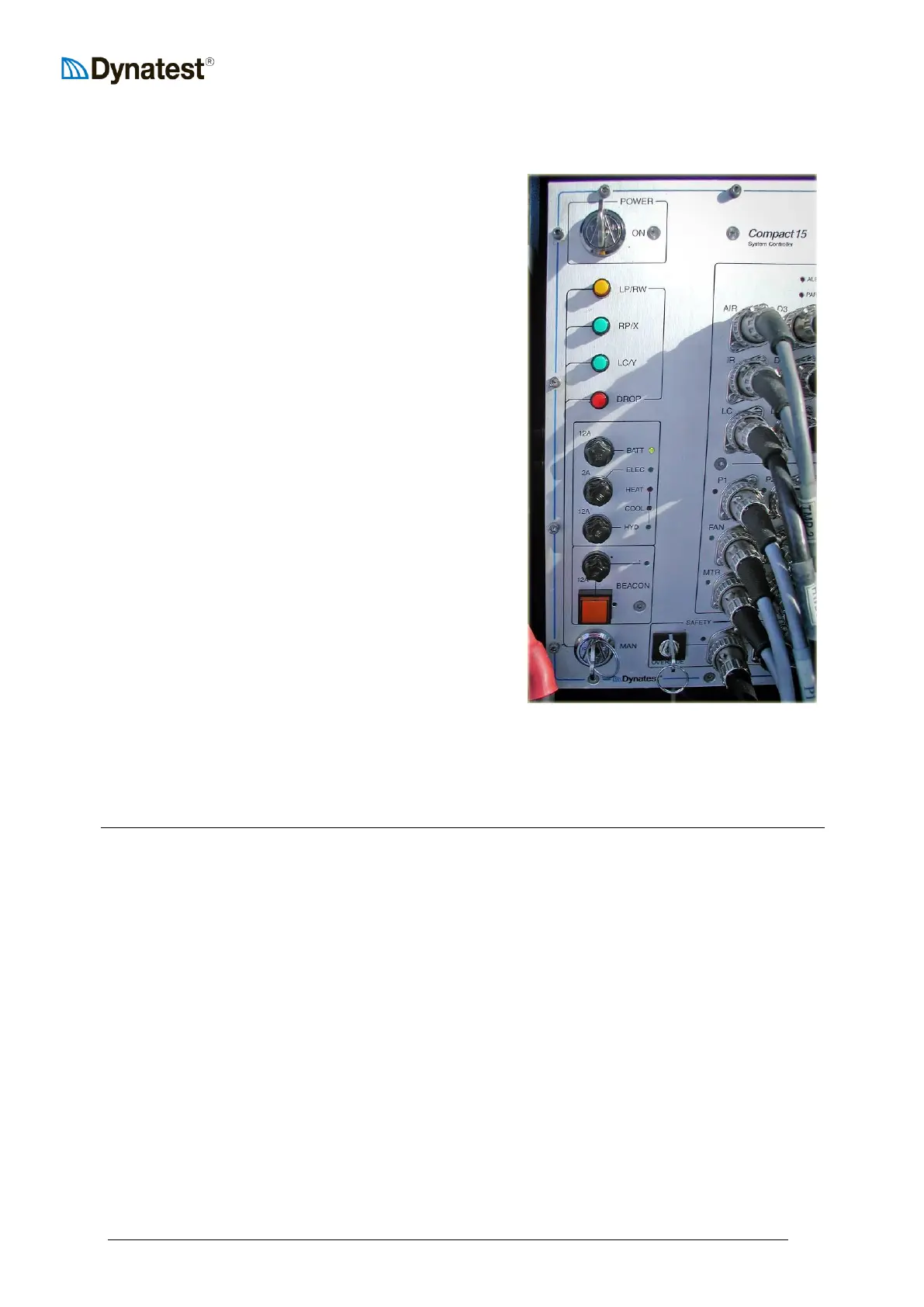
Turn the POWER key “ON”
If the embedded computer has not been
booted through the laptop, wait
approximately 30 seconds for the booting
sequence to finish. (CP15 sounds a short
beep).
For safety reasons the spring disengaged
“MAN” key must be kept activated for the
manual buttons to work!
Press the RP/X (Raise Plate) button to lift the
hit bracket off the transport locks.
Press the LC/Y (Lower Catch) button shortly
to disengage the transport locks.
On deflectometers with manual locks,
manually disengage the transport locks.
Press the LP/RW (Lower Plate/Raise Weight)
button to lower the loading plate to the road
surface.
Press (or keep pressing) the LP/RW button to
raise the weights.
Simultaneously press the LP/RW and DROP
buttons to release the weights from the Catch.
Press the LC/Y to lower the catch to lock on
to the lifting collar of the weight package.
Press the RP/X button to raise the hit bracket
back to transport position.
Pressing the “RP/X” button without engaging the “MAN” key, activates the 12V “X” outlet.
Pressing the “LC/Y” button without engaging the “MAN” key, activates the 12V “Y” outlet.



 To Next Page