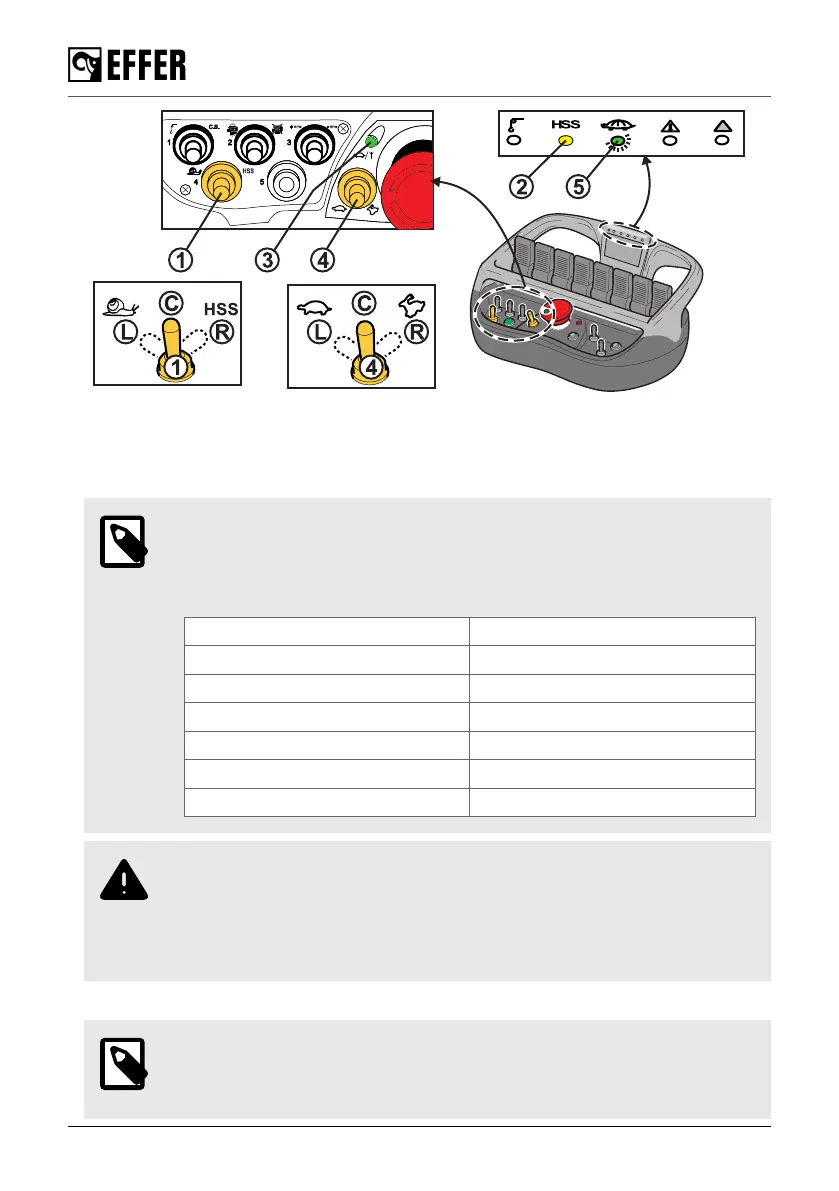
• To activate the feature HSS, turn the selector (1) to the HSS symbol (R). The yellow light (2) is
on when the feature is active.
• To activate the snail feature and reduce the speed, turn the selector (1) to the snail (L).
The green light (3) blinks indicating the set of selected snail speed (refer to the note below).
NOTE
With the snail feature activated, move the selector (4) to the left for a maximum
of five times to adjust the crane's reduced speed. These five reductions are from
100% to 60%, 50%, 40%, 30% and 20%.
Green LED (3) Indication
Not lit 0 to 100% reduced speed
1 blink every three seconds 0 to 60% speed
2 blink every three seconds 0 to 50% speed
3 blink every three seconds 0 to 40% speed
4 blink every three seconds 0 to 30% speed
5 blink every three seconds 0 to 20% speed
WARNING
◦ If you turn the selector to the (R) position, the crane returns to the reduced
speed (100%).
◦ If you push the emergency stop button on the controller, the last speed
selected will be active when you start the controller again.
• To deactivate both features, turn the selector (1) to centre position (C).
NOTE
When the maximum speed is reduced by Progress for safety reasons (despite
any activated feature), the green light blinks (5).
During operation
102 EFFER 265-315-395-525 Progress 2.0 CE



 To Next Page