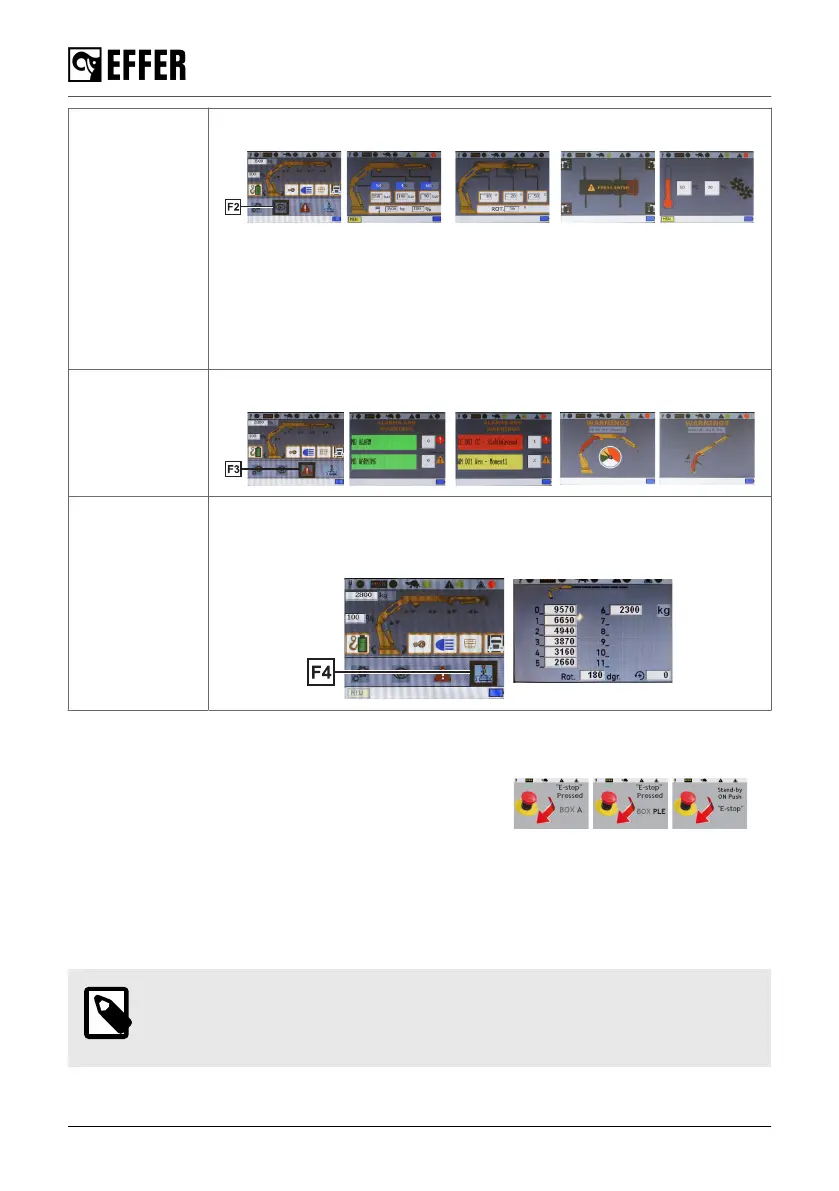
F2:
Visualisations
View all the information related with the crane and stabiliser legs status.
- Actual percentage of the max. lifting pressure permitted.
- Pressure on the lifting cylinders.
- Angles of the lifting booms. Position of the column and the boom system.
- Hoist, JIB and 2nd JIB status.
- Stabiliser legs set or not set on to the ground.
- Oil temperature and fan(s) speed.
F3: Warnings/
Alarms
View all the warnings and alarms status.
F4: DLC-S Dynamic Load Chart feature (display of liftable loads based on a real
stabilisation). Refer to the specific content in this manual for more
information.
Display when an emergency button is pushed
If you push an emergency stop button, the display will show
an appropriate message.
If you push the emergency stop button on the controller, the
controller display will turn off.
Depending on the control station where you push the button, you will see a different image on the
display (Box A (main panel), MEWP). If the crane is on stand-by, push and release one of the
emergency stop buttons for operation.
4.11.3. Standard functions and symbols
NOTE
The function corresponding to each lever depends on the configuration of the
specific crane. The following tables are examples.
The control system
60 EFFER 265-315-395-525 Progress 2.0 CE



 To Next Page