6.1.3. Snail feature
This feature reduces the speed of your crane when you
need precision or small movements.
NOTE
• The display panel on the User Interface allows the operator to select a specific
speed for each movement of this feature.
• The User Interface with LEDs does not allow the operator to select a specific
speed for each movement of this feature. Contact an authorised service
workshop for more information.
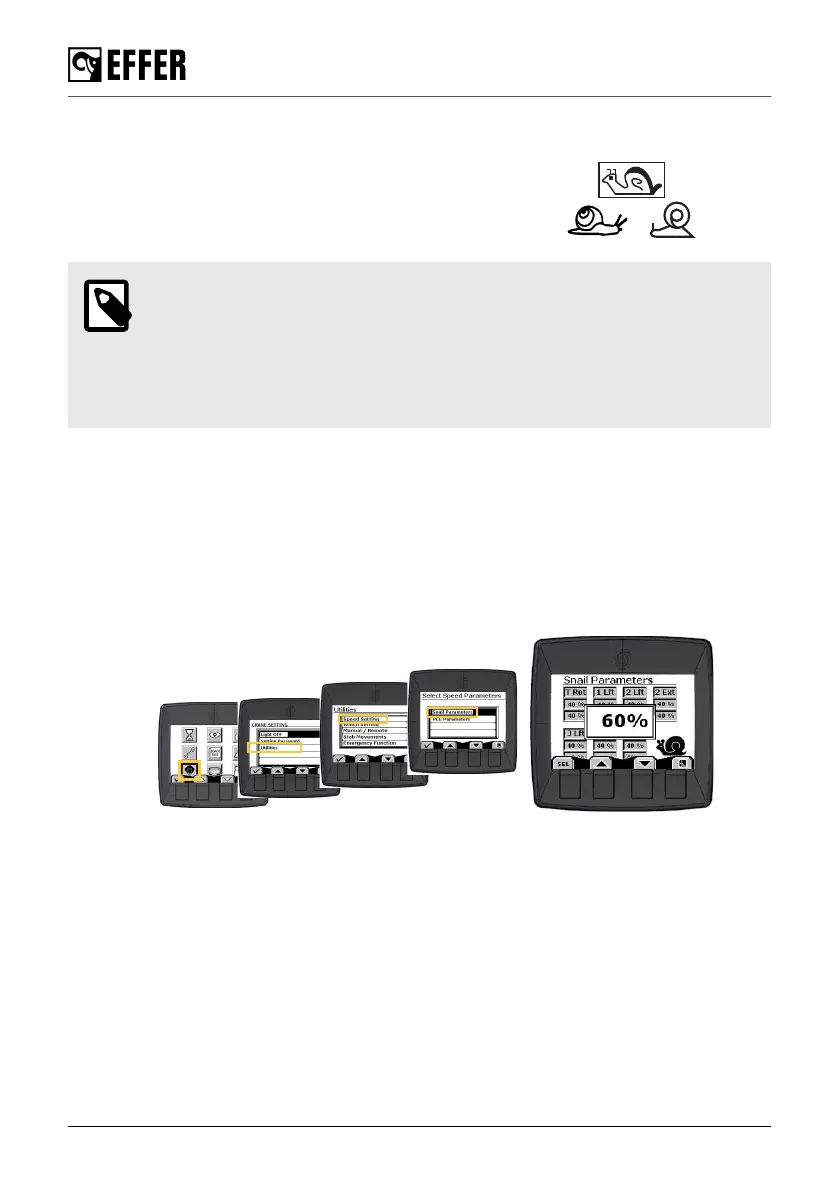
Speed setting on the display panel
1. Go to the ‘Crane settings’ menu on the display panel and select ‘Utilities’, ‘Speed setting’ and
‘Snail parameters’.
2. Move the arrows buttons to select the parameter you need to change. The field selected
blinks.
3. Push the ‘SEL’ button. The new screen shows the current parameter value.
4. Increase or decrease the percentage of the speed with the arrows buttons.
5. Push the ‘SEL’ button to confirm the new parameter value.
6. If needed, repeat this procedure to change other parameter values.
6.1.4. HSS High Speed System [option]
This feature increases the boom extension speed of the crane.
To achieve the maximum pushing power and reach the lifting load capacity shown in the load
diagram, deactivate HSS.
Active and deactivate this feature from the selector on your controller.
During operation
100 EFFER 265-315-395-525 Progress 2.0 CE



 To Next Page