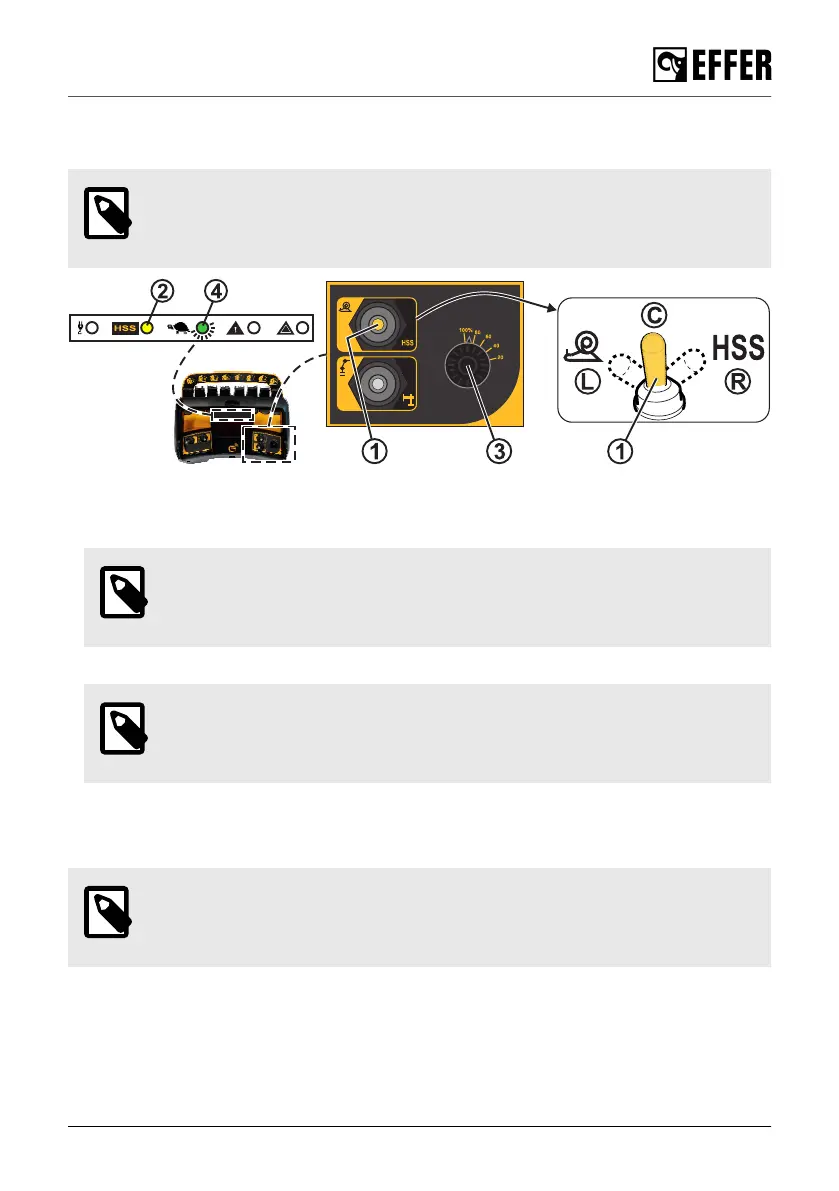
6.1.5. Controlling the crane speed with the controller STEADY
When you turn the speed selector, all levers must be in neutral position.
NOTE
The crane speed always depends on the crane functions you are using and how
many crane functions you operate at the same time.
• To activate the feature HSS, turn the selector (1) to the HSS symbol (R). The yellow light (2) is
on when the feature is active.
• To activate the snail feature and reduce the speed, turn the selector (1) to the snail (L).
NOTE
With the snail feature activated, move the selector (3) to adjust the crane speed.
The value is a percentage of the maximum preset value.
• To deactivate both features, turn the selector (1) to centre position (C).
NOTE
When the maximum speed is reduced by Progress for safety reasons (despite
any activated feature), the green light blinks (4).
6.1.6. Controlling the crane speed with the controller SCANRECO
When you turn the speed selector, all levers must be in neutral position.
NOTE
The crane speed always depends on the crane functions you are using and how
many crane functions you operate at the same time.
During operation
EFFER 265-315-395-525 Progress 2.0 CE 101



 To Next Page