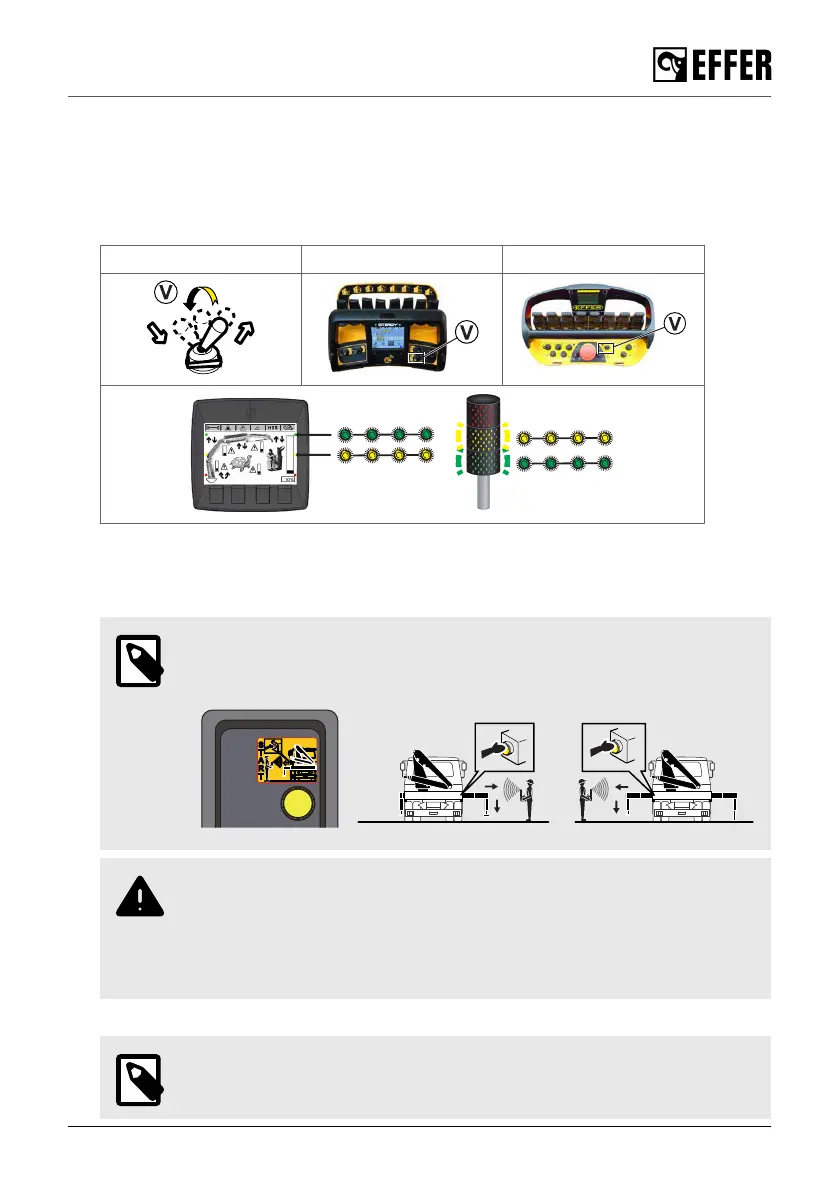
5.2.2. Activate the stabiliser system
Remote-controlled stabiliser system:
1. Lift up and turn the selector (V) to 'STAB' on the controller.
The green and yellow lights on the display panel and the column lamp will blink when the
stabiliser system operation is active.
Selector (V) STEADY SCANRECO
2. Move to the side of the crane where you want to start the operation.
3. Make sure that you have full view of the stabiliser system, and push the timed button that is on
the same side of each stabiliser extension/leg.
NOTE
The button will light up during operation of the stabiliser system on that side. If
the time expires before you finish the operation, push it again.
WARNING
• Do not let another person push the timed button.
• You must always have a clear view of the stabiliser system when operating.
• Do not push the timed button on one side of the vehicle and then move to
the opposite side and move the stabilisers.
4. Activate the related levers on the controller.
NOTE
To avoid that the stabilisers move accidentally, you can only operate them with
a double-action control:
Starting crane operation
EFFER 265-315-395-525 Progress 2.0 CE 85



 To Next Page