4.12.4. Battery and battery charger
Battery
We recommend that you have a spare controller battery, already charged, to avoid machine
downtime. A fully charged battery provides approximately 8 hours of use (at 25°C, 77°F) and
the voltage level is approximately 7.2 V. When the battery is about to be out of power an indicator
LED (3) on the controller flashes and you hear a beep for three times. Replace the battery within 5
minutes.
Battery charger
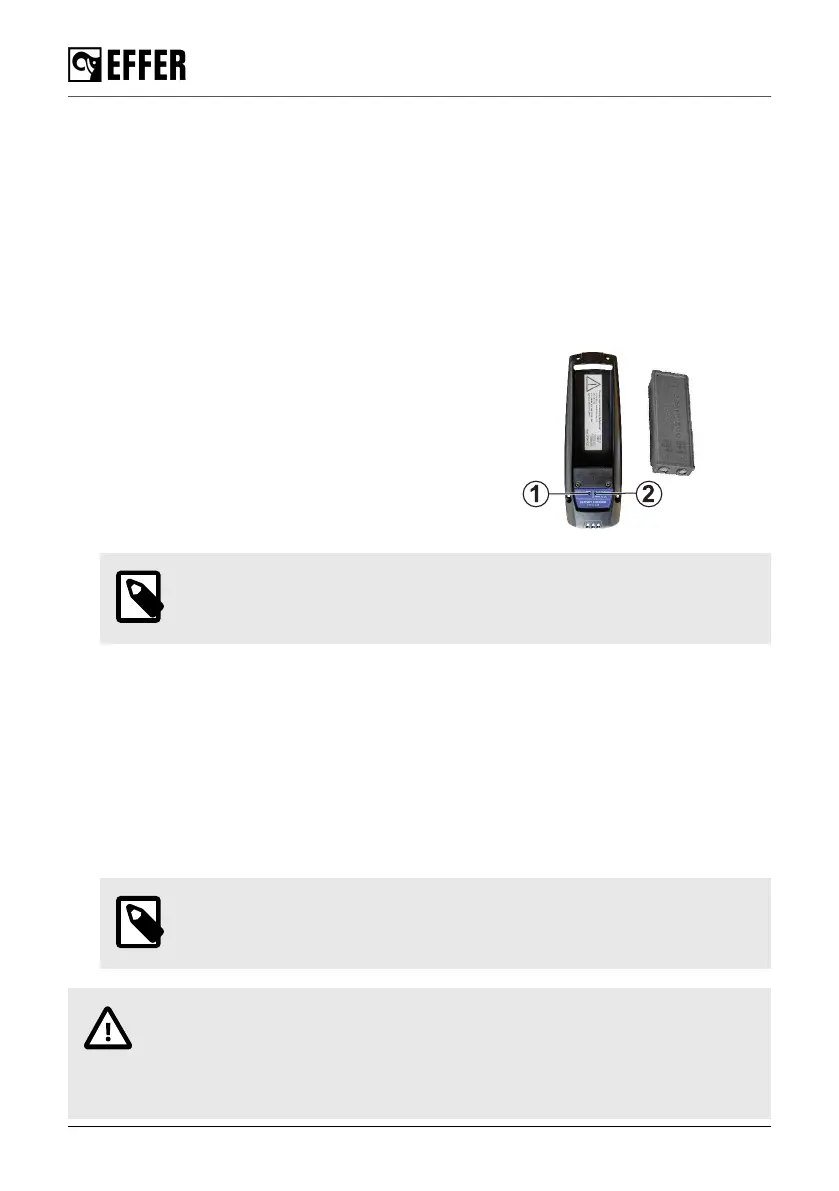
Connect the battery charger in a protected environment,
preferably in the cab.
1. Connect the battery charger to the power supply using
the cable provided.
2. The red LED (1) turns on.
3. Place the battery in the charger.
4. The green LED (2) flashes slowly during recharging
and has a steady light when the battery is fully
charged.
NOTE
The charging time is approximately 3 hours.
Charging the battery in the controller with the cable
Operating ambient temperature for charging: Battery = 0°C to + 45°C (32°F to 113°F).
When the serial cable is connected, the battery inside the controller will automatically recharge.
1. Push the emergency stop button on the crane and on the controller.
2. Insert the battery.
3. Connect the serial cable to the receiver.
4. Release the emergency stop button located on the crane and on the controller. The controller
is ready to use, turn it on if needed.
NOTE
The charging time is approximately 12-14 hours.
CAUTION
• Charge the battery when it is out of power.
• Do not leave the battery without charging it for more than six months.
• Keep the battery and its contacts clean.
The control system
76 EFFER 265-315-395-525 Progress 2.0 CE



 To Next Page