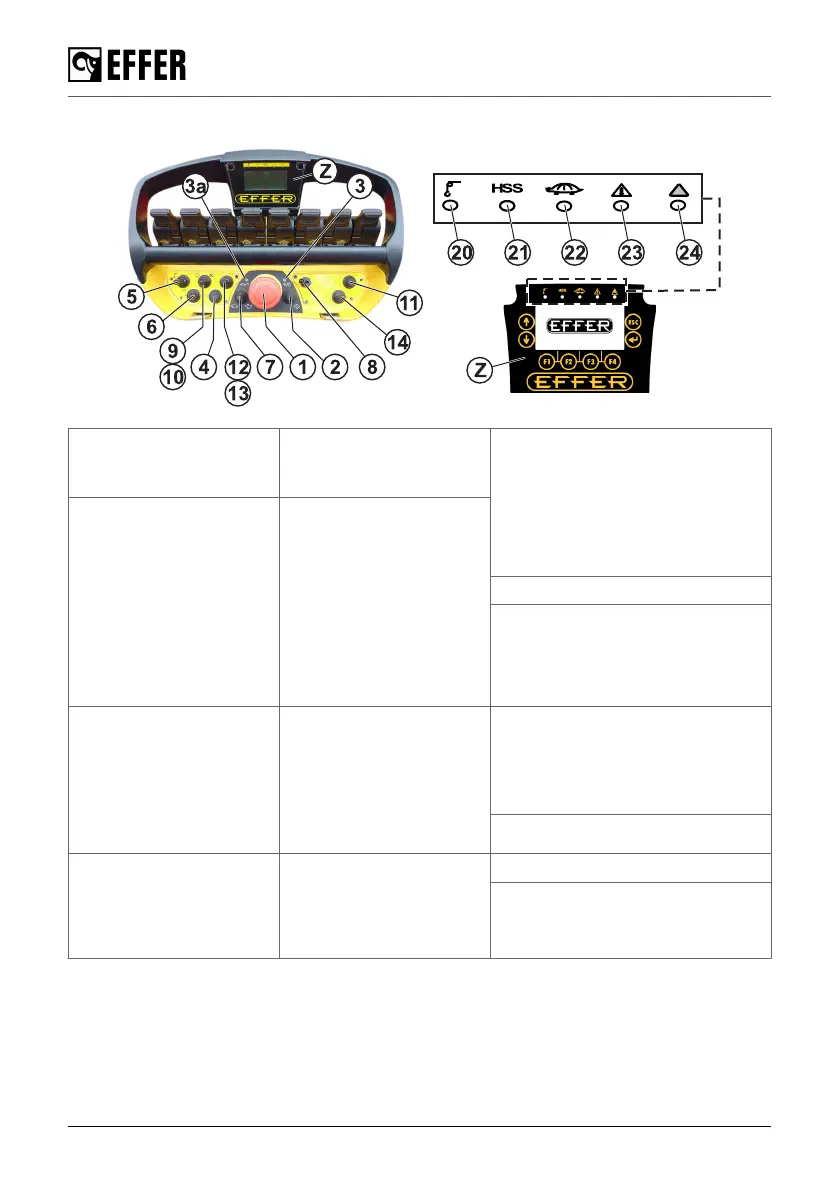
4.12.1. Buttons, selectors and LEDs
(1) Emergency stop
button.
(4) Selector/button for
additional equipment
[option].
(8) Operation selector mode:
• Left: CRANE mode (CRANE)
• Right: STABILISER SYSTEM
mode (STAB)
• Centre [option]: (TRUCK
WALLS)
(2) Button:
• Activate the controller.
• Reset: push it to reset
warnings and alarms.
• Horn
• Push it 2 times
to choose the best
frequency and avoid
interference.
(5) Selector for
additional equipment:
• Left: Hoist
• Right: additional
equipment
(9) Truck engine on.
(10) Truck engine off.
(3) LED for battery
status:
• On: remote on and the
battery is charged.
• Flashing: the battery
must be replaced.
(6) Speed selector
mode:
• Left: reduced speed
• Right: HSS
• Centre: standard
speed
(11) Lights ON/OFF, activation
of special features for some
models (i.e. 7th or 9th extension
with cylinder inside the extension,
etc...)
(12) Rpm increase.
(3a) LED for radio
connection:
• Flashing: the
transmission is bad.
(7) Speed adjustment:
• 5 positions based on
preset values.
(13) Rpm decrease.
(14) Scroll button for the display.
The control system
66 EFFER 265-315-395-525 Progress 2.0 CE



 To Next Page