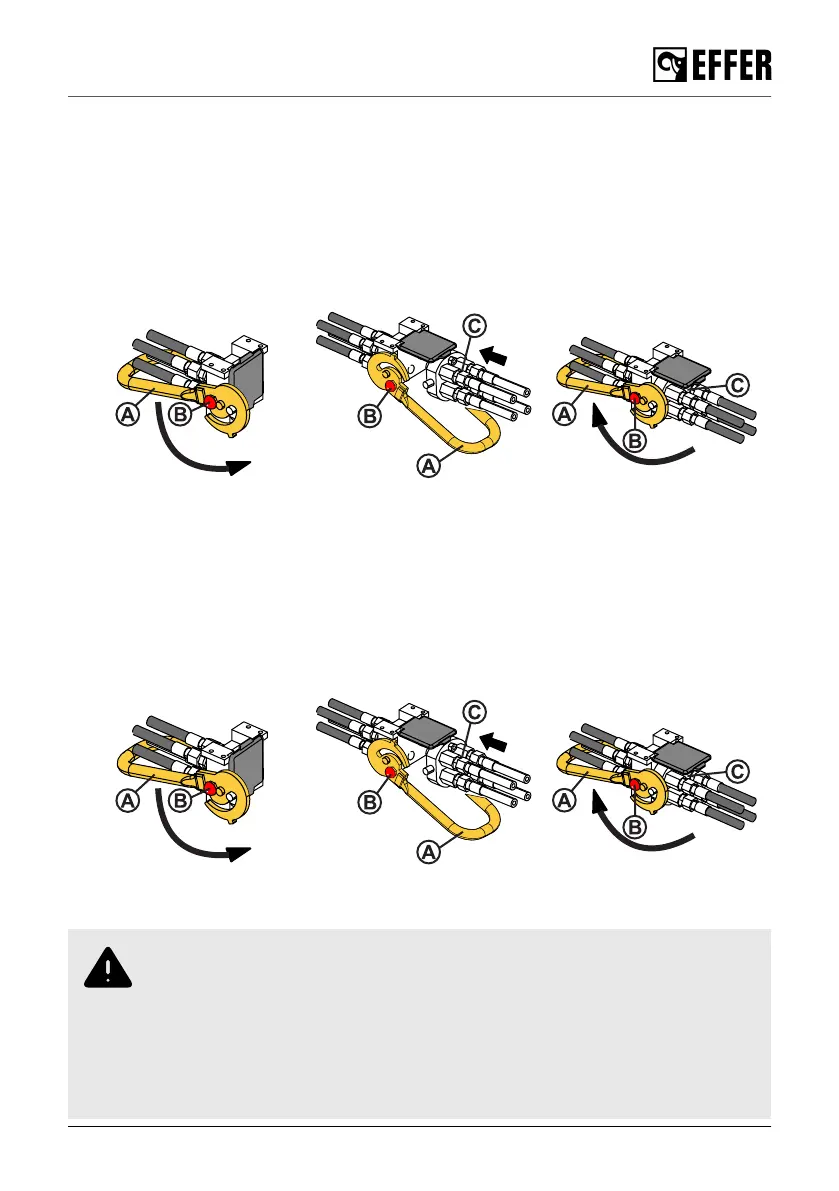
To connect the hydraulic couplings you must:
1. Switch off the control system.
2. Disengage the PTO.
3. Push the red button (B) to release the lever (A).
4. Turn the lever (A) and connect the hydraulic coupling (C).
5. Turn the lever (A) to its initial position. Make sure that the red button (B) locks the connection
correctly.
6. Reconnect the PTO and switch on the system, if needed.
7. Operate the crane.
To disconnect the hydraulic couplings you must:
1. Switch off the control system.
2. Disengage the PTO.
3. Push the red button (B) to release the lever (A).
4. Turn the lever (A) and disconnect the hydraulic coupling (C).
5. Turn the lever (A) to its initial position. Make sure that the red button (B) locks the connection
correctly.
6. Reconnect the PTO and switch on the system, if needed.
7. Operate the crane.
6.6. Electrical connections [option]
WARNING
• Switch off the control system and the PTO before connecting or disconnecting
the connectors.
• Always remove/attach first the electrical connection before the hydraulic
connection.
• Keep the electrical and hydraulic protection caps and bypass in good conditions
and store them in a safe place.
During operation
EFFER 265-315-395-525 Progress 2.0 CE 121



 To Next Page