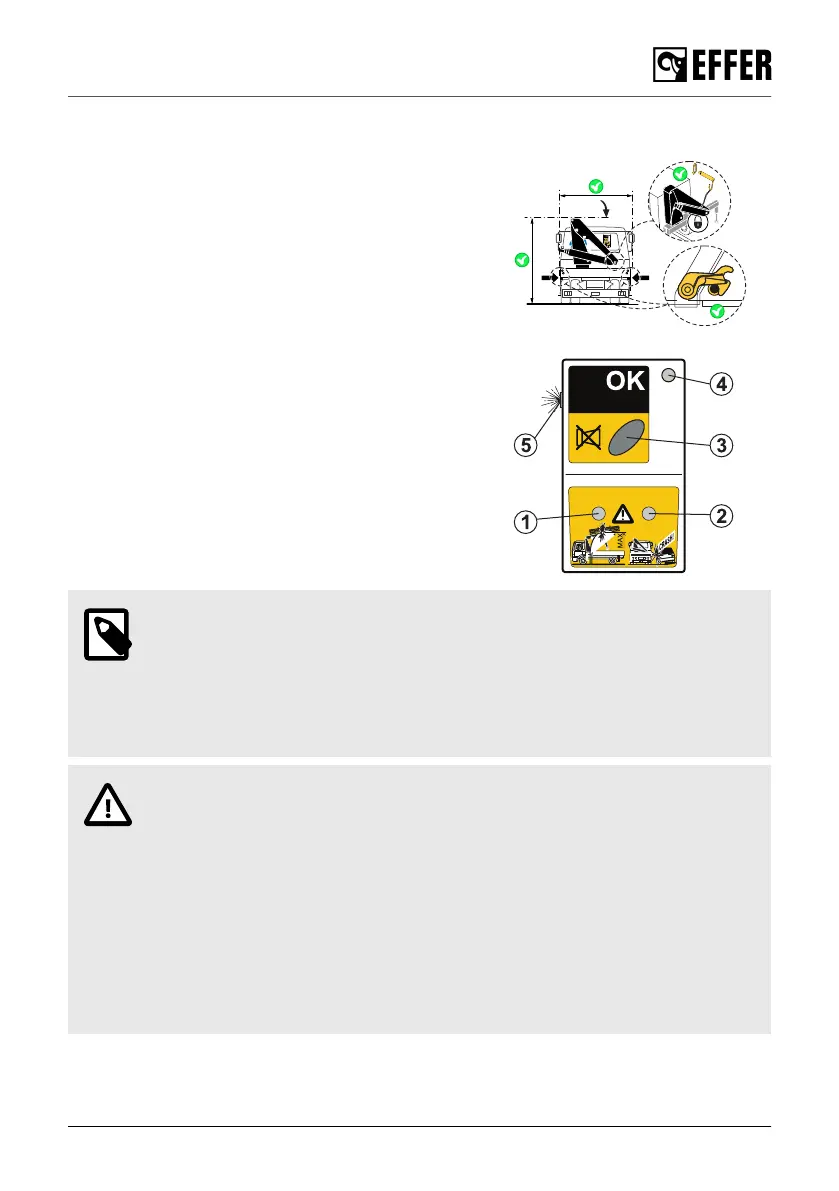
7.5. Transport warning
The system detects that the stabilisers and crane boom
system are in transport position before the operator starts
driving, and also during the transport.
A device installed in the dashboard of the truck Transport
Reporting Interface (TRI) warns the driver with a visible and
audible signal of an incorrect position during the transport:
• Red warning light (1) on: the height of the crane exceeds
a set maximum value.
• Red warning light (2) on: at least one of the stabiliser
extensions is not in transport position.
• Buzzer OFF button (3).
• Green warning light (4) on and the rest of the lights off:
the crane and stabiliser system is in transport position
and the vehicle is ready to move.
• The buzzer (5) sounds if one or both warning lights (1)
and (2) are active.
NOTE
• During the crane operation, the red lights are lit and the buzzer is active. You are
able to turn off the buzzer by pushing the button (3).
• If you are driving the vehicle and the height of the crane or the stabiliser
extensions change from the transport position, the system gives a warning in
the cab.
CAUTION
• Do not move the vehicle if you see or hear the warning on the TRI.
• Stop the vehicle immediately if the visual alarm / sound is active while driving:
1. Switch on the system.
2. Operate the boom system and the stabiliser extensions to their transport
position.
3. Make sure that the locking devices are in good conditions and in place.
4. Switch on the system.
5. If you can still see/hear the warning, secure the crane and the stabiliser
system positions and go immediately to an authorised service workshop.
Ending crane operation
EFFER 265-315-395-525 Progress 2.0 CE 139



 To Next Page