WARNING
Despite the safety feature, always operate
the crane with gentle and slow movements
in the most unfavourable areas (where the
lifting capacity and stability diagram have a
sudden change (T)) to avoid overturning. For
example, do not operate oscillating loads or
slew the crane with high speed.
Effer considers as misuse of the crane:
• positioning on an unstable base.
• sudden movements of the crane with or
without oscillating loads.
• excessive lowering speed from the vertical
position with simultaneous increase of the
load outreach.
• excessive slewing speed of the crane
towards unfavorable areas.
The SENSE diagrams
After the installation on the truck, the installer prints unique stability and load diagrams for each
crane.
Performance stability diagram
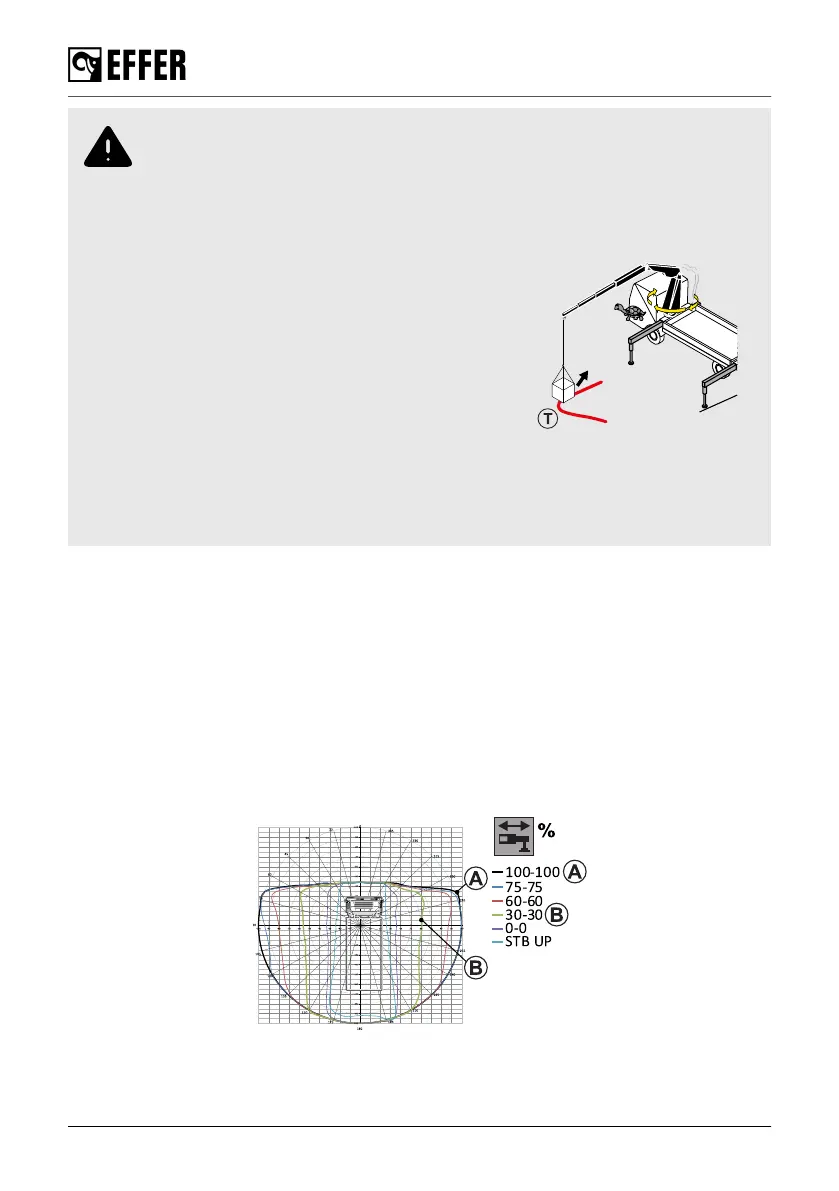
The EFFER software creates a stability diagram, each coloured curve shows the crane’s stable
area and the maximum performance with stabiliser extensions in different outreach positions. The
more you extend your stabiliser extensions, the more stability and crane's performance you will get.
The diagram shows 10 different sectors surrounding the crane and each sector is a percentage
referred to the lifting performance. A percentage of 90 indicates that the available working pressure
in the 1st boom cylinder is reduced to 90% in this sector.
During operation
108 EFFER 265-315-395-525 Progress 2.0 CE



 To Next Page