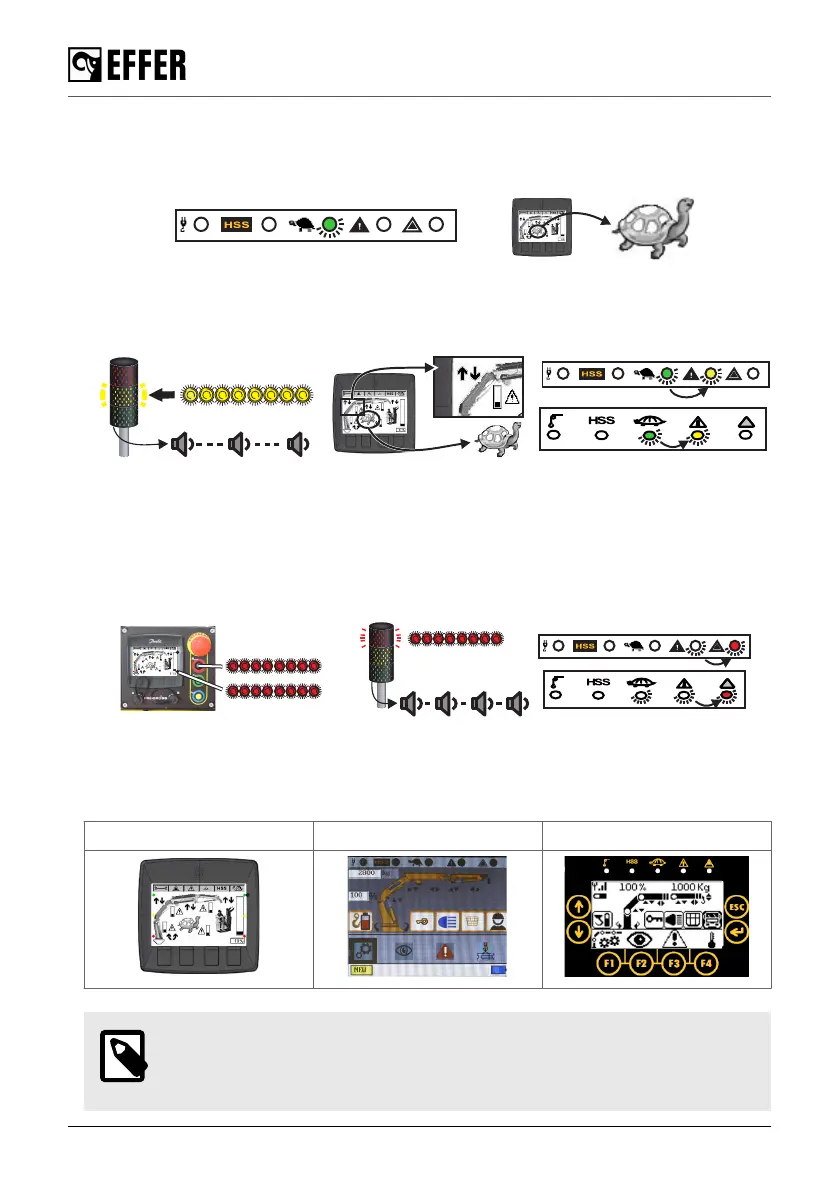
• Crane with load on the hook.
When the pressure inside a boom moving cylinder (1st boom, 2nd boom, JIB) approaches 70%
of the max pressure allowed (max pressure = max crane performance), the slow-down begins.
◦ The green LED turns on and the turtle icon is shown.
When you operate the crane and reach the 90% of the max performance:
◦ The yellow lamp on the column lights is flashing.
◦ A slowly intermittent sound is activated on the horn.
◦ The yellow LED goes on.
• When 100% of the maximum permitted pressure is reached, the system stops all functions
that increase the pressure.
◦ On the column lamp, the red light is flashing.
◦ A quick intermittent sound is activated from the horn.
◦ On the display panel, the red light is flashing.
◦ On the User Interface, the red light of the reset LED is flashing.
◦ The yellow LED on the controller turns off and the red LED is flashing.
Unblocking crane movements in overload situations
If the maximum lifting capacity is reached, the system stops all crane movements that could
worsen the stability. You can see on the display panel and on the controller which movements
are not allowed (100% overload) and which are still permitted to correct the overload situation.
Display STEADY SCANRECO
NOTE
If you are in an overload situation where no movement is allowed, follow the
procedure: “Section 6.2.2: Release the overload protection (page 115)”.
During operation
114 EFFER 265-315-395-525 Progress 2.0 CE



 To Next Page