NOTE
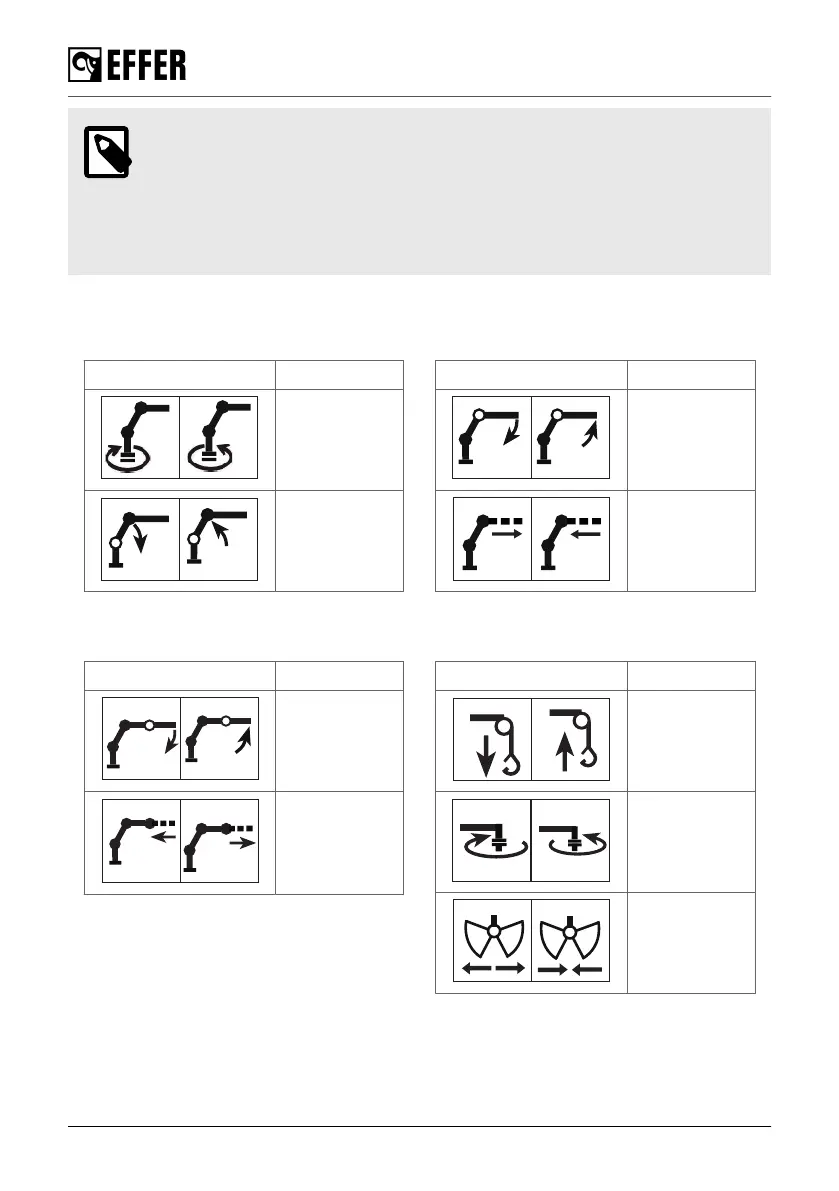
For normal operation, you will use a controller. You can read about the symbols
displayed on it in the dedicated section of this operator’s manual.
By default, the symbol on the controller corresponds to the positive movement of
the levers. To operate the opposite movement of that symbol, move the lever in the
opposite direction.
Always operate the lever according to the function on the symbol sign.
Basic crane symbols and functions
SYMBOLS FUNCTIONS
Slewing
First boom
SYMBOLS FUNCTIONS
Second
boom
Hydraulic
extensions
Accessories symbols and functions (if delivered)
SYMBOLS FUNCTIONS
JIB cylinder
JIB
extensions
SYMBOLS FUNCTIONS
Hoist
Rotator
Grapple
The control system
48 EFFER 265-315-395-525 Progress 2.0 CE



 To Next Page