(a) Battery status (f) Lights enabled [option]
(b) Limit load percentage (g)
(g1)
MEWP mode [option]
Rotator/grapple mode [option]
(c) Weight detected [option]
(d) Radio hook battery status [option] (h)
(h1)
Cabin protection enabled [option]
Operator protection enabled
[option]
(e)
(e1)
Partial bypass enabled
Progress bypass enabled
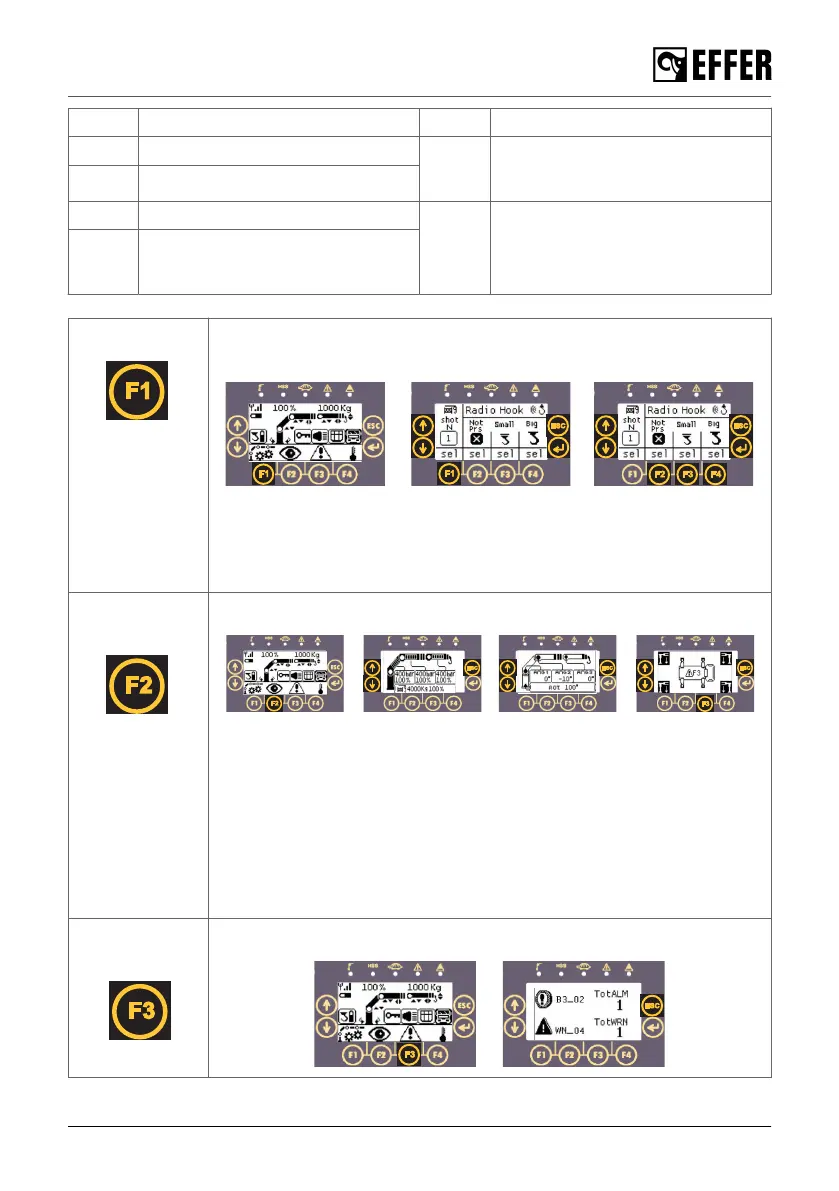
F1: Settings Set the hoist pulls on the tip of the crane (n. of winch shots/lines) or set the
radio hook according to the hook installed.
- Push [F1] to set the hoist pulls on the tip of the crane (n. of winch shots).
Change the number with the arrows and confirm with the ENTER button.
- Push [F2], [F3] or [F4] to set the radio hook according to the hook
installed. Confirm the selection with the ENTER button.
F2:
Visualisations
View all the information related with the crane and stabiliser legs status.
- Actual percentage of the max. lifting pressure permitted.
- Pressure on the lifting cylinders.
- Angles of the lifting booms. Position of the column and the boom system.
- Hoist, JIB and 2nd JIB status.
- Stabiliser legs set or not set on to the ground.
- Oil temperature and fan(s) speed.
- If a 2nd JIB is applied to the JIB, on pressing the down arrow button only
the information related to the 2nd JIB will be displayed.
- Push [F3] to go directly to the warning/alarms display.
F3: Warnings/
Alarms
View all the warnings and alarms status.
The control system
EFFER 265-315-395-525 Progress 2.0 CE 69



 To Next Page