107
CHAPTER 2: Instructor / Operator’s Station (IOS)
* Recognize...
* Analyze...
* Solve...
Always be aware of the “symptoms” of icing.
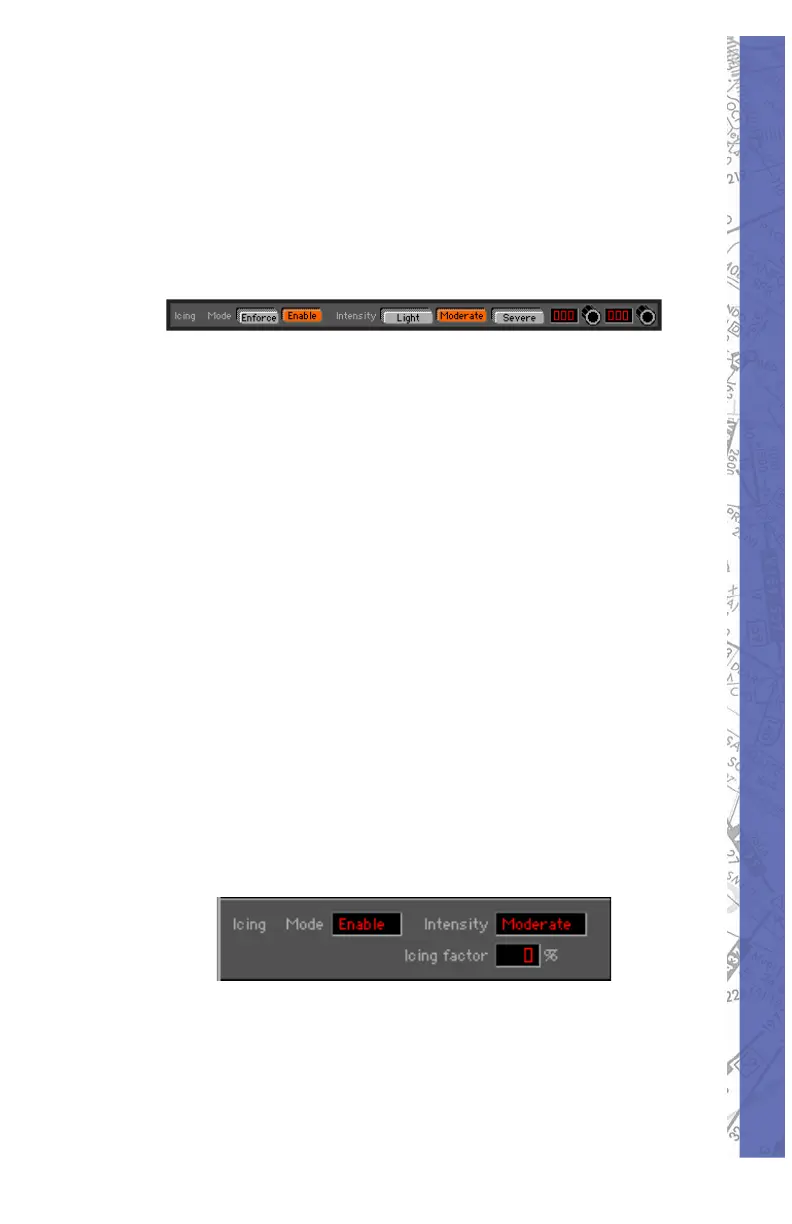
Icing can be implemented in two different ways.
Press “Enforce” and choose an intensity 1.
level (Light, Moderate, Severe) to activate
icing regardless of OAT or visible moisture
present. This can be used by an in struc tor
for example to demonstrate the affects of
icing on aircraft performance at any time.
Press “Enable” and choose an intensity 2.
level (Light, Moderate, Severe) to activate
temperature/moisture dependent icing. Ice
will begin forming at the intensity chosen
anytime the aircraft is in visible moisture and
at a temperature of approximately 32 degrees
Fahr en heit and lower. For the purposes of
the simulation, vis i ble moisture is defi ned as
1/4 statute mile visibility and less, or fl ying in
an overcast (OVC) layer.
With either icing implementation, intensity levels af fect
“ic ing factor” in the fol low ing ways:
Light: icing factor goes up to 50% in 60 minutes
Moderate: icing factor goes up to 100% in 20 minutes
Severe: icing factor goes up to 100% in 10 minutes



 To Next Page