ELITE OPERATOR’S MANUAL
198
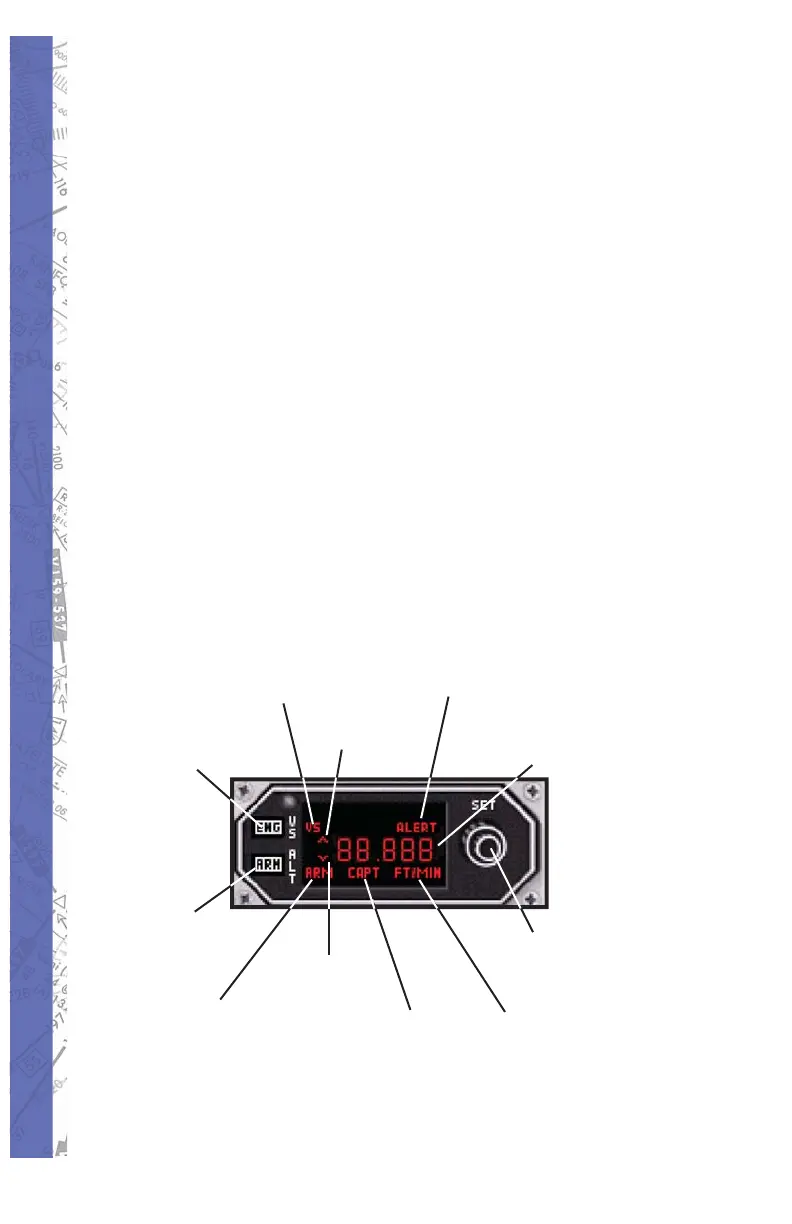
ALTITUDE/VERTICAL SPEED SELECTOR
This feature is available only with the Bonanza, Baron,
Seneca III and King Air (King radio option) aircraft modules
only. The KAS 297B offers the user the ability to pre-select
altitudes and vertical speeds while using the autopilot.
Altitude Pre-Select - to pre-select an altitude the unit must
fi rst be indicating FT. If it is not then either push in the
inner concentric knob if using a mouse or fl ip the toggle
switch to ALT if using an ELITE avionics panel. Using the
knob(s), choose the desired altitude and then press the
ARM button to arm the altitude capture mode. This will
cause ARM to appear on the indicator. Use pitch attitude
hold or select a vertical speed to guide the aircraft to the
desired altitude. As the aircraft nears the desired altitude
the system computes a roundout and will indicate altitude
capture (CAPT) as the aircraft levels off. Once the aircraft
has leveled off the vertical speed mode disengages and
the CAPT indication disappears.
Vertical Speed
Mode An nun ci a tor
Vertical Speed
“Up”
Vertical Speed
“Down”
Altitude Alert
Annunciator
Knobs for altitude
or vertical speed
settings
Feet Per Minute
Annunciator
Altitude Capture
Mode An nun ci a tor
Altitude Arm
Mode An nun ci a tor
Display shows
selected altitude
or vertical speed
Altitude Select
Mode Button
Vertical Speed
Mode Button


 To Next Page