PI-135 OPERATOR’S MANUAL
64
instructor’s station is being used as it allows the “instructor”
to quickly ascertain the WX at any given moment without
having to change screens and thus maintain uninterrupted
monitoring of the student’s fl ight. Outside air temperature
(OAT), visibility, pressure, and wind will be displayed in
a format similar to the “station model” symbology found
on Surface Analysis charts. Please note that the reported
pressure is the actual ambient pressure (not altimeter
setting) at the aircraft’s current altitude. Wind speed and
direction are displayed graphically using a barb and fl ag
system (see fi gure on page 265) connected to a “pole” that
points in the direction FROM which the wind is blowing
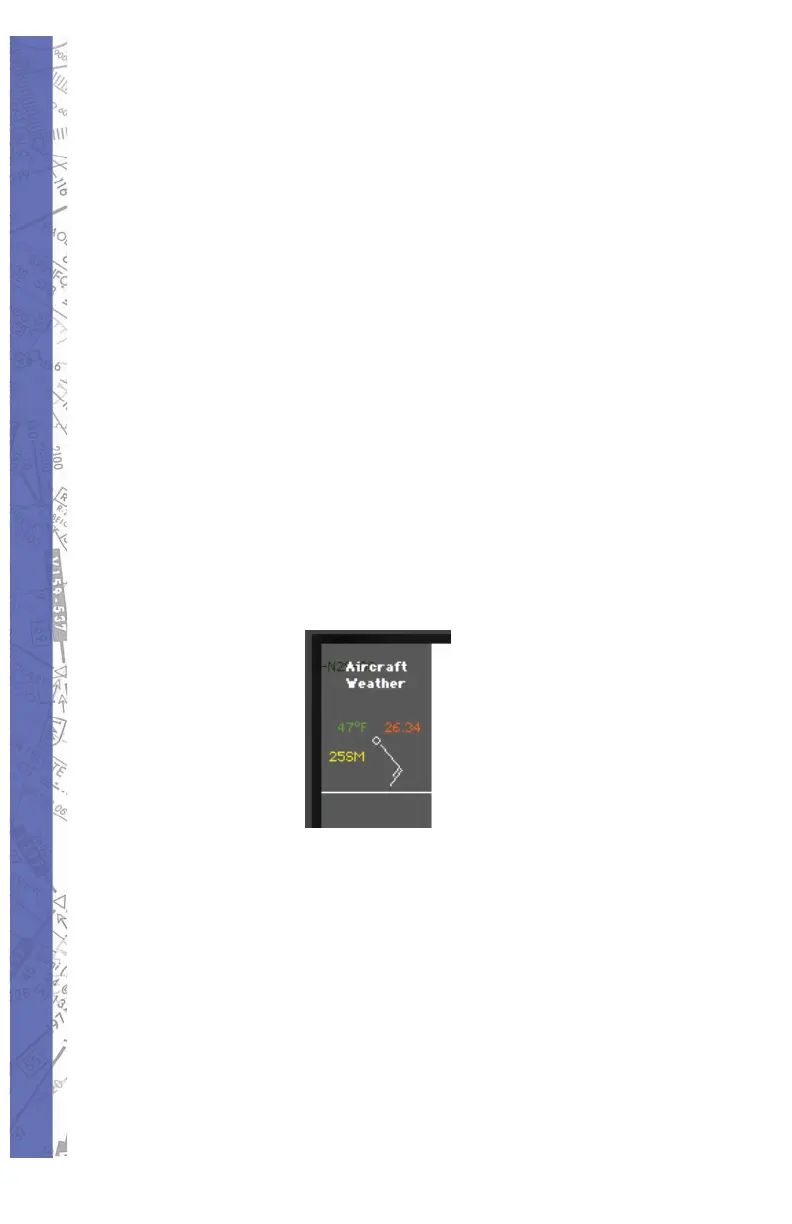
relative to True North. In the following example, the aircraft
is at 3500 feet, wind is from the southeast at 15 knots, OAT
is 47° Fahrenheit, ambient pressure is 26.34 inches, and
visibility is 25 statute miles. Note that unlike the station
model used on Surface Analysis charts, no sky cover
information is provided.
To turn ON/OFF aircraft spot weather simply click the
FACILITY “show” button at the bottom of the MAP Page.
On the “Show Facilities” dialog box click on the Aircraft
Info “SHOW” button. This button is an ON/OFF toggle that
will turn yellow when pushed in (ON). The spot weather
data appears at the upper-left corner of the MAP Page at
the top of the shaded information display region.
NAVIGATION DATABASES
All airports, airport lighting, fi xes, NDBs, VORs, localizers,
glideslopes, com mu ni ca tions data etc. are contained in



 To Next Page