19
CHAPTER 1: Assembly and Startup
Connect fl ight controls as applicable. If using 3.
other than ELITE hardware follow specifi c
manufacturer’s instructions for proper
fl ight control connection and calibration as
required.
CONNECTING SIMULATOR HARDWARE TO
THE COMPUTER
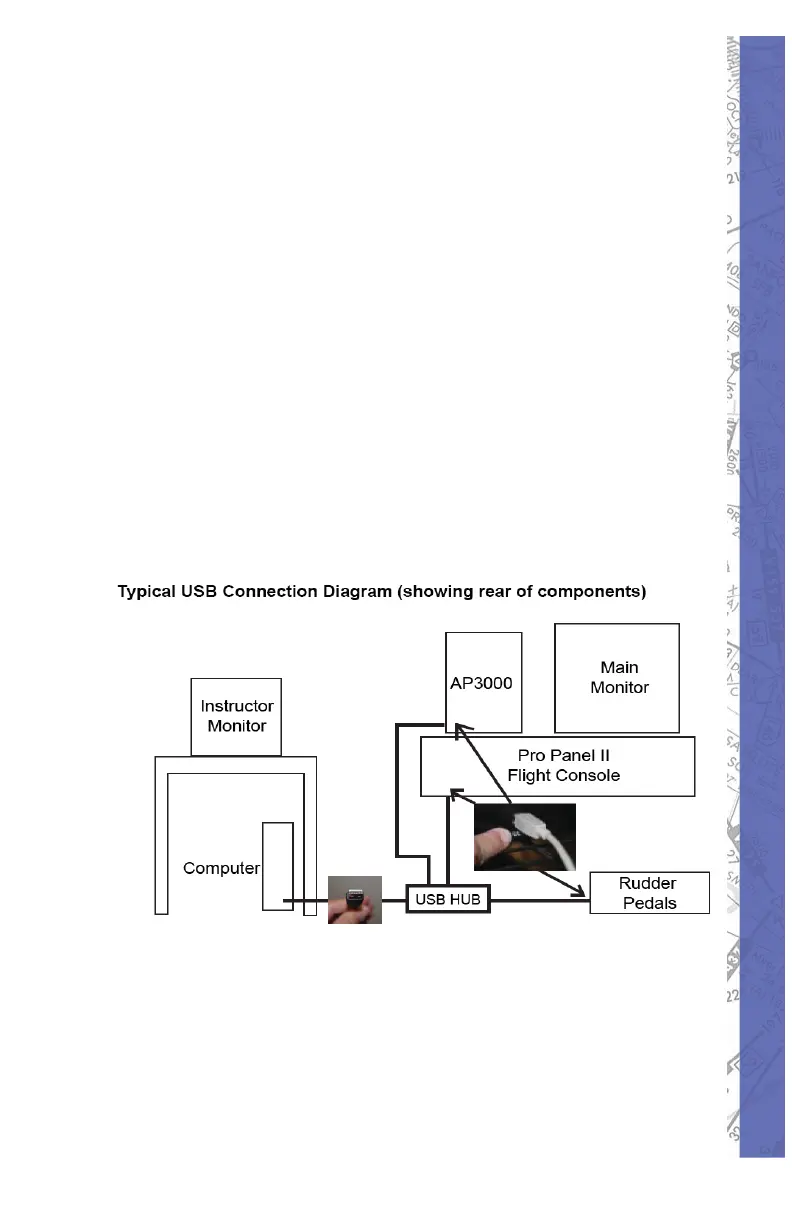
Connecting USB components of the PI-135 to the computer
is a very simple thing to do. Each component comes with
a typical USB cable that connects to the computer’s USB
ports. If the computer does not have enough USB ports
for 3 PI-135 components plus mouse and keyboard, a
powered USB hub may be necessary (not included). The
main monitor and instructor monitor connects to the video
out ports on the computer*. The basic layout follows:
* The ELITE software is designed to accommodate a
separate graphical instructor station (second monitor).
When using your own computer, you must install either a
second graphic card or use a graphic card that has dual
monitor output. You must confi gure Windows for multi-
monitor use. When Windows is confi gured properly,
ELITE will automatically see and use the second monitor.



 To Next Page