65
CHAPTER 2: Instructor / Operator’s Station (IOS)
regional navigation da ta bas es. This data must be loaded
for use in the program.
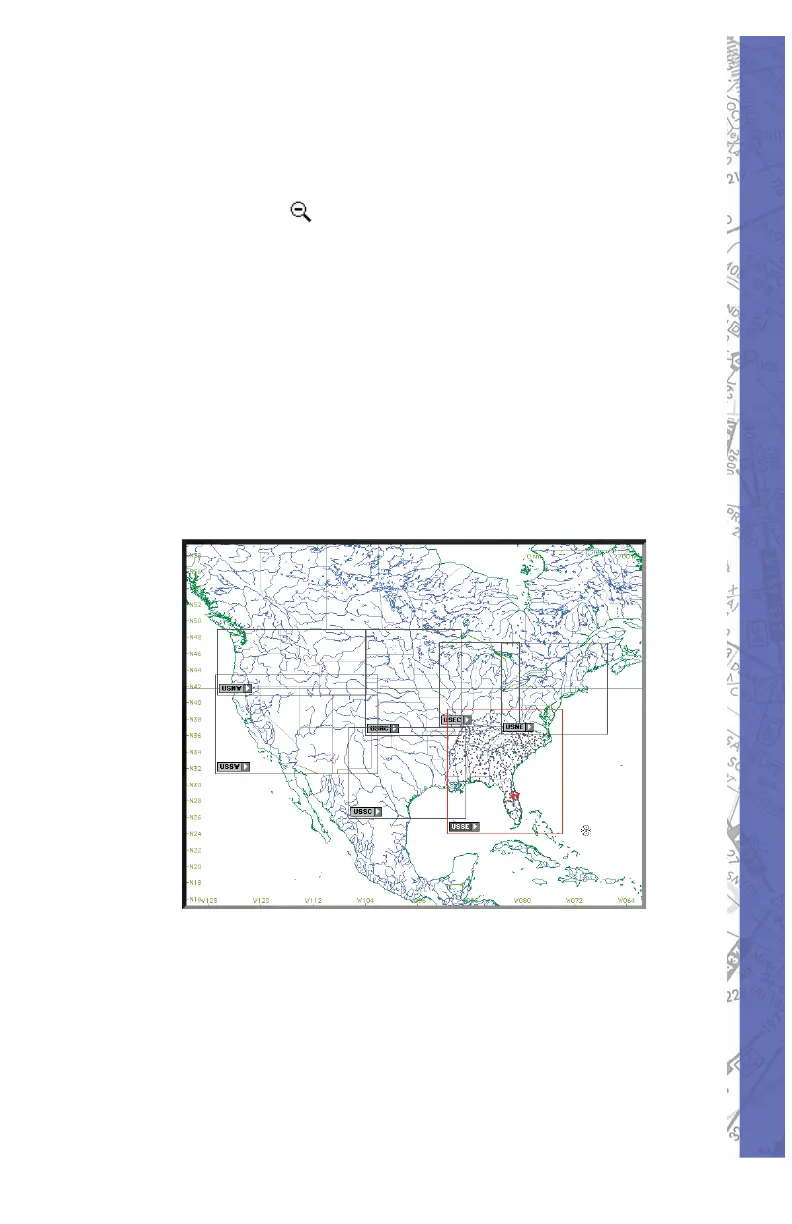
To understand the structure of the NAV databases, press
the ZOOM out (
) button several times until an en tire
continent is visible. Using North America (shown below)
for example, notice there are boxes visible across the U.S.
that defi ne the regional boundaries of each NAV database.
From this same view you can also determine if a spe cifi c
NAV da ta base (region) is load ed. Gray box es in di cate data
is available but not load ed. Red boxes in di cate the data
with in its bound ary is load ed and ready for use.
Note: Each NAV da ta base (re gion) is labeled for
iden ti fi ca tion. The label (USNW) shown be low is for the
Unit ed States North West.
NAV DATA Disclaimer: We do our best to ensure the
ac cu ra cy of the NAV data in the software. Un for tu nate ly,
in ac cu ra cies orig i nat ing from the data source are be yond
our control and may be encountered at some point over
time in the nor mal course of using the product. If you
do encounter data that you feel is in error please make
a note and let us know. The more in for ma tion you can
gather about the specifi cs of your ex pe ri ence, the better.



 To Next Page