CR825 and CE875 Instant Issuance System User’s Guide 33
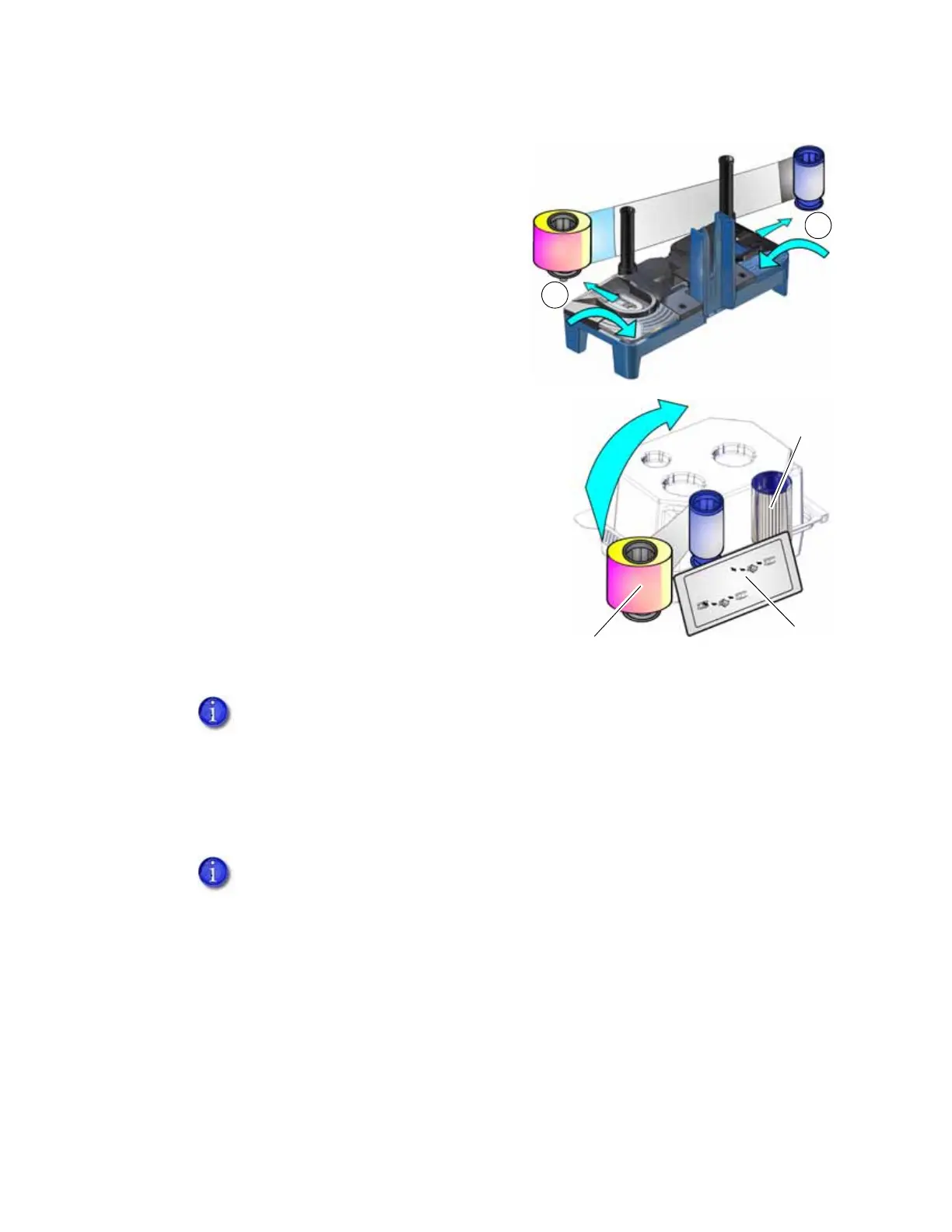
4. Remove both used spools from the cartridge.
a. Press the blue latch button and slide the
used supply spool out from the cartridge.
b. Press the silver latch button and slide the
full take-up spool out from the cartridge.
c. Follow your site’s guidelines to properly
discard the used ink ribbon.
5. Clean the printer.
Each ink ribbon package contains an isopropanol-
coated cleaning card. We recommend that you
clean the printhead cam rollers using the double-
sided, sticky cleaning card (ordered separately)
first. Then use the sticky cleaning card to clean a
single-hopper printer, or the isopropanol cleaning
card to clean a multi-hopper printer.
Refer to “Clean the Printer” on page 44 for
complete information about the cleaning process.
6. Remove the new ink ribbon from its package. Hold the ribbon cores and pull them up from
the package base.
Make sure that you clean the printer each time you install a new ink ribbon. We
recommend that you clean the printer after every 500 cards processed, or more
often as needed, so you may need to run a cleaning card between ribbon
changes.
The package also includes a new cleaning sleeve. Refer to “Replace the Cleaning
Sleeve” on page 35.
Isopropanol
Cleaning Card
Ink Ribbon
Cleaning
Sleeve



 To Next Page