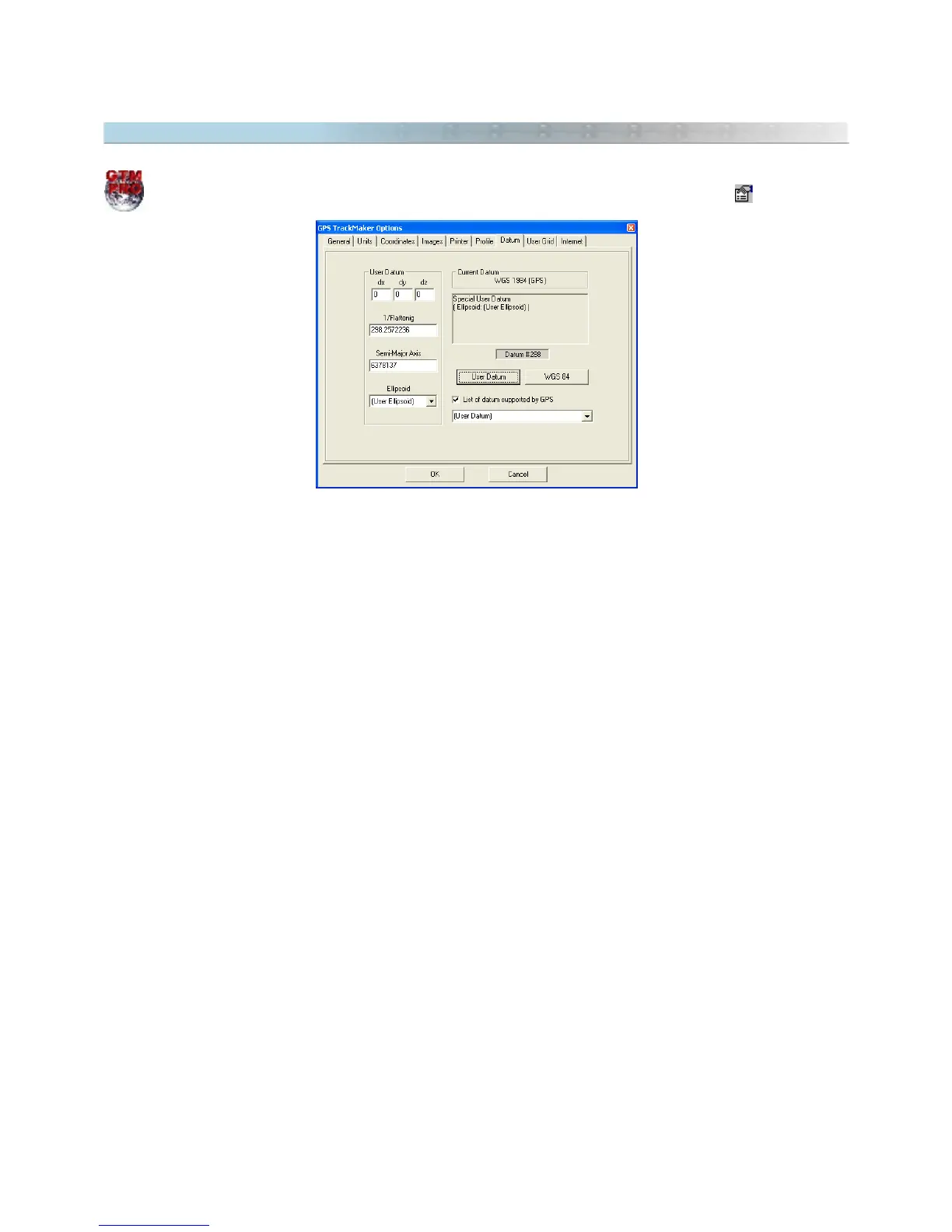
9.15 Datum Defined by User
In GTM PRO®, the User can configure their own datum that will be called
User Datum
. This is done
through the
Options
window accessed through the
Tools
menu, or by pressing the button
In the
Options
window, click on the
Datum
tab and on the <User Datum> button, so that the five fields of the
datum configuration be enabled.
DX, DY and DZ Field
These fields represent the conversion differences (delta) between User's datum and the default WGS 84 datum.
They are specific values using the Molodensky pattern formula for datum conversion. To obtain a complete list of
DX, DY and DZ fields, see Datum Table
1/Flattening
It is the inverse of the flattening value of the Earth’s ellipsoid. Each datum has its own flattening value. The values
accepted by GPS TrackMaker® for the inverse of the flattening are between 280 and 310.
Major Semi-axis
Field destined to the length of Earth's larger semi-axis. The values chosen by the User must be between 6376000
and 6379000 meters.
Predefined Earth Ellipsoid
If the User doesn't want to define the fields for the flattening and the larger semi-axis of the Earth, they can
choose between the several reference ellipsoids contained in the Predefined ellipsoid list. To learn which are the
Predefined ellipsoids of GPS TrackMaker®, consult the Datum Table.
110



 To Next Page