4.10 Fragment Tracklog Tool
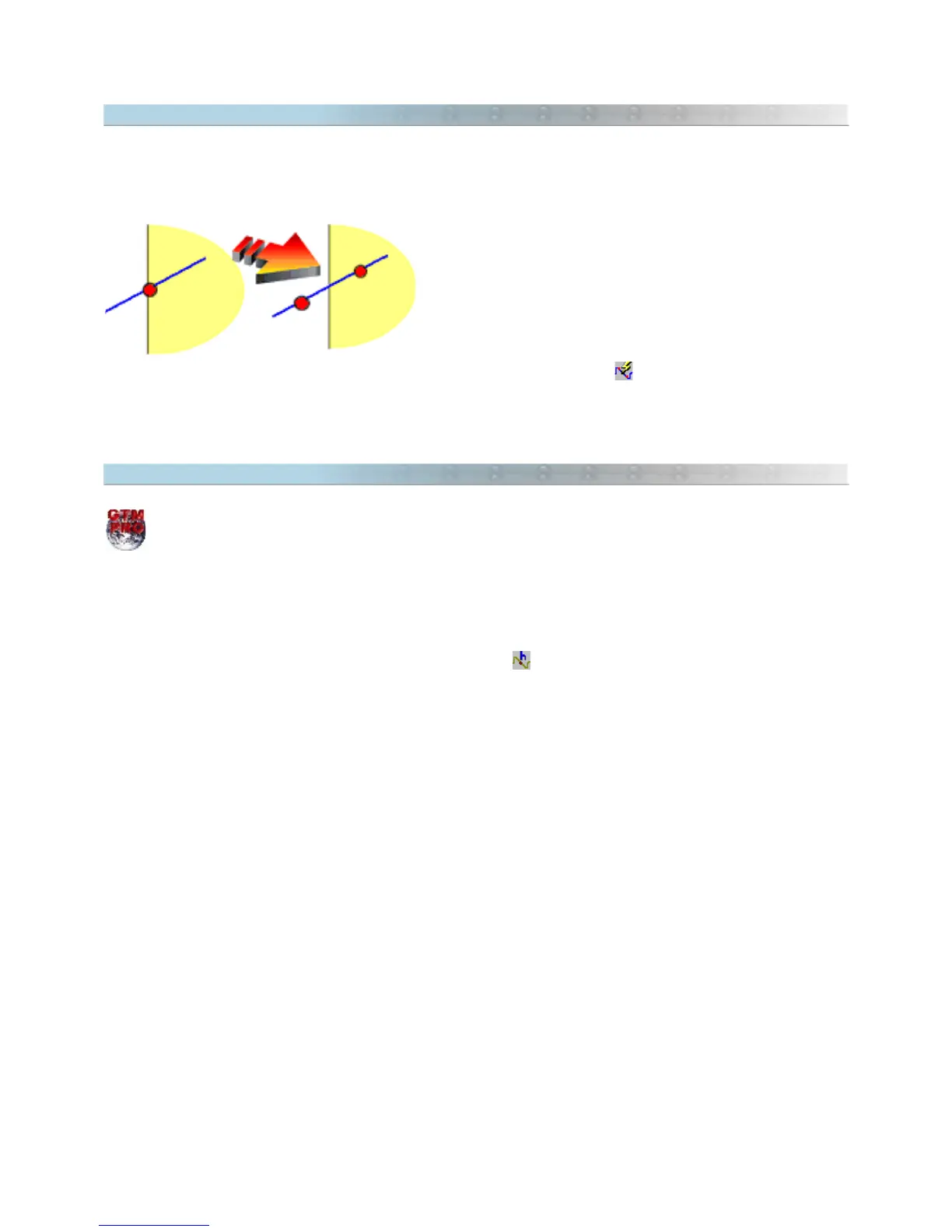
Fragment Tracklog Tool is used to divide Tracklog that cut other Tracklogs, allowing the edition and deletion of
part of segments. In the intersection points of the Tracklogs, new points are created, fragmenting the segment in
two or more parts.
The side picture shows the intersection of two Tracklogs before
and after the Fragmentation. Note that after fragmenting, the
segment was divided in two parts, creating an extra point
exactly in the intersection.
To use the Fragment Tracklog Tool, first select the Tracklogs
and click in
Tools > Tracklogs/Routes > Fragment Tracklog
menu or click in . After using fragment tool, only
the fragmented Tracklogs will remain selected.
4.11 Applying Altitudes in Contour Lines
This option is available only in GPS TrackMaker Professional®.
Contour lines are imaginary lines that represents the same altitude on the terrain. Using GPS TrackMaker®, it is
possible to create Tracklogs with the same altitude to represent the Contour Lines of the terrain. For that, it is
necessary to apply a same altitude in the whole Tracklogs.
To create a Contour Line, select the Tracklog which will be applied the altitude and click in Tools >
Tracklogs/Routes > Apply Altitudes in Contour Lines or click in . Then type the altitude and press <OK>.
Also see Creating Altitude Profile Starting From Contour Lines
52



 To Next Page