- 83 -
MULTIPLE EXPANSIONS
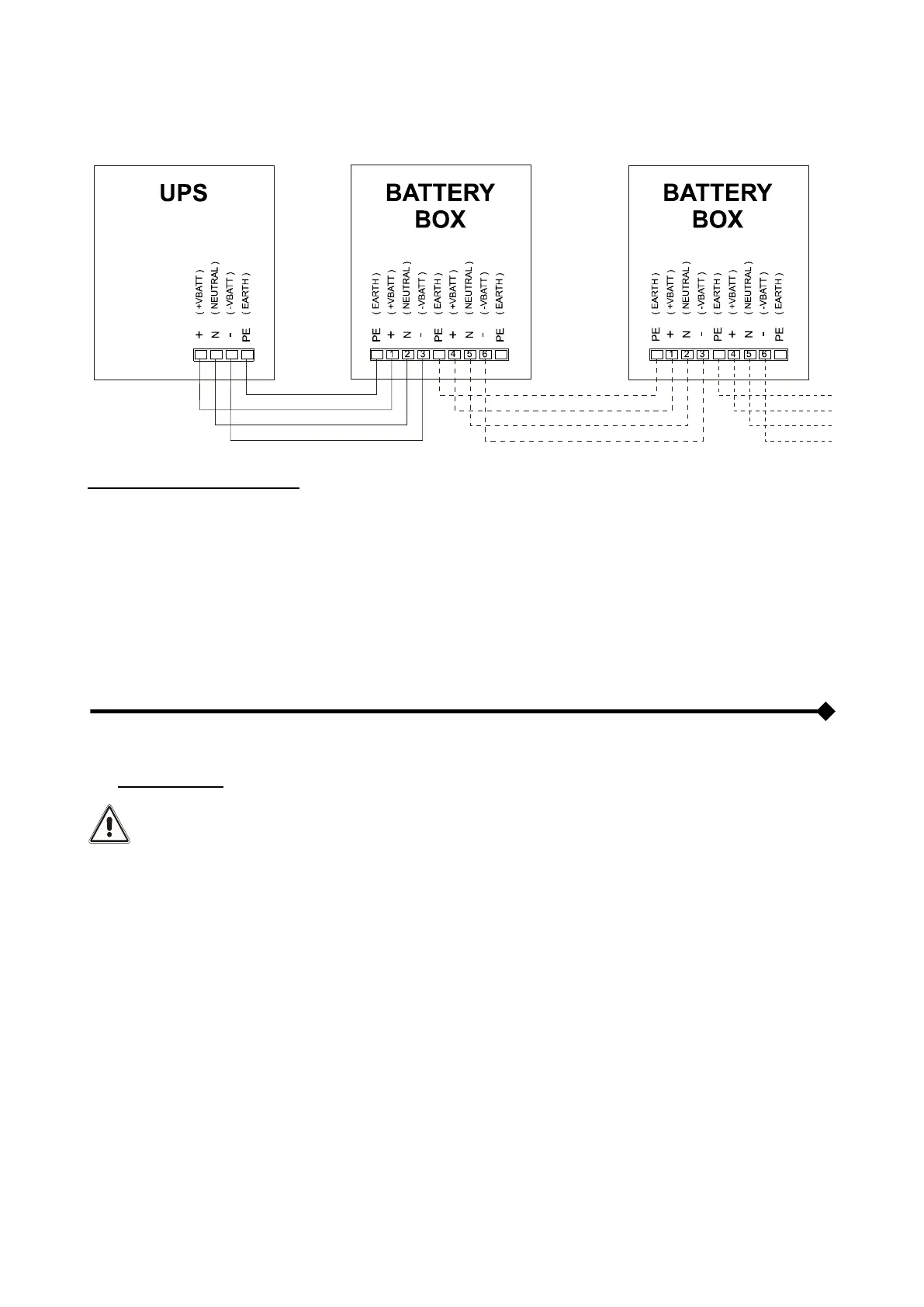
Several Battery Boxes can be connected in a cascade to ensure prolonged autonomy. The connections should be made
as shown here below:
WARNING (only for single CPS): No more than one CPS may be connected to each Battery Box or to more than
one Battery Box connected in a cascade.
SETTING THE RATED BATTERY CAPACITY – SOFTWARE CONFIGURATION
Having installed one or more BATTERY BOXES, the CPS must be set up to update the rated capacity value (total Ah of
batteries inside the CPS + external batteries).
To perform this operation, use the dedicated configuration software.
EXTERNAL TEMPERATURE PROBE
This NON ISOLATED input may be used to measure the temperature inside a remote Battery Box.
The special kit provided by the manufacturers must be used: any methods not conforming to specifications
may cause faults or breakdowns in the equipment.
To install, connect the cable included in the special kit to the "EXT BATTERY TEMP PROBE" connector (see "View of
the CPS Connections" ref. 3).
After installation, enable the outdoor temperature measuring function using the configuration software.



 To Next Page