USER INTERFACE
6.12
ThinPrep™ 5000 Processor with AutoLoader Operator’s Manual
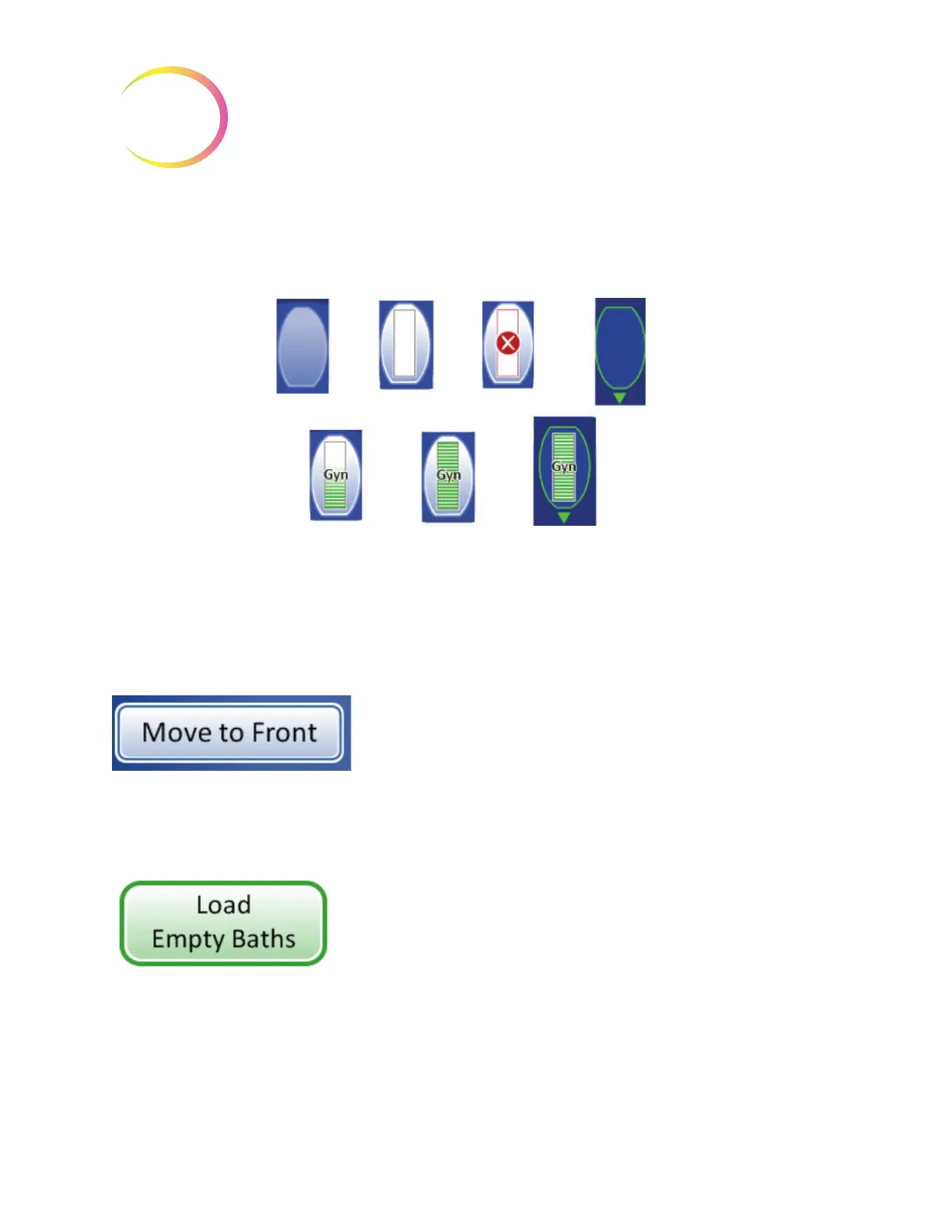
Figure 6-12 Fixative Bath Status - Gyn Slides as Example
Baths Movement Commands
Move to Front
- to move a fixative bath to the door, either touch the Move to Front button with the
bath selected, or double-touch the position it occupies on the screen display. The system locks the
door and moves the position in front of the door. When the door unlocks, it may be opened and the
fixative bath removed.
Load Empty Baths
- To load one or more fixative baths into the bath compartment, make sure the
door is closed and press the
Load Empty Baths
button. The system locks the door and moves an
empty bath position in front of the door. When the door unlocks, open it and slide the fixative bath
with staining rack into the position. Close the door. The compartment rotates to the next empty
position and then unlocks the door. Continue in this manner until the desired number of baths are
loaded. Press the
Done
button when all baths are loaded.
Bath position
empty
Completed fixative
bath positioned at
the door
Bath position with
fixative bath
present
Empty bath
position at the
door
Completed fixative
bath with slides in
it
Fixative bath In
use for the
current batch
Fixative bath
with error
condition



 To Next Page