ThinPrep™ 5000 Processor with AutoLoader Operator’s Manual
6.69
USER INTERFACE
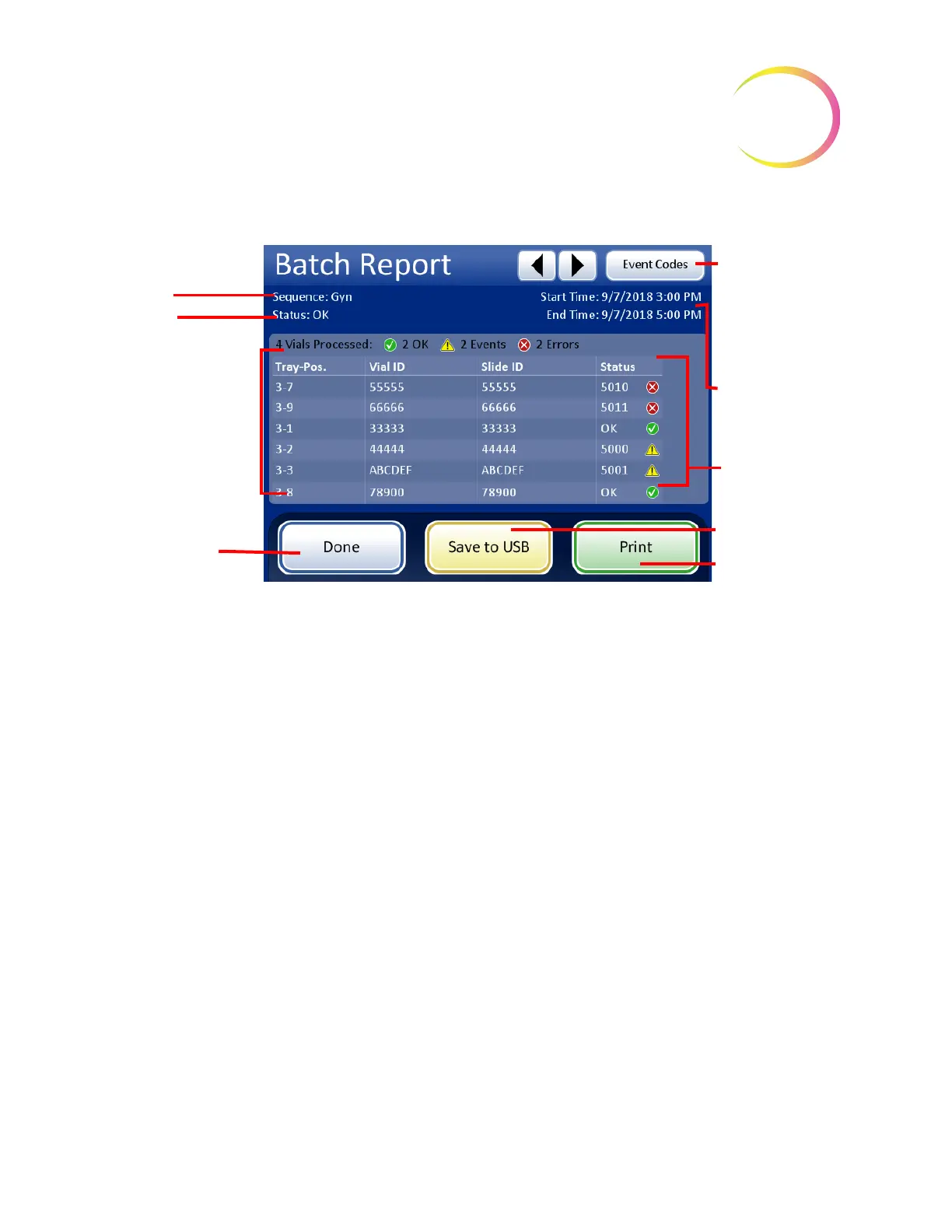
Figure 6-85 A Batch Report Display
A Batch Report is generated every time slides are processed. An AutoLoader batch is 1 - 40 samples
in a vial tray. Refer to Figure 6-85 and Figure 6-86.
The
header
of every printed batch report identifies every batch with:
• Date/time stamp, which records the time the batch started and ended
• The names of the lab and the processor (if this is set up in the Settings tab, page 6.27)
• The serial number of the ThinPrep 5000 processor with AutoLoader
• The type of process sequence selected for the batch to run
• The status of the batch: OK or an error code number which corresponds to a system error that
ended the batch or operator cancellation of the batch
The batch
report
lists every vial encountered by the system and for each vial, lists:
• The vial tray position it was in
• The vial ID read off of the vial label
• The slide ID read off of the slide label
• Any sample errors that may have occurred, with the event code
• Vials processed
Sample type in the
tray
Status
Vial information:
Position in tray
Vial/Slide ID, and
status of the
sample
Done
button to
return to Batch
Report list
To view
descriptions of
system events
and errors, touch
the
Event Codes
button
Time & date
stamp for batch
start and finish
Status:
Check mark,
event code or
error code
Save to USB
or
Print
(if enabled)



 To Next Page