6 Maintenance and Troubleshooting
Copyright © Huawei Technologies Co., Ltd.
Replace the Independent Deployment AI/DI Unit if it is faulty. For the replacement method, see 4.2.3
(Optional) Installing a Rack-mounted Independent Deployment AI/DI Unit or 4.2.4 (Optional) Installing
a Wall-mounted Independent Deployment AI/DI Unit.
Procedure
Step 1 Remove cables from the old module, and insulate the cables and paste labels.
Step 2 Loosen the two captive screws on the panel of the old module counterclockwise by using an
M3 screwdriver.
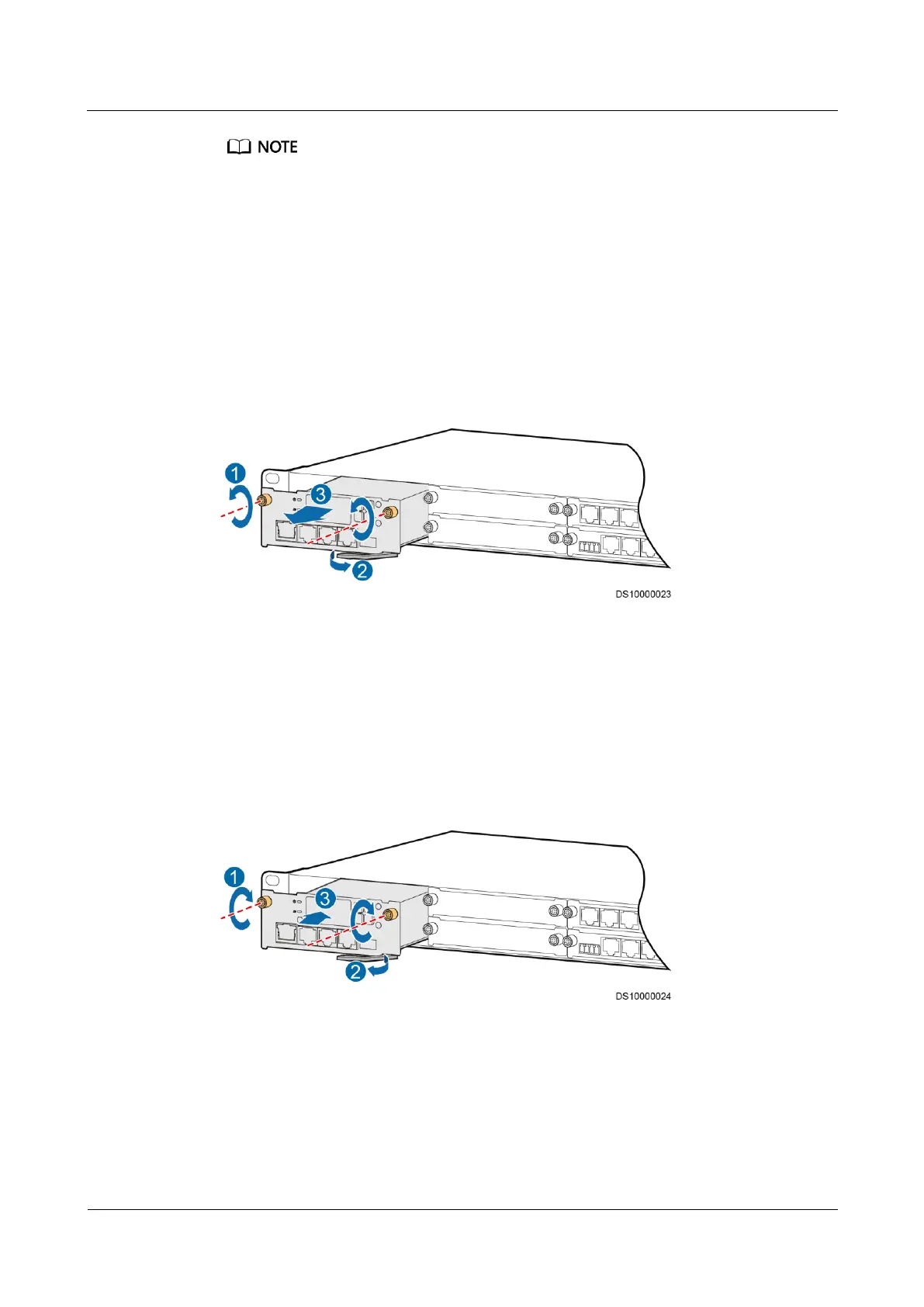
Step 3 Hold the handle with both hands and pull out the module, as shown in Figure 6-1.
Figure 6-1 Removing an old module
Step 4 Grasp the handle of the new module and put the module into the correct slot in the ECC500
subrack.
Step 5 Push the new module into the subrack until their front panels are aligned with each other.
Step 6 Close the handle.
Step 7 Push and tighten the captive screws using the M3 screwdriver, as shown in Figure 6-2.
Figure 6-2 Installing a new module
Step 8 Connect the cables to the module based on the labels on the cables.
----End



 To Next Page