4 Installation and Commissioning
Copyright © Huawei Technologies Co., Ltd.
4.2.2 Installing a Wall-mounted ECC500
Prerequisites
The installation position on the wall has been determined.
The following tools are available: Phillips screwdriver, flat-head screwdriver, hammer
drill (Φ10 bit), socket wrench, marker, and rubber mallet.
Procedure
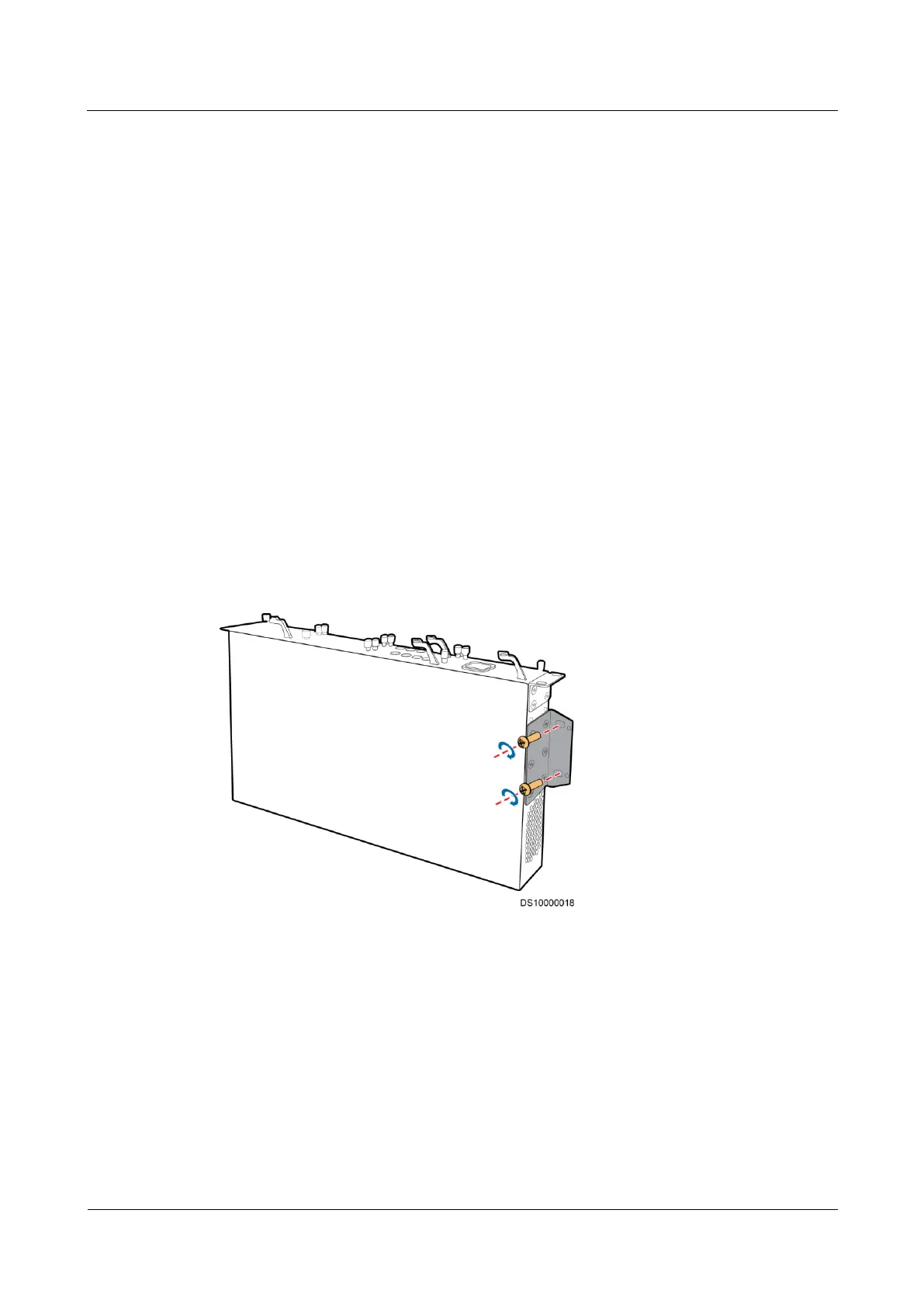
Step 1 Install mounting ears on the ECC500 in the position and direction shown in Figure 4-4.
Step 2 Place the ECC500 at the installation position on the wall and mark the mounting ear hole
positions using a marker.
Step 3 Drill holes at the marked installation position (hole spacing: 52 mm x 472 mm) on the wall
using a hammer drill, and install four M8 expansion bolts into the holes.
Step 4 Install the ECC500 at the expansion bolts on the wall and ensure that the rear panel of the
ECC500 is flush with the wall.
Step 5 Tighten the four expansion bolts for the ECC500 using a socket wrench, as shown in Figure
4-4.
Figure 4-4 Wall-mounted ECC500
----End
4.2.3 (Optional) Installing a Rack-mounted Independent
Deployment AI/DI Unit
Prerequisites
The installation position in the rack has been determined.



 To Next Page