Copyright © Huawei Technologies Co., Ltd.
Follow-up Procedure
To delete a link from the list, select the target link in Video Info List, click Delete from list,
and click Submit.
5.2.12 (Optional) Setting SNMP Monitoring Parameters
Prerequisites
You have obtained the ECC500 IP address as well as the user name and password for
WebUI login.
You have prepared a PC which is in the same IP address segment as the ECC500 and
connected the PC to the ECC500 over a switch.
Context
Set SNMPv3 parameters before connecting the ECC500 to the NMS. These parameters
are needed for setting up the ECC500 on the NMS.
The default values of SNMP Version and SNMP Port Number are SNMPv3 and 161
respectively. You change the SNMP version and port number using the following
method.
Procedure
Step 1 Log in to the ECC500 WebUI.
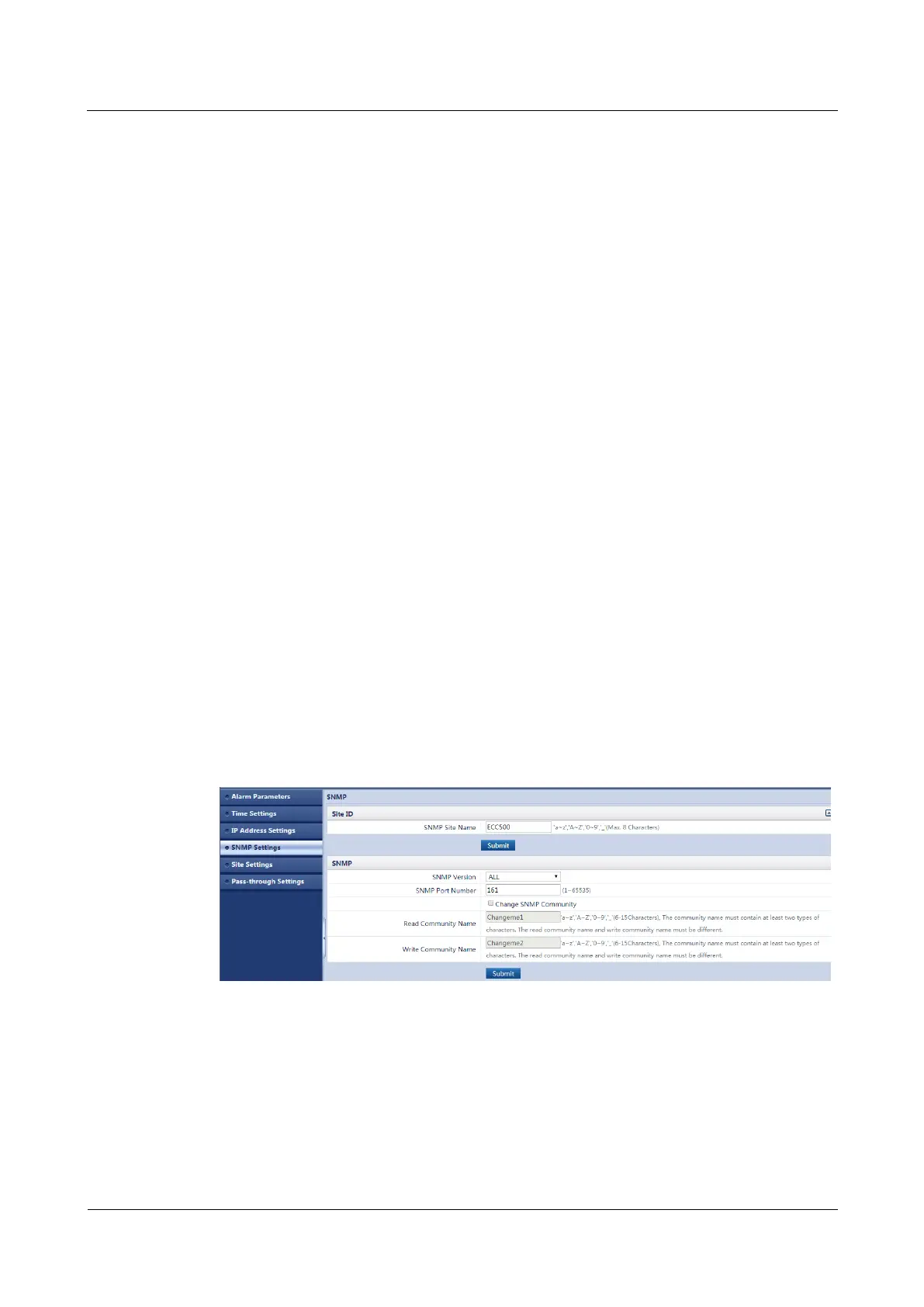
Step 2 Choose System Settings > SNMP Settings.
Step 3 (Optional) Set SNMP Site Name as required, and click Submit.
Step 4 Set SNMP Version and SNMP Port Number to the required values, as shown in Figure
5-30.
Figure 5-30 Setting SNMPv3 parameters_01
Step 5 Click Add in SNMPv3, as shown in Figure 5-31.



 To Next Page