Copyright © Huawei Technologies Co., Ltd.
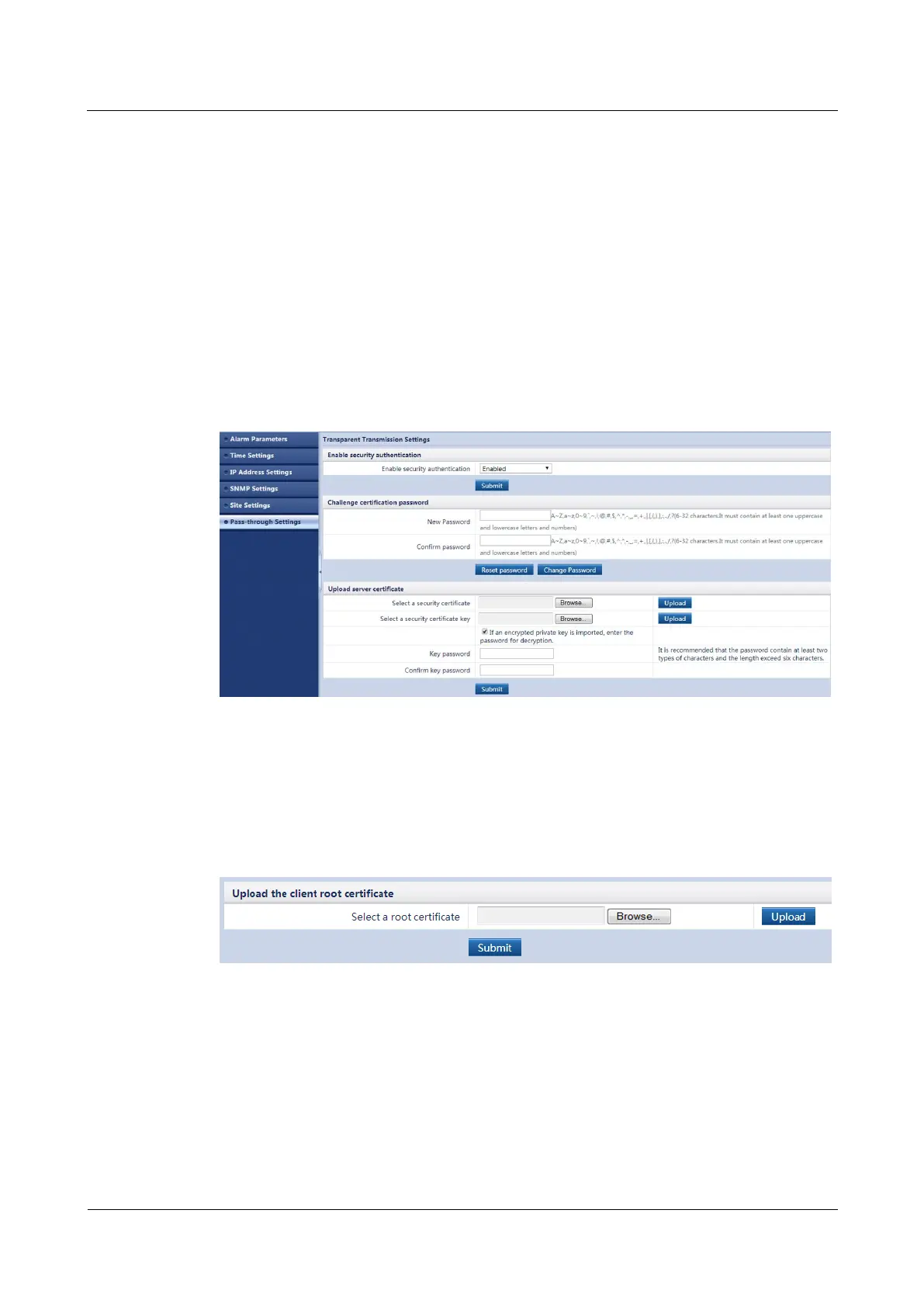
Step 3 Set Enable security authentication to Enable, and click Submit.
Step 4 Click Browse behind Select a security certificate.
Step 5 Select the security certificate to be imported from the PC and click Upload.
Step 6 Click Browse behind Select a security certificate key.
Step 7 Select the security certificate key to be imported from the PC and click Upload.
Step 8 (Optional) If the security certificate is encrypted, select If an encrypted private key is
imported, enter the password for decryption., and enter Key password and Confirm key
password.
Step 9 Click Submit, as shown in Figure 5-35.
Figure 5-35 Uploading a security certificate_01
Step 10 Click Browse behind Select a root certificate.
Step 11 Select the root security certificate to be imported from the PC and click Upload.
Step 12 Click Submit, as shown in Figure 5-36.
Figure 5-36 Uploading a security certificate_02
----End
Follow-up Procedure
Import the NMS security certificate and key issued by an authorized party into the upper-level
NMS of the ECC500 collector. Then the ECC500 collector will be able to communicate with
the network management system.



 To Next Page