Copyright © Huawei Technologies Co., Ltd.
Before importing the operating parameters for a device, add the device on the ECC500 WebUI.
Device alarm parameters in System Settings > Alarm Parameters
System site name in System Settings > Site Settings
SNMP site name in System Settings > SNMP Settings
The number of connected devices for ECC500s A and B must be the same.
Procedure
Step 1 Log in to the ECC500 WebUI.
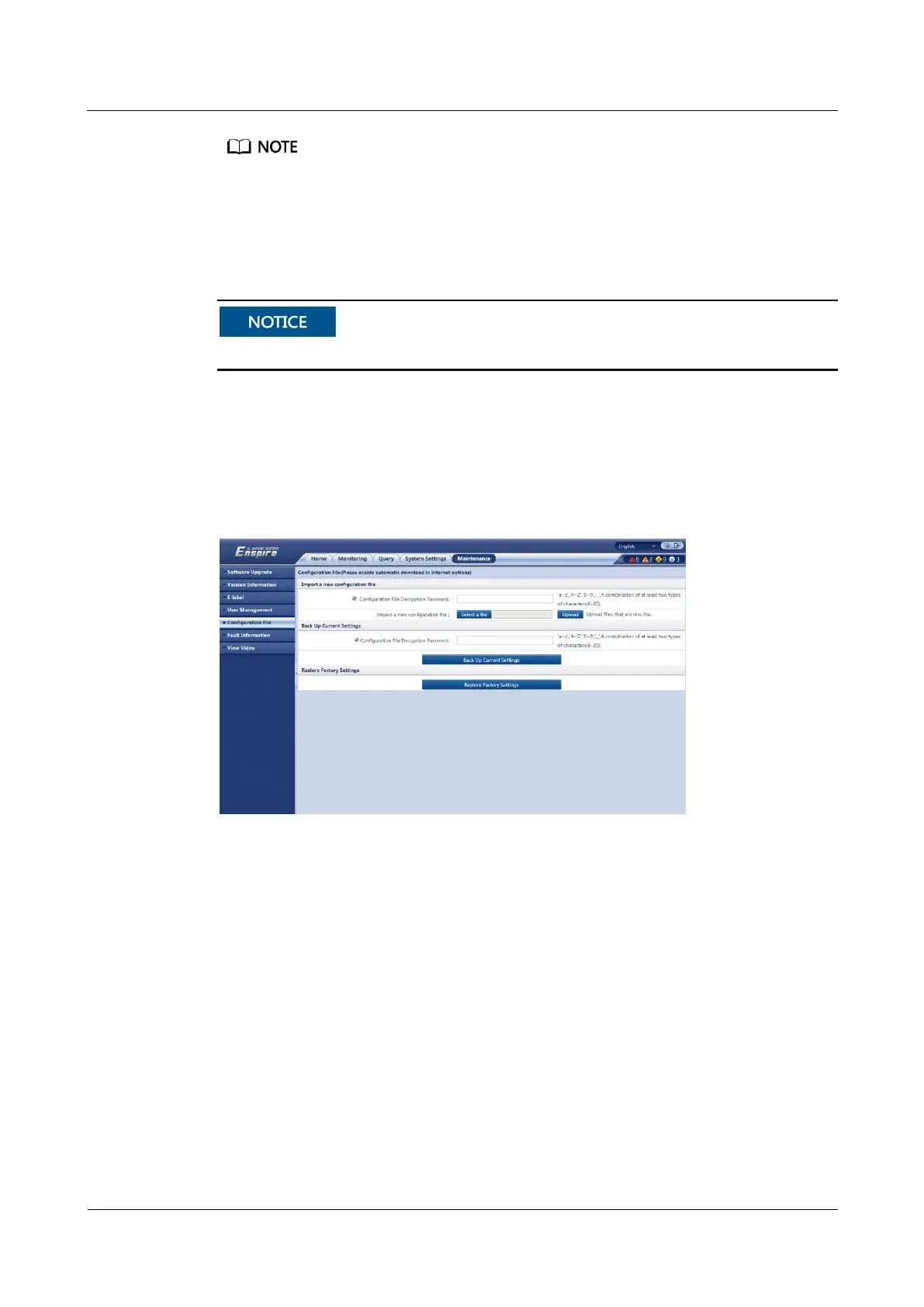
Step 2 Choose Maintenance > Configuration File, as shown in Figure 5-37.
Figure 5-37 Exporting a configuration file
Step 3 Export a configuration file.
1. Click Back Up Current Settings.
2. Save the current configuration file to the PC.
Step 4 Import a configuration file.
1. Log in to the WebUI of the ECC500 to which a configuration file is to be imported.
Choose Maintenance > Configuration File.
2. Click Browse, specify the path where the configuration file is stored in the PC, and click
Upload.
After the upload is complete, a message "Uploaded successfully, monitoring restart later"
is displayed and the ECC500 will automatically restart.
----End



 To Next Page