EasyManua.ls Logo

LACO Technologies TITAN VERSA C - Status Icons; Status Icon Summary

LACO Technologies TITAN VERSA C
181 pages
Print Icon
To Next Page IconTo Next Page
To Previous Page IconTo Previous Page
Loading...
6 OPERATION
LACO Technologies TITAN VERSA Operations and Maintenance Manual 57
Status Icons
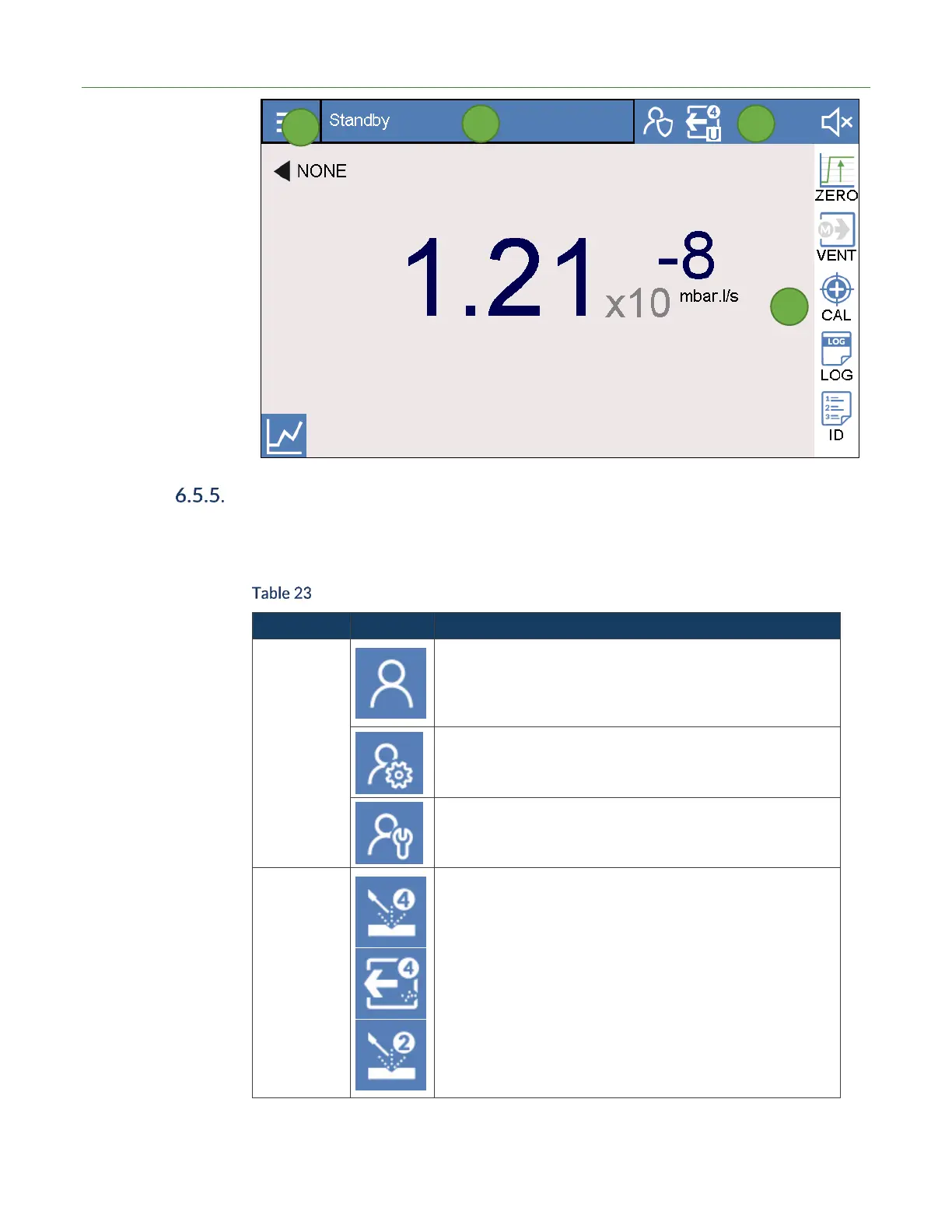
In the upper-right section of all screens five status icons are available. These icons give
the user current status information (see Table 23 below).
Status Icon Summary
Function
Icon
Description
Login Level
Operator Login Not set up by default. If configured, the base
user has very limited access to change parameters.
Technician Login Access all features except advanced.
Advanced Login Login for service centers or advanced users.
Method /
Mode / Mass
Dynamic Icon indicate main unit settings.
Main Symbol Vacuum or Sniff
Subscript - Test Mode
G = Gross test mode
F = Fine test mode
U = Ultra Test mode
Superscript Mass
2 = Hydrogen
3 = Helium 3
4 = Helium
1
2
3
4

Table of Contents

Related product manuals