44
LeeBoy 8515E Conveyor Paver 4-5
Operation
PV480 Powerview Display
Gauge ScreenGauge Screen
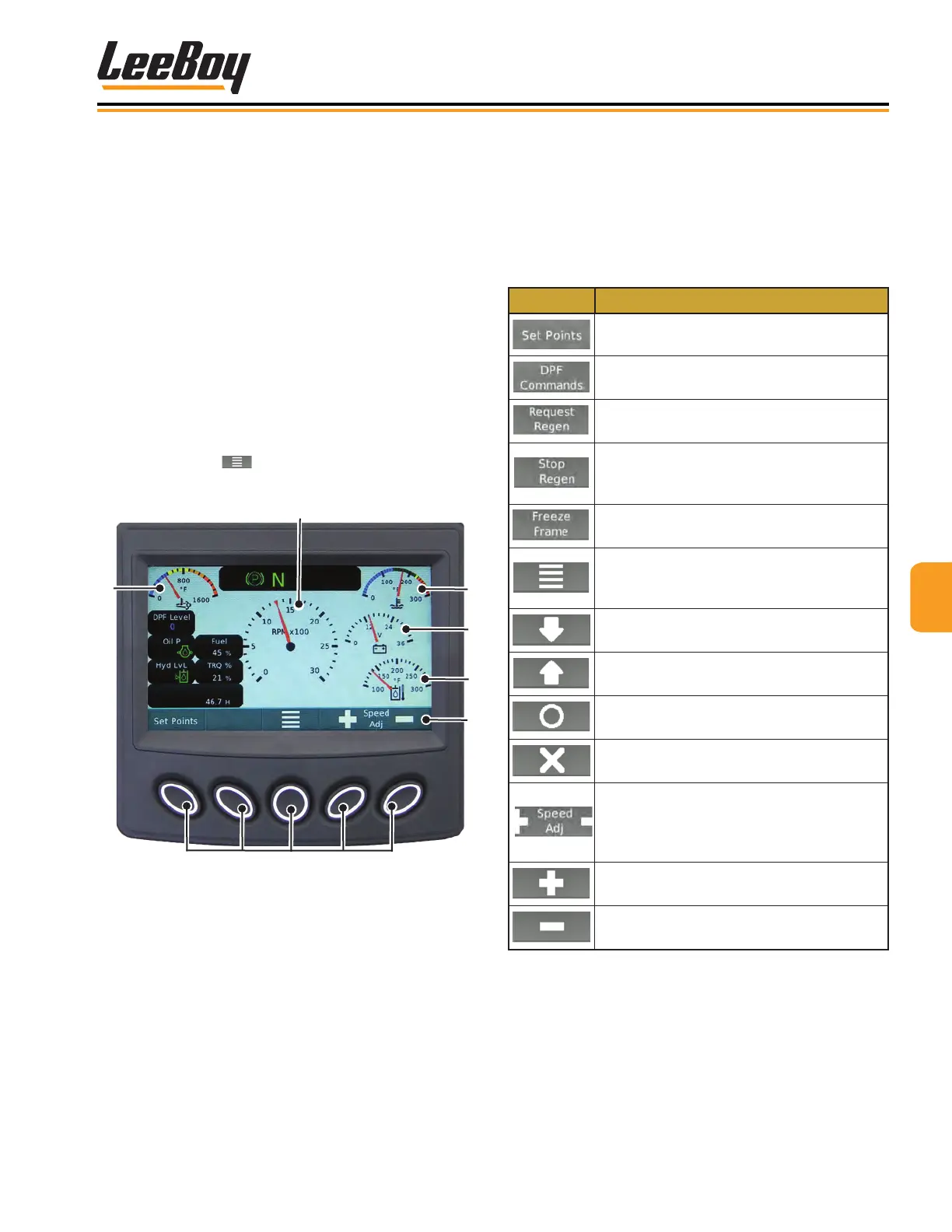
The PV480 digital controller Gauge Screen is the rst
screen to appear when starting the engine. This is the
default screen. (Figure 4-3)
Pressing the “soft key” buttons along the bottom of the
controller unit allows the operator to navigate to various
other screens. The banner icons along the bottom of
the screen correspond with these buttons, and changes
accordingly on some screens as described on the fol-
lowing pages. Table 4-2 shows the icons that appear
on the banner with descriptions.
Pressing the Set Points button navigates to the Set
Point and Throttle Speed screen. (Page 4-6) Pressing
the center button ( ) always navigates to the Main
Menu screen. (Page 4-7)
1
3
5
Soft Keys
Figure 4-3. Gauge Screen
1 - After Treatment DPF Outlet Gas Temperature
2 - Engine Speed/RPMs
3 - Engine Coolant Temperature
4 - Electrical Potential Voltage
5 - Hydraulic Oil Temperature
6 - Soft Key Banner
Soft Keys (Buttons)Soft Keys (Buttons)
The following table shows icons appearing on the
bottom banner that correspond to the soft key button,
depending upon the screen mode. (Some sources may
not be present on your model.)
Table 4-2. Soft Key Choices
Icon Description
Displays the default speed (RPMs) set
points.
Displays the DPF commands to access
Uninhibit Regen and Inhibit Regen.
Sends message to the ECU to start DPF
regeneration.
Sends message to the ECU to stop DPF
regeneration. (DO NOT use unless
necessary.)
Requests freeze frame data from the
ECU when faults are present.
Navigates to the Main Menu screen
where you can scroll to choose action
items (such as settings and diagnostics).
Use to scroll down through a list of items.
Use to up scroll through a list of items.
Select: Enters the action item selected.
Deselect: Closes pop-up messages.
Speed Adjustment: Adjusts throttle
speed in increments. Use the (+) button
to increase speed or the (-) button to
decrease speed.
Increases the engine speed (RPMs).
Decreases the engine speed (RPMs).



 To Next Page