44
LeeBoy 8515E Conveyor Paver 4-29
Operation
Setting the CrownSetting the Crown
The screed can also be set to control the pavement
slope, or crown. A pavement crown is the elevation of
the middle in relation to the edges, and insures proper
drainage of the pavement.
NOTE: Maximum crown is two inches.
To adjust the crown:
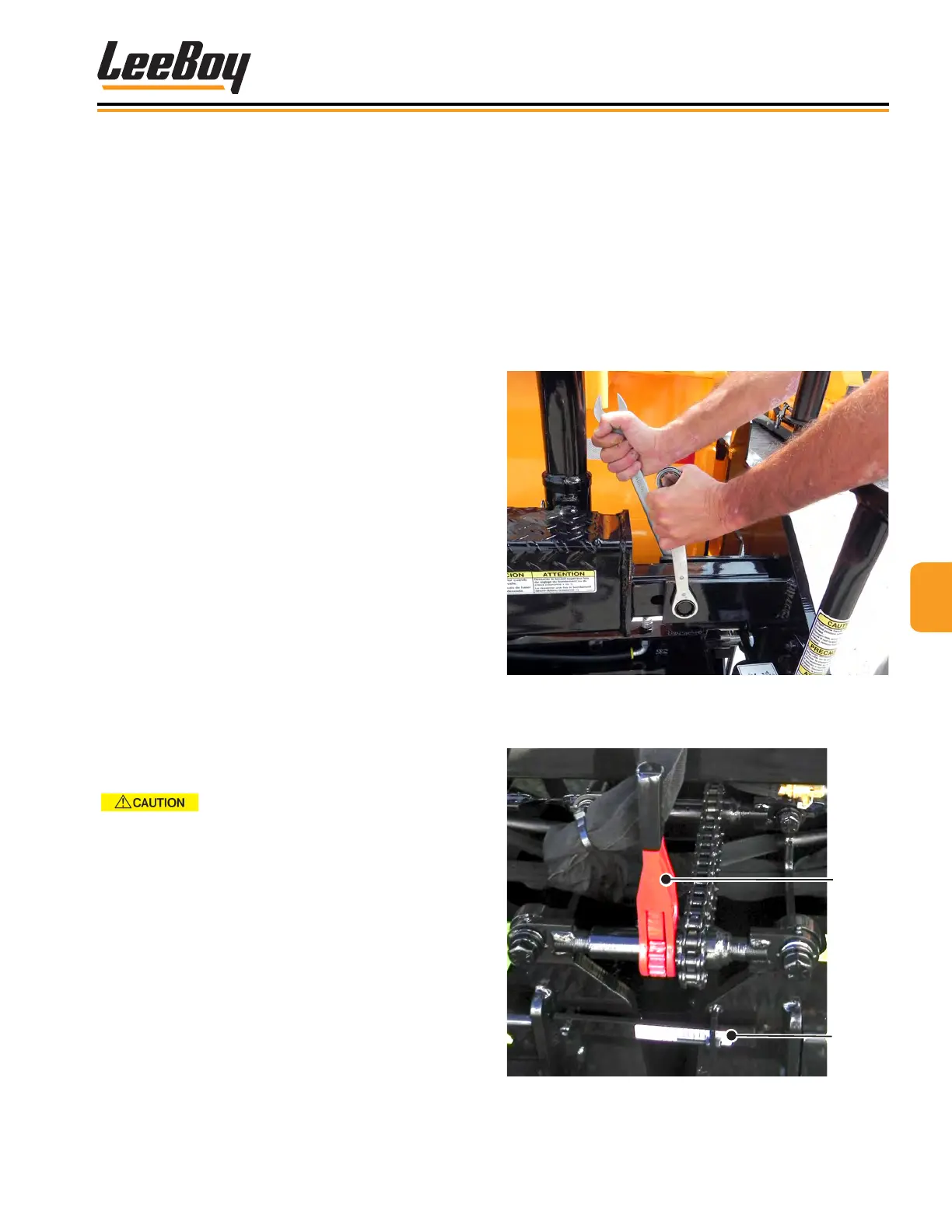
1. Loosen the lock-down bolts in slotted bars before
adjusting crown and valley mechanism. (Figure
4-59)
Figure 4-59. Loosen Lock-Down Bolts
2. Use the crown handle adjuster for setting positive or
negative crown: (Figure 4-60)
Gauge
Crown
Handle
Adjuster
Figure 4-60. Crown Adjustment
Basic PavingBasic Paving
1. Position paver at the starting point for the mat.
2. Open Under Auger Material Cut-Offs. (Page 4-25)
3. Adjust screed as needed. (Pages 4-26 and 4-27)
4. Open hopper wings to accept asphalt from the
material truck. (Page 4-22)
NOTE: Allow only a partial load of asphalt to enter the
hopper when rst starting to pave.
6. Turn the left and right conveyor switches to the
AUTO position. (Page 4-23)
7. When the material begins to discharge from under
the screed, set the screed lift switch to the FLOAT
position. (Figure 4-52 on Page 4-26)
8. If paving a width more than eight feet, turn the left
and right auger switches to AUTO to control the
material height at the end gate. (Augers aren’t
needed when paving a basic eight-foot pull.)
• When the material starts moving into the
sonic range, the sonic auger will automatically
regulate the auger operation.
NOTE: The material height must be set to the highest
point when the endgates are closed. When
the endgates are open, the material height will
lower to prevent material from pushing in front
of the endgates.
9. Begin paving, moving slowly at rst to adjust the
screed if needed.
10. Make a paving pass until the asphalt level in the
hopper is low.
Never back up with cut-off gates open.
NOTE: To prevent excessive handwork, set the
left and right conveyor switches to the OFF
position and set both cut-off switches to the
CLOSE position about three feet from the end
of the pull to prevent excessive handwork.
11. Return paver back to starting position to begin the
next pull.
12. Position and set the screed endgate on the joint
side back to “0” feet, or ush with bottom of the
screed.
13. Repeat these steps as you continue to pave.



 To Next Page