44
LeeBoy 8515E Conveyor Paver 4-33
Operation
Optional Components
Auger Extensions OptionAuger Extensions Option
The auger extensions should be attached to the main
auger to increase the ow of asphalt to the endgates
and screed extensions when paving at wider widths.
This makes it possible to lay asphalt at a higher rate.
Auger extension options are 12-inch extensions for each
side or 24-inch extensions with shields for each side.
Left and right auger extension covers
or shields must be installed on the correct side of the
machine.
To attach the auger extensions proceed as follows:
1. Identify the right and left auger extensions by
observing the left or right on the end of the auger
extension shaft.
2. After identifying the right and left auger extensions,
extend the screed extension fully as follows:
• Set the left and right auger switches to the OFF
position.
• Set the left and right extension switches to the
OUT position and extend fully.
3. Shut off engine.
Serious injury can result when
attaching extensions if the engine is running.
4. Remove bolt, nut cap on end of main auger.
5. Attach the correct side auger extension to the main
auger with hardware just removed.
6. Secure end of extension auger to main auger.
7. Install guard. Make sure extension auger is running
at.
8. Repeat this procedure for opposite side.
Umbrella OptionUmbrella Option
The umbrella kit option provides shelter from sun and
other weather conditions for the operator. The umbrella
kit assembly includes the mounting bracket and
umbrella frame assembly that can be mounted on either
side of the screed handle.
Steering Wheel OptionSteering Wheel Option
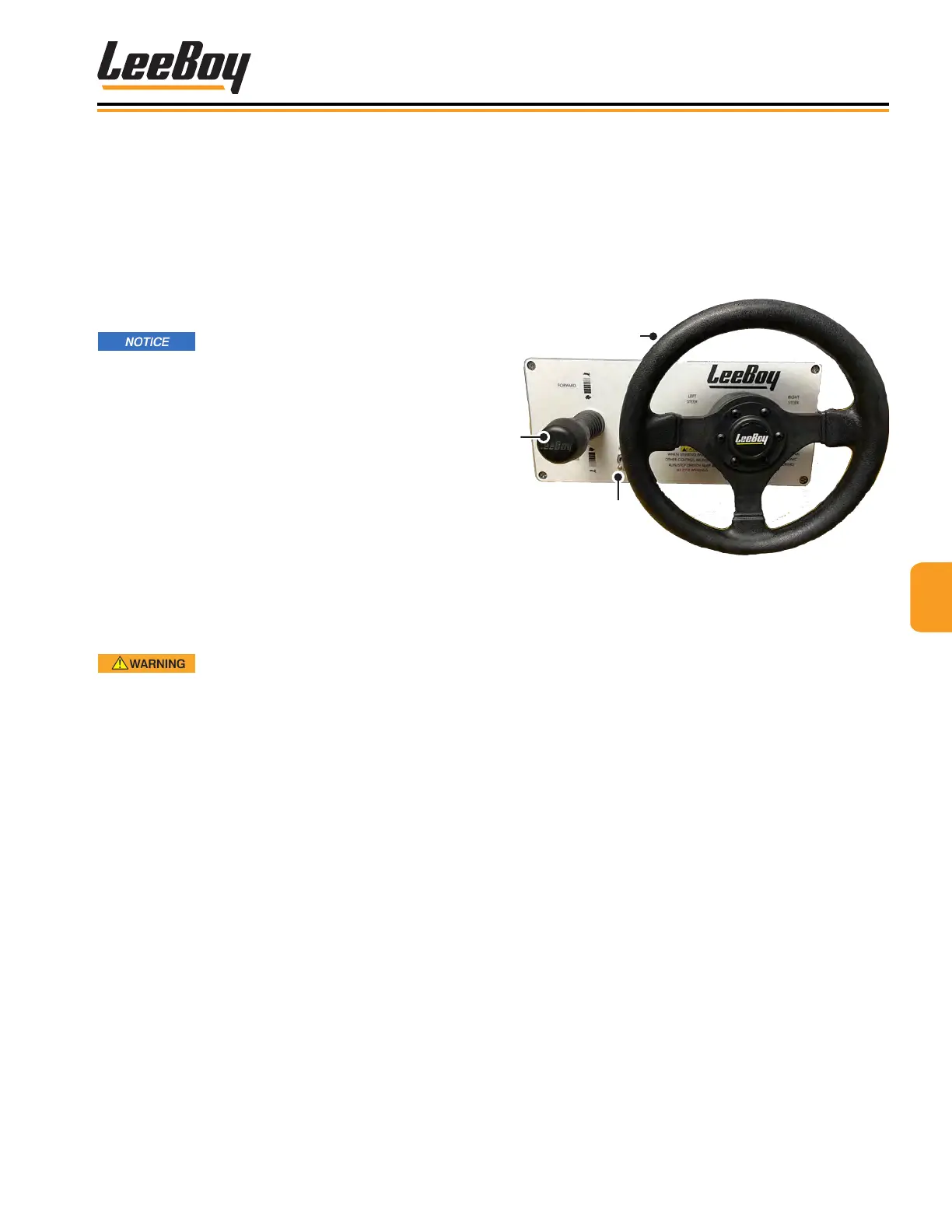
A steering wheel option is also available in lieu of
joystick steering. (Figure 4-67) The Run/Stop switch
on the steering panel controls running and stopping
the machine, and applies parking brake when set to
the STOP position. The joystick controls forward and
reverse travel along with speed.
3
2
Figure 4-67. Steering Wheel Option
1 - Forward/Reverse
2 - Steering Wheel
3 - Run/Stop Switch
• To drive the paver forward, push joystick forward to
reach the desired speed.
• To move in reverse, pull joystick(s) and move
backwards to reach desired speed. A back-up alarm
will automatically turn on when in reverse.
• To slow the paver, move joysticks closer to the neutral
position.
• Return joystick to the neutral position to stop paver.
NOTE: If the joystick steering function is not being
used, the Run/Stop switch must be in the
center OFF position.
NOTE: The engine will not start unless the E-STOP
button is disengaged and the joystick must be
in the NEUTRAL (center) position.



 To Next Page