4-6 LeeBoy 8515E Conveyor Paver
Operation
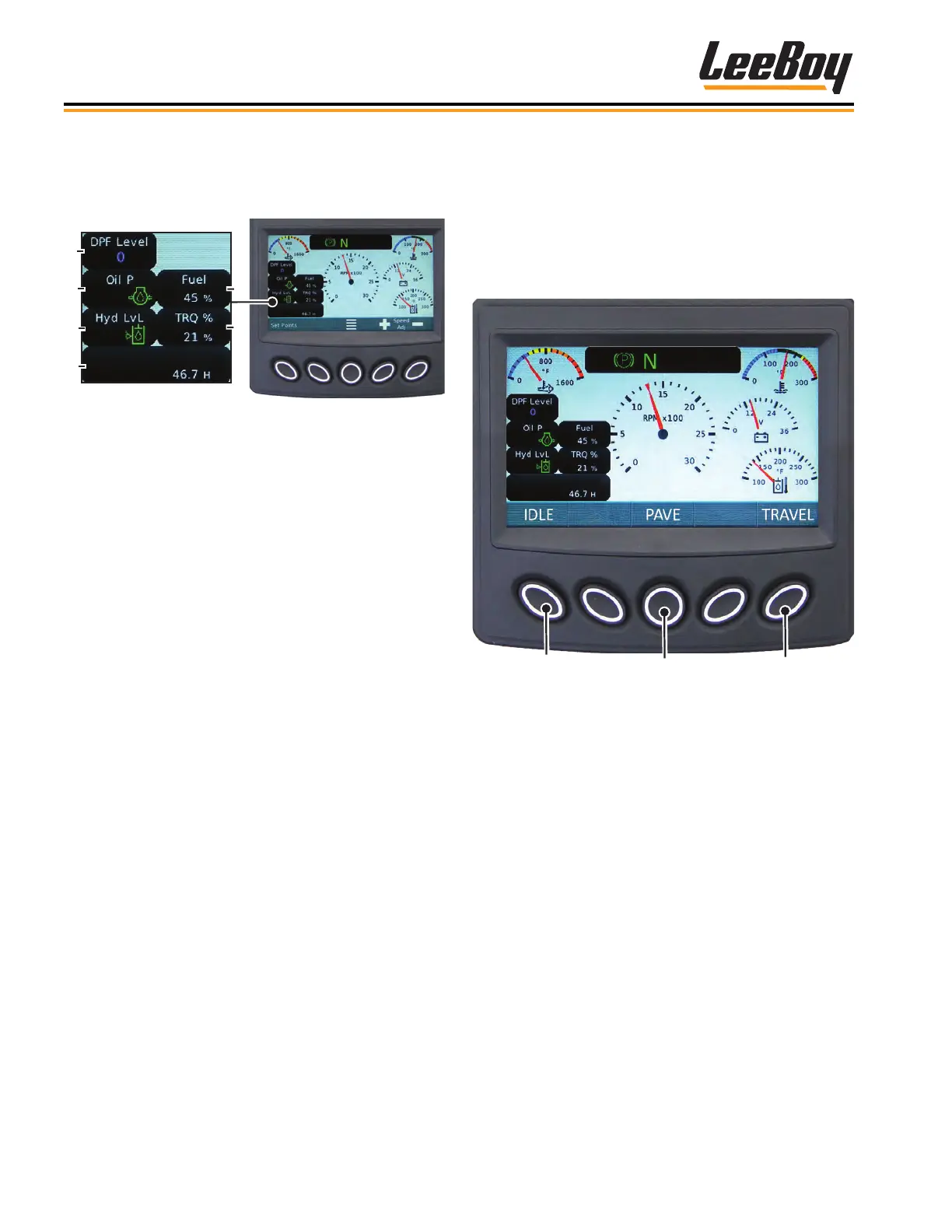
The gauge screen also displays engine, torque per-
centage, hydraulic, total hours of operation, and fuel
information in the lower left quadrant of the screen.
(Figure 4-4)
Figure 4-4. Status Quadrant
1 - DPF Soot Level
2 - Oil Pressure
3 - Hydraulic Oil Level
4 - Engine Total Hours of Operation
5 - Fuel Level
6 - Actual Engine Torque Percentage
Warning lights will illuminate and fault codes will also
display:
• A warning icon will also display if the hydraulic or
engine oil temperature is too high.
• Other warning status icons may also illuminate. (Page
4-17)
NOTE: The DEF Tank Level icon always displays “0”
as this is not applicable nor equipped on this
machine.
Set Points and Throttle SpeedSet Points and Throttle Speed
Pressing the Set Points button on the gauge screen
navigates to the Set Points and Throttle Speed screen.
Select the desired throttle speed using the keypad
buttons. The throttle speed selections are: IDLE (1300
RPMs), PAVE (1800 RPMs), and TRAVEL (2200 RPMs).
(Figure 4-5)
1
Figure 4-5. Engine Throttle Speeds Screen
1 - IDLE (1300 RPMs)
2 - PAVE (1800 RPMs)
3 - TRAVEL (2200 RPMs)



 To Next Page