55
Maintenance
LeeBoy 8608 Commercial Paver 5-19
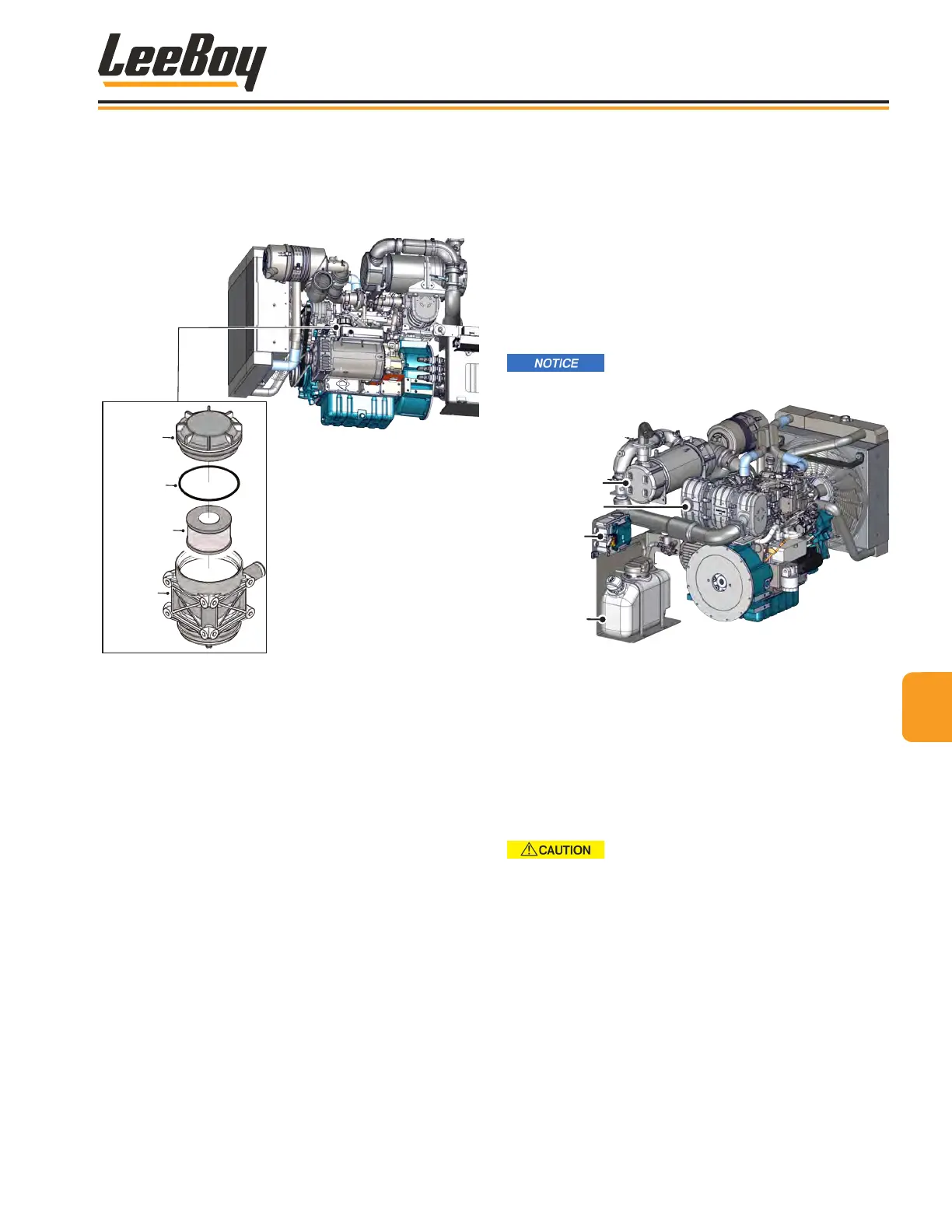
Change Oil Separator ElementChange Oil Separator Element
The oil separator captures oil mist carried over from the
lubrication process. The oil separator element must be
changed every 1500 hours of operation. (Figure 5-13)
Cap
O-Ring
Gasket
Element
Oil
Separator
Body
Replace the oil
separator element
every 1500 hours
of operation.
Figure 5-13. Oil Separator
To change the oil separator element:
1. Unscrew the oil separator cover cap and remove
from the body.
2. Remove the used gasket and lter element.
Dispose of in accordance with environmental laws
and requirements.
3. Wipe oil and grease off the oil separator body and
cover.
4. Insert a new lter element and gasket.
5. Reattach the cover cap to the oil separator body.
Selective Catalytic Reduction Selective Catalytic Reduction
(SCR) (SCR)
The SCR system is an efcient, effective means of
ltering contaminates for optimum engine performance
while reducing air pollution from exhaust emissions.
The SCR system precisely injects Diesel Exhaust Fluid
(DEF) into the engine’s exhaust system to transform
those toxic exhaust gases into harmless water vapor
and nitrogen. SCR technology is also cost-effective and
fuel-efcient. (Figure 5-14)
NEVER tamper with or remove any
emission-related component under penalty of law.
DEF Pump
DEF Tank
DPF
SCR
Figure 5-14. DEF Tank, Pump and DPF
A sensor on the Diesel Particulate Filter (DEF) tank
header monitors the uid level, temperature and quality
of DEF in the tank. The header is mounted on top of the
DEF tank and provides ltered DEF supply from the tank
to the DEF injector through the DEF pump.
NOTE: Check the ttings around the DEF tank header
for leaks or any signs of damage regularly. DEF
leaks will leave a white deposit around the ttings.
DO NOT pressure wash or steam
clean this unit to avoid damaging the components.
Use compressed air to remove any loose debris.



 To Next Page