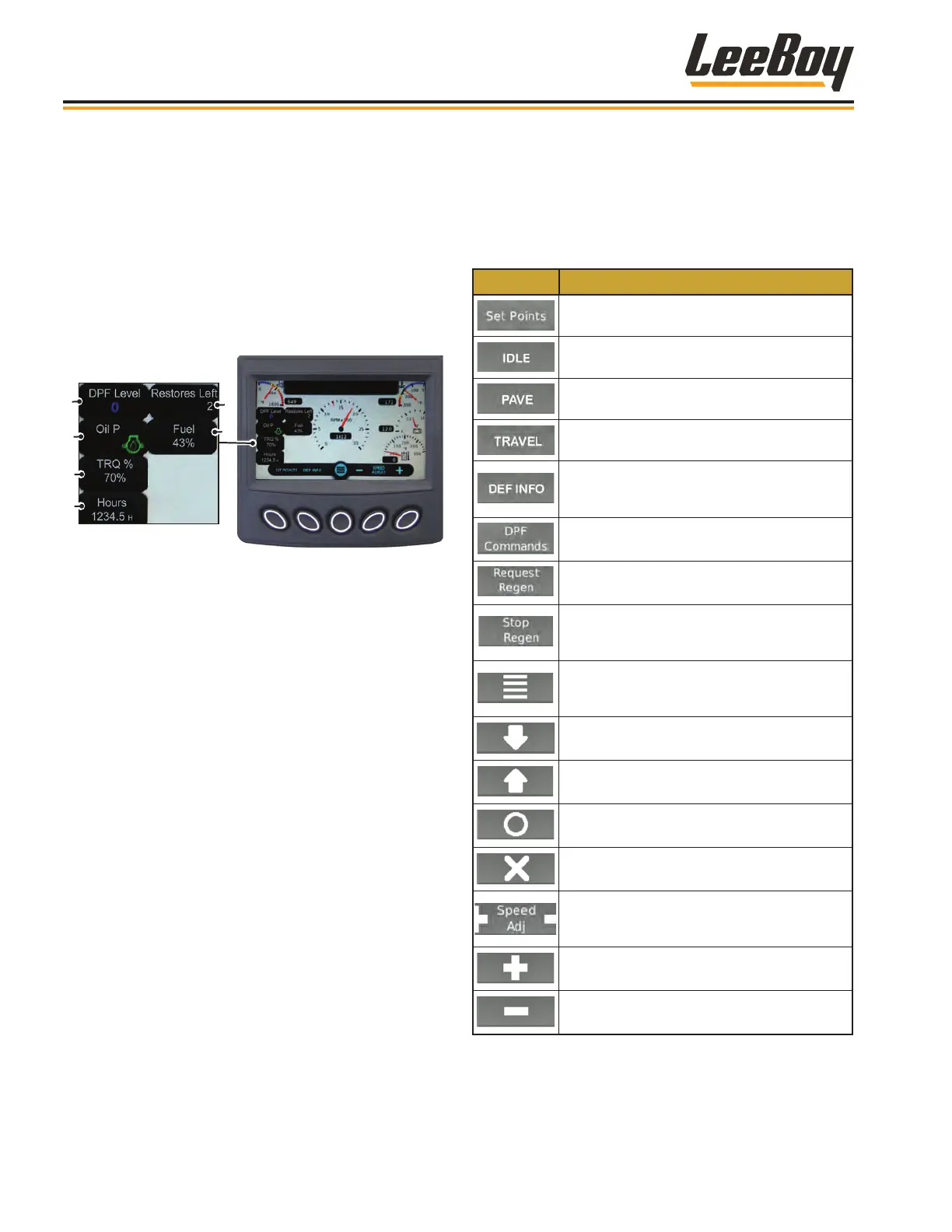
The gauge screen also displays engine, torque per-
centage, total hours of operation, and fuel information in
the left quadrant of the screen. (Figure 4-4)
Warning lights will also illuminate and fault codes will
also be displayed in the alerts window:
• The engine oil light is normally illuminated green,
but will illuminate red if the oil pressure is too low
and display a warning icon on the screen.
• A warning icon will also display if the hydraulic oil
temperature is too high.
1
2
3
4
5
6
Figure 4-4. Gauge Screen Quadrant
1 - DPF Level
2 - Oil Pressure
3 - Actual Engine Torque Percentage
4 - Engine Total Hours of Operation
5 - Restores Left**
6 - Fuel Level
** When the DEF level is too low, the engine will de-rate.
The restore function allows you to restore engine to full
power for 10 minutes, then the engine will de-rate again
if the DEF tank has not been lled. There are only two
restores available per low-DEF level.
NOTE: Restores can be used during any Level 1
torque de-rate (50 percent reduction). This
can be DEF level, DEF quality, or SCR system
tampering. Tampering includes any sensor
or controller errors of the SCR system.
Complete DEF alerts and warning screens are
described on the following pages.
Soft Key ButtonsSoft Key Buttons
The following table shows icons appearing on the soft
key banner that appear for selection, depending upon
the screen mode described on the following pages.
Table 4-2.Soft Key Choices
Icon Description
Displays the default speed (RPMs) set points.
Sets IDLE throttle speed (1300 RPMs).
Sets PAVE throttle speed (1900 RPMs).
Sets TRAVEL throttle speed (2200 RPMs).
Use to scroll through DEF information
screens that include DEF level, temperature,
pressure, thaw mode activity, etc.
Navigates to DPF commands for regeneration
process selections and messages.
Sends message to the ECU to start the DPF
regeneration process.
Sends message to the ECU to inhibit (stop)
DPF regeneration. (DO NOT use unless
necessary.)
Navigates to the Main Menu screen where
you can scroll to choose action items (such
as settings and diagnostics).
Use to scroll down through a list of items.
Use to up scroll through a list of items.
Select: Enters the action item selected.
Deselect: Closes pop-up messages.
Adjusts throttle speed in increments. Use the
(+) button to increase speed or the (-) button
to decrease speed.
Increases the engine speed (RPMs).
Decreases the engine speed (RPMs).
NOTE: Some icons may not be present on your
model.
Operation
8608 Commercial Paver4-6



 To Next Page