55
Maintenance
LeeBoy 8608 Commercial Paver 5-63
PV485 TroubleshootingPV485 Troubleshooting
Under certain conditions, the PV485 digital display can
become inoperable. If the display screen is completely
black, it must be replaced. If the gauges on the screen
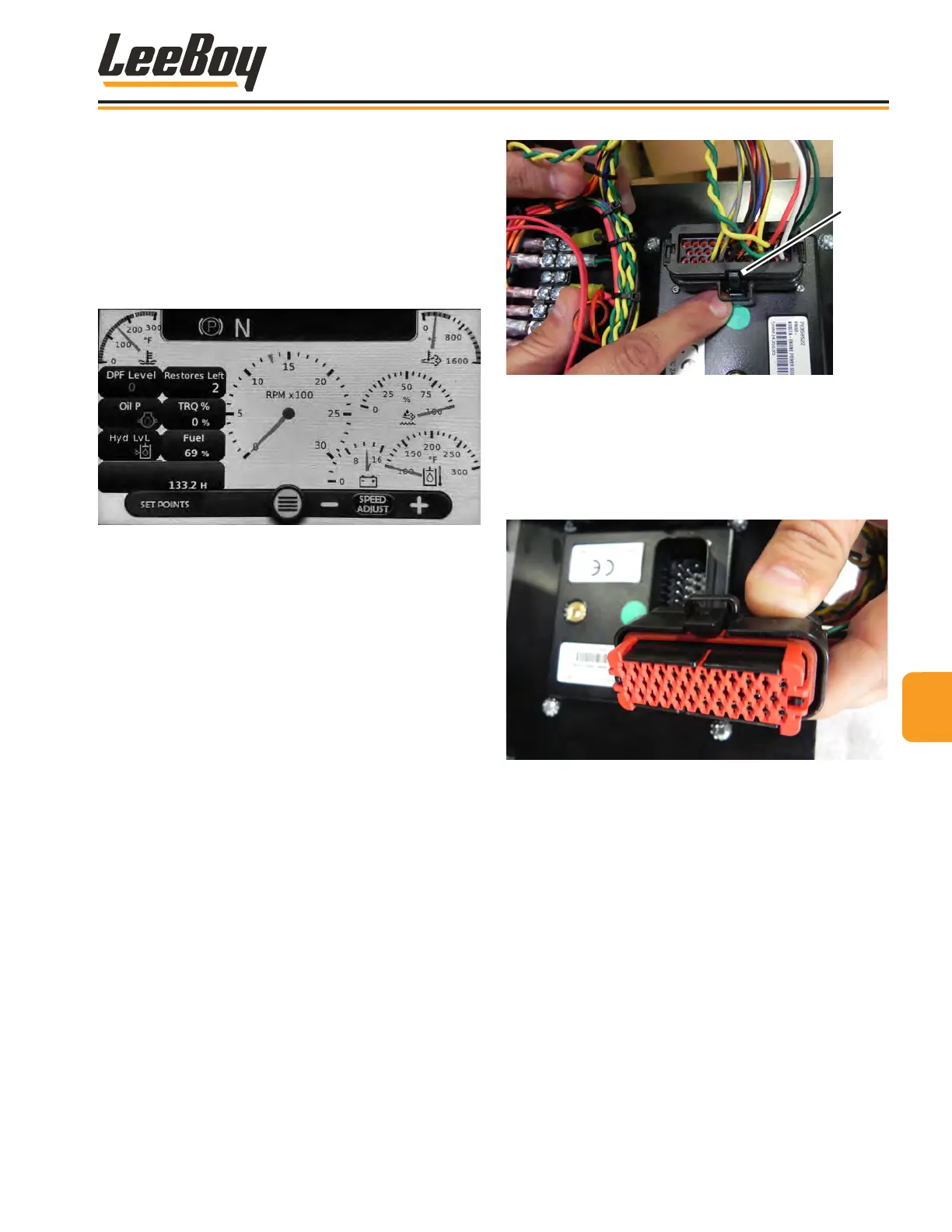
become gray (Figure 5-65), the display panel is not
receiving communication over the CANbus. If this
occurs, check the connector. If the gauges are still gray,
check the ECU powering up.
Figure 5-65. Gauges Grayed on Screens
Check PV485 ConnectorCheck PV485 Connector
1. Ensure the ignition switch is in the OFF position
before starting the machine.
2. Remove the main connector from the rear of the
PV480 digital display controller.
3. Inspect the terminals in positions 14 (green) and 26
(yellow) for the CANbus communication.
4. If terminals are properly seated, carefully “unlock”
the red retaining clip and slide away from the wires.
(Figure 5-66)
Clip
Figure 5-66. PV485 Main Connector
5. Ensure all the other terminals are locked into the
connector shell.
6. Push the red retaining clip back into the locked
position and ensure terminals are ush with the red
retaining clip. (Figure 5-67)
Figure 5-67. Terminal Seat
7. Reinstall connector on to the PV485 panel, making
sure the connector shell locks into its mate on the
display panel.



 To Next Page