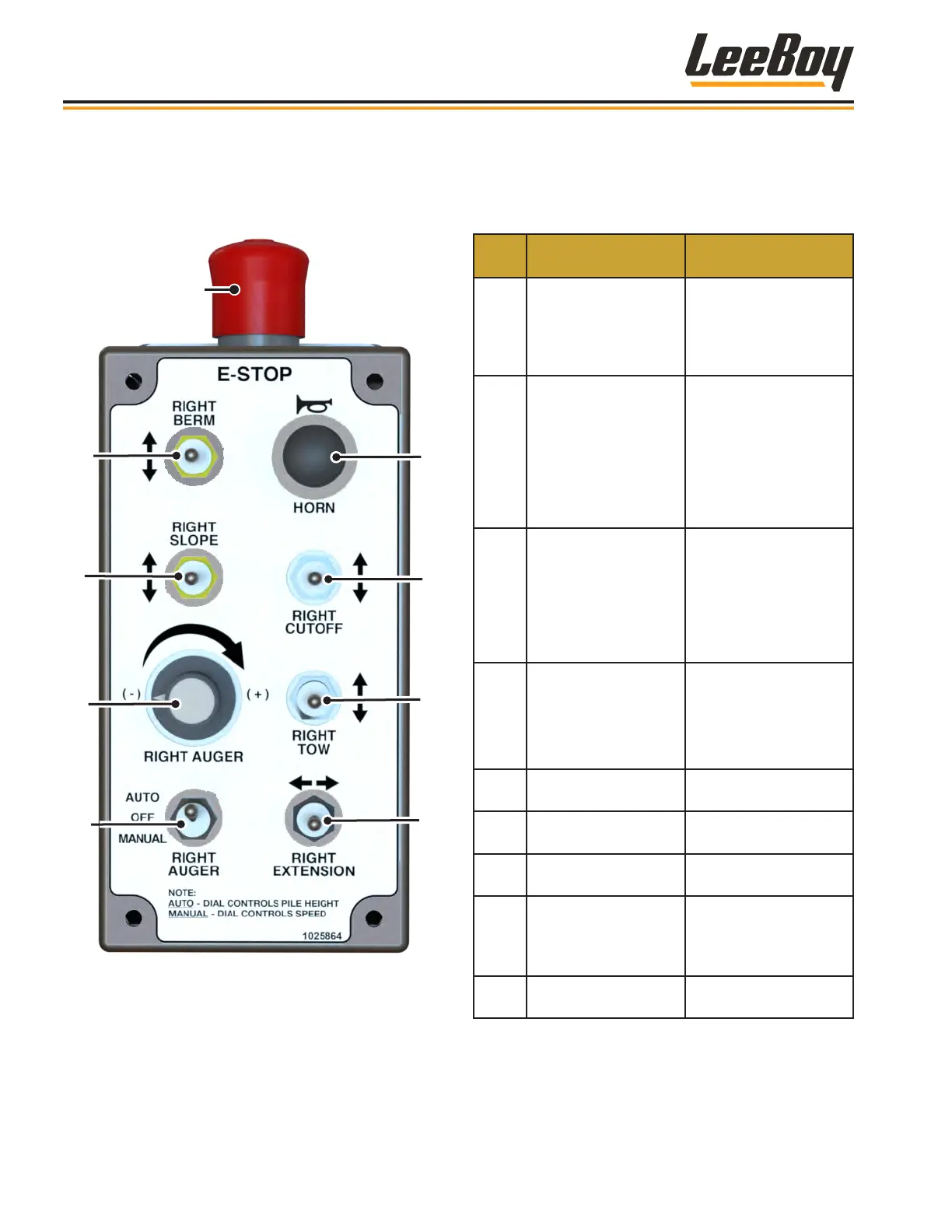
Screed Control BoxScreed Control Box
The 9-function remote screed extension control boxes
are mounted on each side of the paver for screed
operator convenience (right control box shown).
1
2
3
4
5
6
7
8
9
Figure 3-6. Screed Control Box
(Right Control Box Shown)
ITEM
NO.
CONTROL NAME FUNCTION
1
Emergency Stop
(E-Stop) Button
Immediately stops the
paver engine and all
electronic functions.
Turn clockwise to
release E-Stop button.
2 Berm (Right)
If equipped with
the optional berm
attachment:
• Push switch UP to
increase berm.
• Push switch DOWN
to decrease berm.
3 Slope (Right)
Raises and lowers the
asphalt slope.
• Push switch UP to
increase slope.
• Push switch DOWN
to decrease slope.
4 Auger Speed Dial
• Controls pile height
in AUTO mode.
• Controls auger
speed in MANUAL
mode.
5 Auger Switch
Turns auger on to
AUTO or manual.
6 Horn Sounds horn.
7
Under Auger Material
Cut-Offs
Opens and closes Under
Auger Material Cut-Offs.
8 Tow Switch
Sets the thickness
of the asphalt and
controls the electric
tow screws.
9 Screed Extension
Extends and retracts
screed extension.
Component Location
LeeBoy 8608 Commercial Paver3-10



 To Next Page