OPTIONAL COMPONENTS
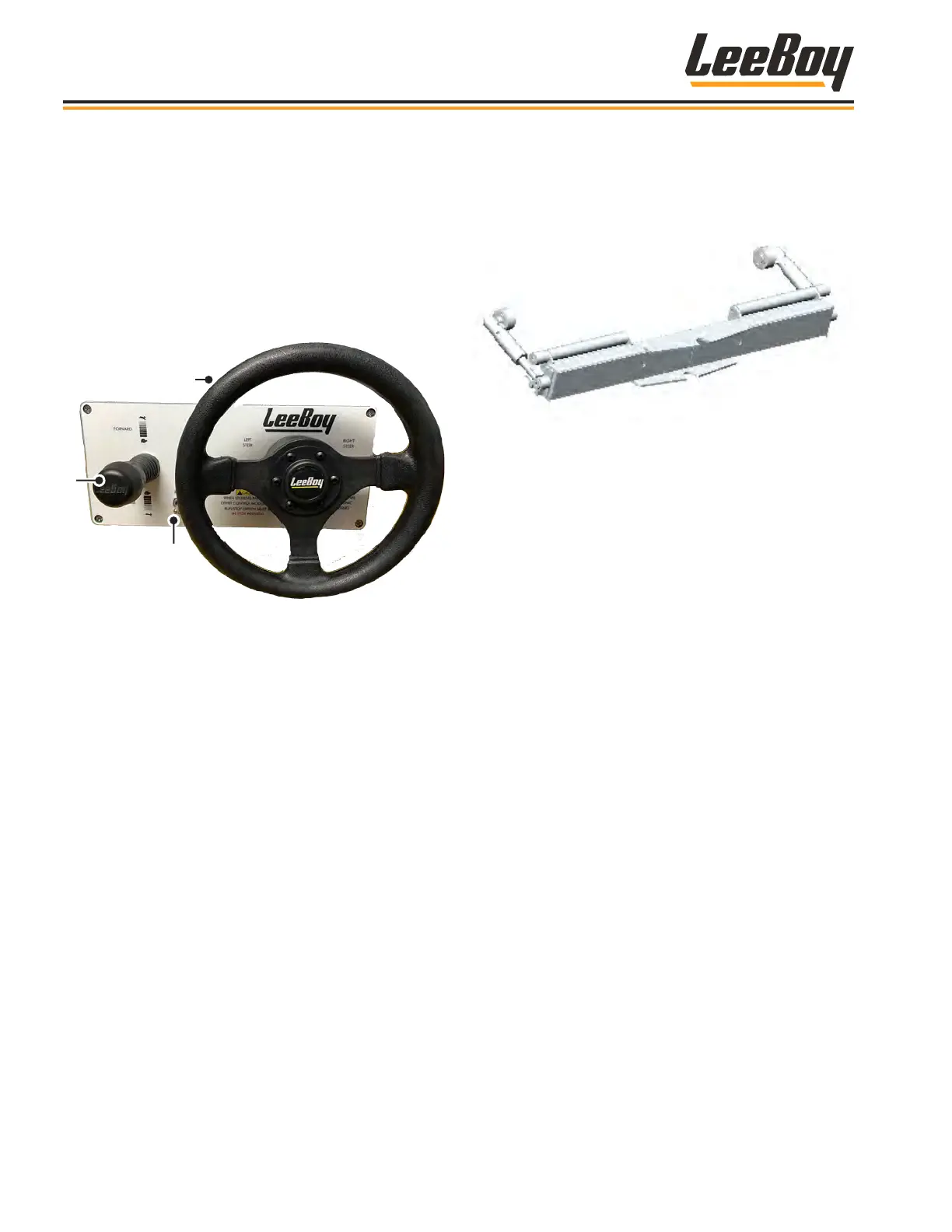
Steering Wheel OptionSteering Wheel Option
A steering wheel option is also available in lieu of
joystick steering. (Figure 4-82) The Run/Stop switch
on the steering panel controls running and stopping
the machine, and applies parking brake when set to
the STOP position. The joystick controls forward and
reverse travel along with speed.
1
3
2
Figure 4-82. Steering Wheel Option
1 - Forward/Reverse
2 - Steering Wheel
3 - Run/Stop Switch
• To drive the paver forward, push joystick forward to
reach the desired speed.
• To move in reverse, pull joystick(s) and move
backwards to reach desired speed. A back-up
alarm will automatically turn on when in reverse.
• To slow the paver, move joysticks closer to the
neutral position.
• Return joystick to the neutral position to stop paver.
NOTE: If the joystick steering function is not being
used, the Run/Stop switch must be in the
center OFF position.
NOTE: The engine will not start unless the E-STOP
button is disengaged and the joystick must
be in the NEUTRAL (center) position.
Truck Hitch Attachment OptionTruck Hitch Attachment Option
The truck hitch is an optional attachment that prevents
excessive and uneven braking from the paving material
truck. (Figure 4-83)
Figure 4-83. Truck Hitch Attachment Option
To engage the hitch with the rear wheels of the asphalt
truck:
1. Use the Truck Hitch switch on the main control
panel to move truck hitch into the desired position.
2. Extend the arm extensions of the truck hitch by
pushing and holding the Truck Hitch button in the
OUT position.
3. The paving material truck then SLOWLY backs up to
the paver until the hitch makes contact with the rear
tires of the truck.
4. Retract the arm extension by pushing and holding
the Truck Hitch switch in the IN position until both
guide rollers are fully locked onto the truck wheel
rims.
NOTE: It may be necessary to adjust the roller guides
to the inside of the wheel rims.
Umbrella OptionUmbrella Option
The umbrella kit option provides shelter from sun and
other weather conditions for the operator. The umbrella
kit assembly includes the mounting bracket and
umbrella frame assembly.
Screed Extension VibrationScreed Extension Vibration
Screed vibration helps compact material. If equipped
with this option, use the Vibrators button on the main
control panel to turn vibration on and off. (Pages 3-6 to
3-7)
Operation
8608 Commercial Paver4-40



 To Next Page