DPF REGENERATION (REGEN)
Before operating the paver, it is important that the
operator understand the Diesel Particulate Filter (DPF)
regeneration process described throughout the fol-
lowing pages. DPF regeneration is the term given to
the cleaning process where the exhaust temperature is
raised to safely burn off any soot and undesired com-
bustion gas. When the DPF lter reaches a soot satura-
tion level between 25 - 45 percent, the onboard engine
ECU (Engine Control Unit) will activate a regeneration
cycle. The DPF icon on the PV485 digital controller indi-
cates the level of soot build-up on a scale of Level 0 - 5.
Regeneration will occur automatically at Level 1 - 2. DPF
is further explained on the following pages.
During normal operation, the DPF is cleaned automati-
cally. Under certain conditions, the operator may have
to instruct the control system to perform the cleaning
process. It is important to perform a parked, manual
regeneration BEFORE the engine reaches as high as
Level 4. If the DPF reaches Level 4 - 5, non-warranty
factory assistance from the engine manufacturer is
required.
Once the regeneration cycle has been activated, it is
important not to shut off the engine as the regeneration
cycle will fail and could possibly damage the engine.
The system may attempt a second regeneration, but if it
is unsuccessful, the DPF lter is blocked more than 80
percent and needs to be cleaned or replaced.
The engine speed will increase during regeneration
and there may be a noticeable sound difference. Once
regeneration is complete, the engine will return to
normal idle speed.
Don’t idle machine any longer than
necessary as too much idling can cause soot to build
up on the DPF, requiring more frequent regeneration.
There are several factors that affect how often your DPF
regenerates and the life expectancy of your DPF lter:
• Grade of engine oil.
• Grade of diesel fuel.
• Use of additives.
• Mileage.
• Wear of other components.
PV485 POWERVIEW DISPLAY
Gauge ScreenGauge Screen
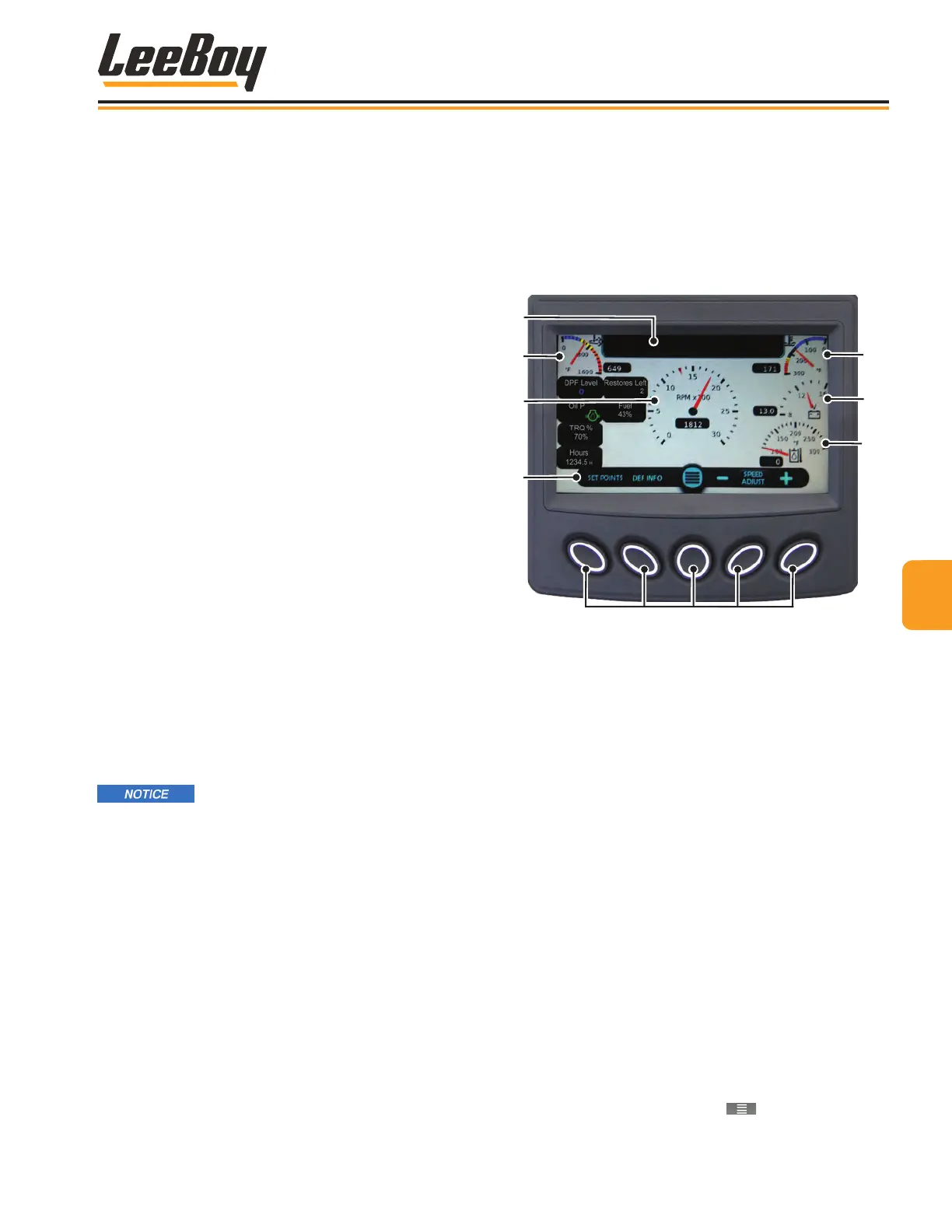
The PV485 digital controller Gauge Screen is the rst
screen to appear when starting the engine by default.
Warnings and alerts appear in the Alerts window at the
top of the screen. (Figure 4-3)
1
2
3
4
5
6
Soft Key Button Selections
7
Figure 4-3. Gauge Screen
1 - Alerts Window
2 - Exhaust Temperature
3 - Engine Speed/RPMs
4 - Soft Key Banner
5 - Engine Coolant Temperature
6 - Battery Voltage
7 - Hydraulic Oil Temperature
Pressing “soft key” buttons navigates to other screens.
Banner icons along the bottom of the screen corre-
spond with these buttons, and may change accordingly
as described on the following pages. Table 4-2 shows
the icons that appear on the banner with descriptions.
(Page 4-6)
• Pressing the Set Points button navigates to the Set
Point and Throttle Speed screen. (Page 4-7)
• Pressing the DEF Info button navigates to the DEF
information screen. Using the arrow button allows
the operator to scroll a series of screens. (Pages
4-8 to 4-11)
• Pressing the center button ( ) navigates to the
Main Menu screen. (Page 4-12)
44
Operation
8608 Commercial Paver 4-5



 To Next Page