User SettingsUser Settings
Select Lamp Info from the rst Main Menu screen.
(Figure 4-18 on Page 4-12) Use the UP (
>
) or DOWN
(
>
) arrow keys, then press the Select (√) soft key when
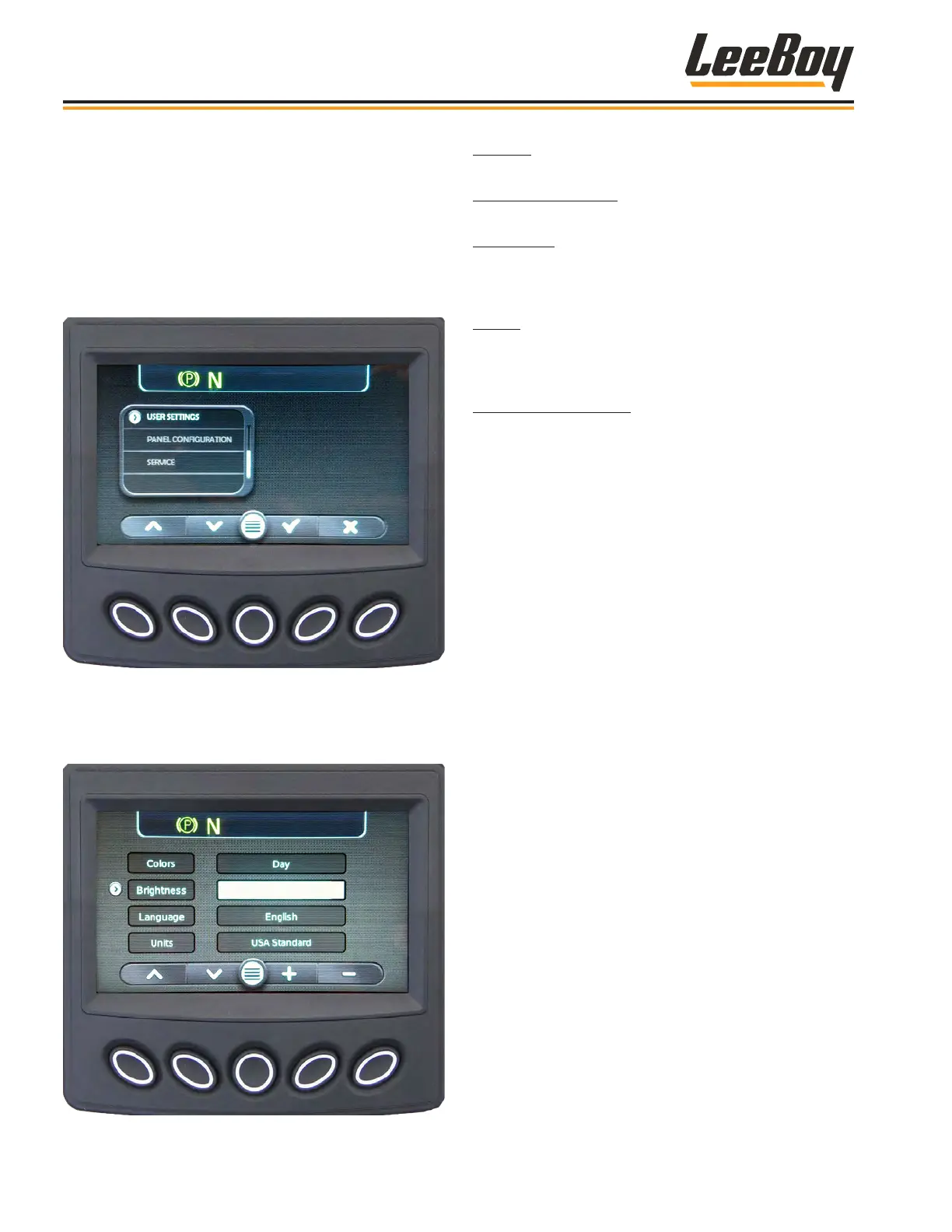
the cursor (>) points to User Settings. (Figure 4-30)
NOTE: The Panel Conguration and Service screens
will not function. These items are for
authorized technician use only.
Figure 4-30. User Settings Screen Navigation
The User Settings screen displays the following action
items: Screen Color; Brightness; Language; Units; Date
and Time. (Figure 4-31)
Figure 4-31. User Settings Screen
Colors: Set your preference for day or night vision
using the UP (
>
) or DOWN (
>
) soft keys.
Screen Brightness: Set the brightness of the backlight
by using the UP (
>
) or DOWN (
>
) soft keys.
Language: Use the UP (
>
) or DOWN (
>
) soft keys,
then press the Select (√) soft key when the cursor
(>) points to the desired Language. (English, French,
German, Spanish, Italian or Japanese)
Units: Use the UP (
>
) or DOWN (
>
) arrow keys, then
press the Select (√) soft key when the cursor (>) points
to your unit of measurement preference. (US Standard,
Metric kPa or Metric Bar.)
Date and Time Setting: Use the UP (
>
) or DOWN
(
>
) soft keys, then press the Select (√) soft key when
the cursor (>) points to the action item Date or Time.
Use the UP (
>
) or DOWN (
>
) soft keys to increment or
decrement the number.
• Use the DOWN arrow to reach the day value and
year value, using the UP (
>
) or DOWN (
>
) soft
keys to make changes.
NOTE: A reboot is required for changes to the Date
Setting to take effect.
DPF CommandsDPF Commands
It cannot be emphasized enough that the paver should
be maintained in good operating condition so the
system can automatically perform the regeneration
(regen) process, depending upon the DPF soot level.
(Pages 4-18 to 4-20) It is important to read the entire
message and follow any instructions. Ignoring warning
messages can lead to costly engine repairs.
Use the UP (
>
) or DOWN (
>
) buttons to scroll through
messages if shown on the soft key banner. To exit
screens, press X.
NOTE: Automatic regeneration will not occur if active
engine faults are present, nor will you be able
to perform the needed parked regeneration
process and soot levels will continue to rise.
NOTE: During the regeneration process, the Engine
Speed will increase and there may be a
noticeable sound difference. The HEST
Lamp will appear in the alerts window until
regeneration is complete.
Operation
8608 Commercial Paver4-16



 To Next Page