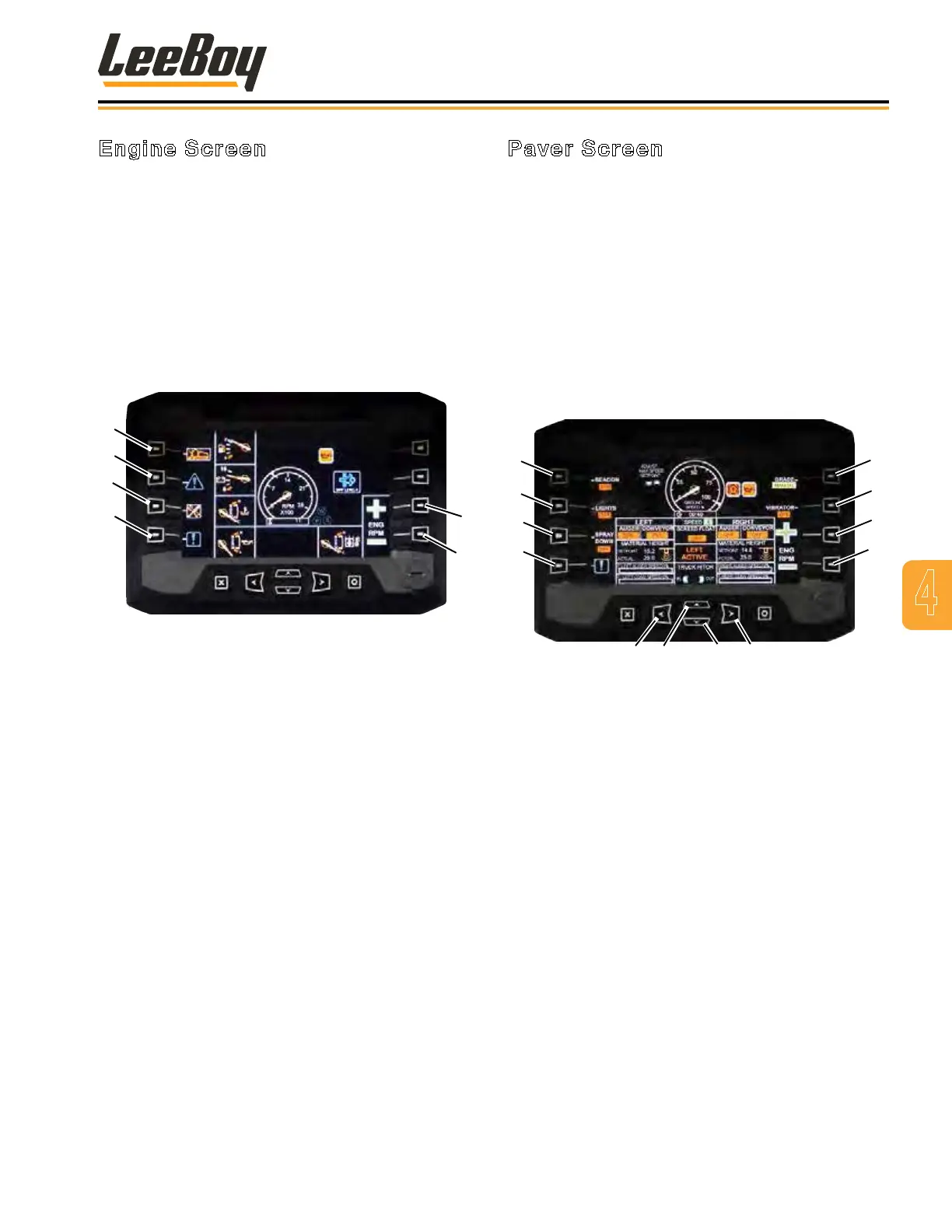
Engine Screen
The engine screen displays water temperature, oil
pressure, voltage, engine RMPs, fuel level and hydraulic
oil temperature. Indicators also show the operator
warnings for low fuel, high coolant or hydraulic oil
temperature low voltage, and low engine oil pressure.
Other indicators include beacon or work lights ON,
spray-down ON and generator ON. There will be an
indicator for left or right console “in control” to let the
operator know which joystick console is in control.
The Left/Right arrow buttons provide IN/OUT
functionality for the truck hitch.
1
2
3
4
5
6
Figure 4-2. Engine Screen
1 - Paver Screen
2 - Engine Fault
3 - Set-Up Tools/Password
4 - System Faults
5 - Throttle Up
6 - Throttle Down
Paver Screen
You can navigate to the paver screen by pressing the
top left button (Paver Screen) in the engine screen.
The paver screen displays indicators and status of the
left and right augers and conveyors, material height
setting (when in AUTO mode), auger and conveyor
speed, vibrator ON/OFF, Grade (AUTO or MANUAL) and
screed oat. Warning indicators from the engine screen
will also display. The paver screens has a ground speed
indicator showing 1 - 100 percent ground speed with
maximum speed setting.
NOTE: The maximum travel speed is determined by
the set ground speed percentage.
1
2
3
4
5
6
7
8
9 10 11 12
Figure 4-3. Paver Screen
1 - Beacon Lights
2 - Work Lights
3 - Spray Down
4 - System Faults
5 - Grade Auto/Manual
6 - Vibrator
7 - Throttle Up
8 - Throttle Down
9 - Truck Hitch In
10 - Ground Speed Up
11 - Ground Speed Down
12 - Truck Hitch Out
• The Up/Down arrow buttons control ground speed
percentage.
• The Left/Right arrow buttons provide IN/
OUT functionality for the truck hitch (optional
component).Spray Down Button:
4
Operation
LeeBoy 8616B Conveyor Paver 4-5



 To Next Page