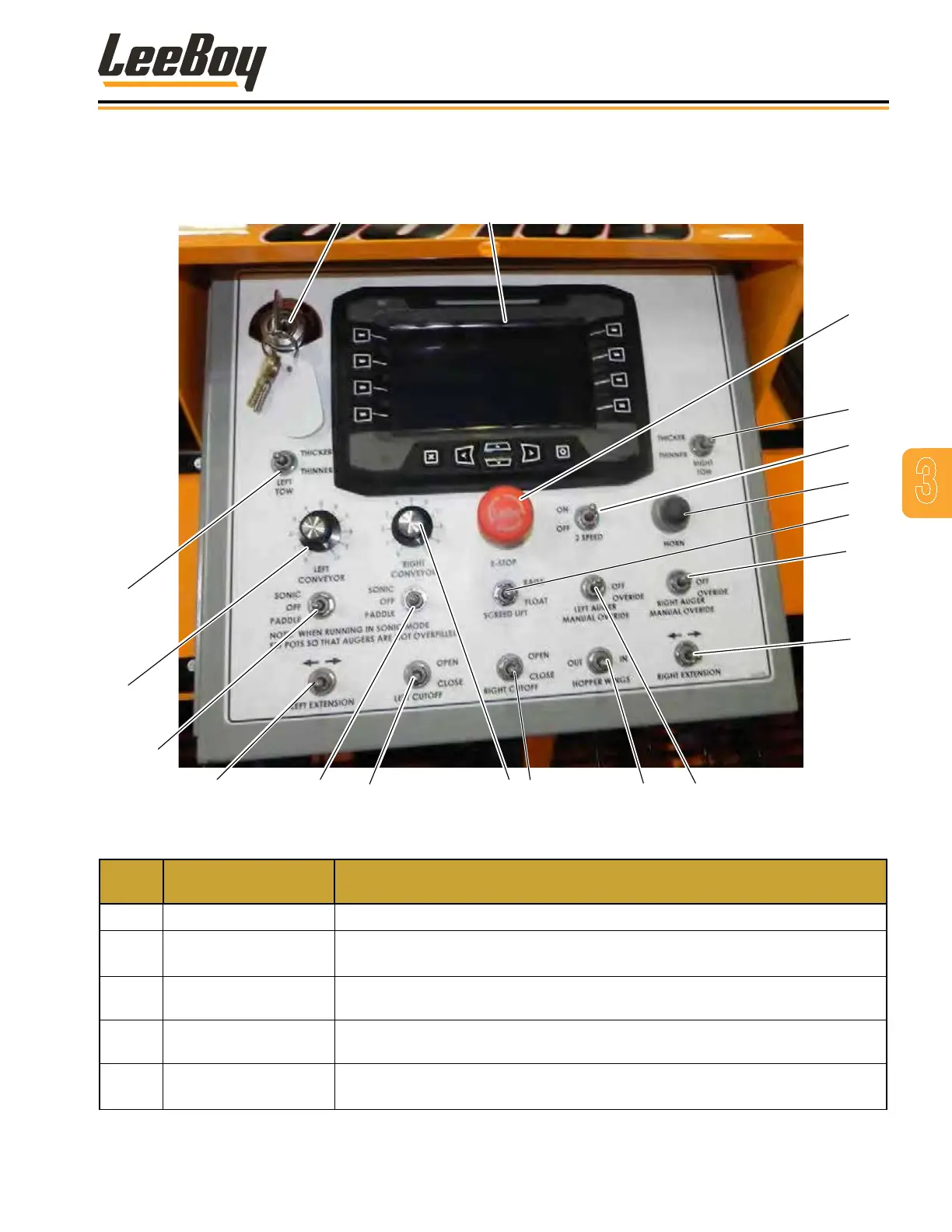
OPERATOR CONTROL PANEL
2
3
4
1
5
8
6
7
19
9
18
17
13 11 10
14
15
16
12
Figure 3-3. Control Panel, Indicators and Gauges
ITEM
NO.
CONTROL NAME FUNCTION
1 Ignition Switch Starts and stops engine.
2 DP700 Digital Display
Displays paver setup and calibration information, engine operating information,
and engine and paver system fault information.
3 E-Stop Button
Immediately stops the paver engine and all electronic functions. Turn clockwise
to release E-Stop button.
4
Right Tow Thicker/
Thinner Switch
Sets the thickness of the asphalt.
5 2-Speed Switch
Used to change machine speed. Place switch in OFF position for low speed.
Place the switch in ON for high speed position.
3
Component Location
LeeBoy 8616B Conveyor Paver 3-7



 To Next Page