June 2018
Legrand PDU User Guide 111
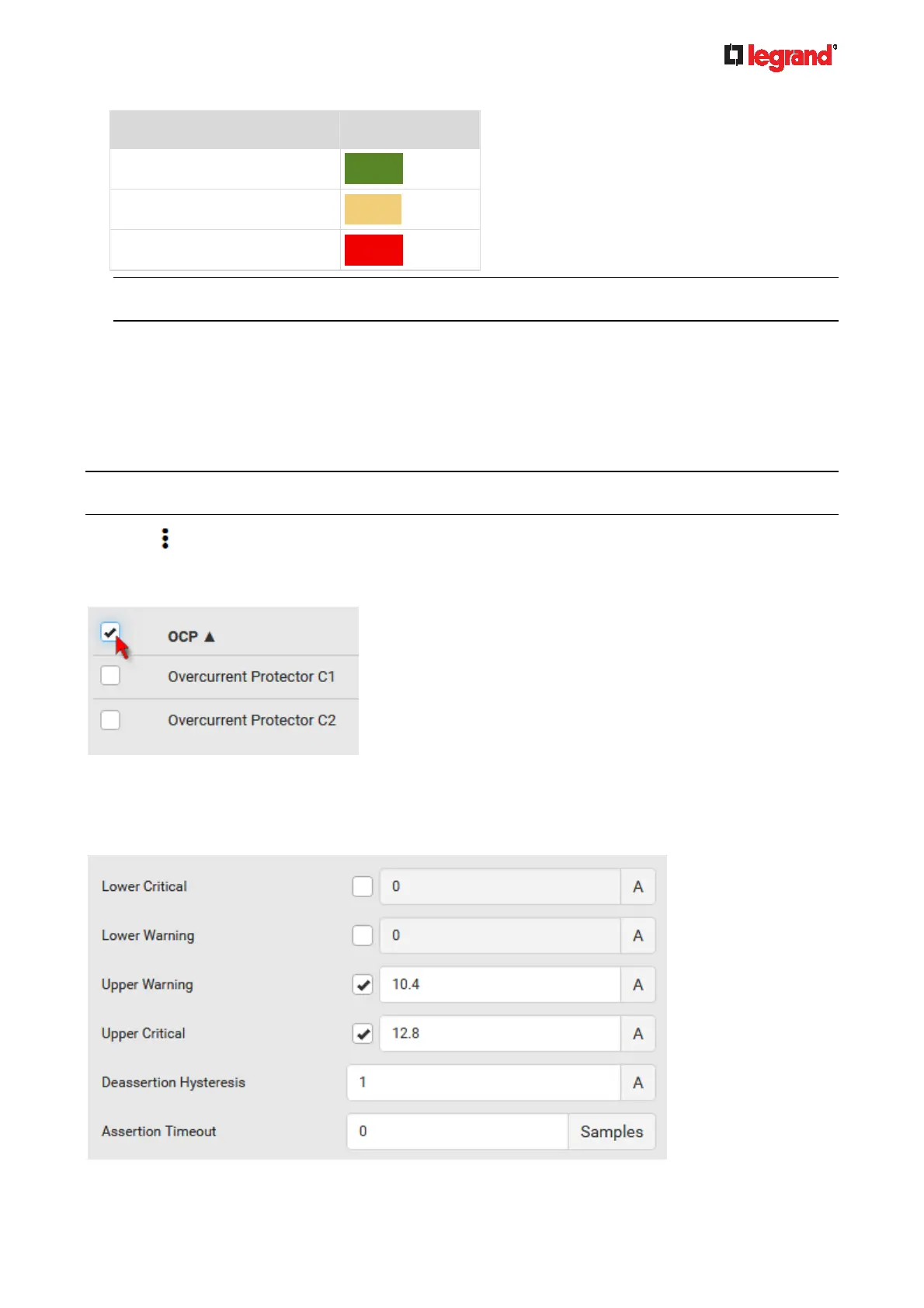
Status Bar colors
normal
above upper warning
above upper critical
Note: The "below lower warning" and "below lower critical" states also show yellow and red colors
respectively. However, it is not meaningful to enable the two thresholds for current levels.
Protected outlets, which are indicated with outlet numbers
Associated lines
To configure current thresholds for multiple overcurrent protectors:
OCP thresholds, when enabled, help you identify the OCP whose RMS current enters the warning or critical
level with the yellow or red color. In addition, you can have Legrand PDU automatically generate alert
notifications for any warning or critical status. See Event Rules and Actions (on page 184).
Note: By default, upper thresh
olds of an OCP's RMS current have been configured. See Default Voltage
and Current Thresholds (on page 479). You can modify them as needed.
1. Click > Threshold Bulk Setup.
2. Select one or multiple OCPs.
To select all OCPs, simply click the topmost checkbox in the header row.
3. Click Edit Thresholds.
4. Make changes as needed.
To enable any threshold, select the corresponding checkbox.
Type a new value in the accompanying text box.



 To Next Page